21
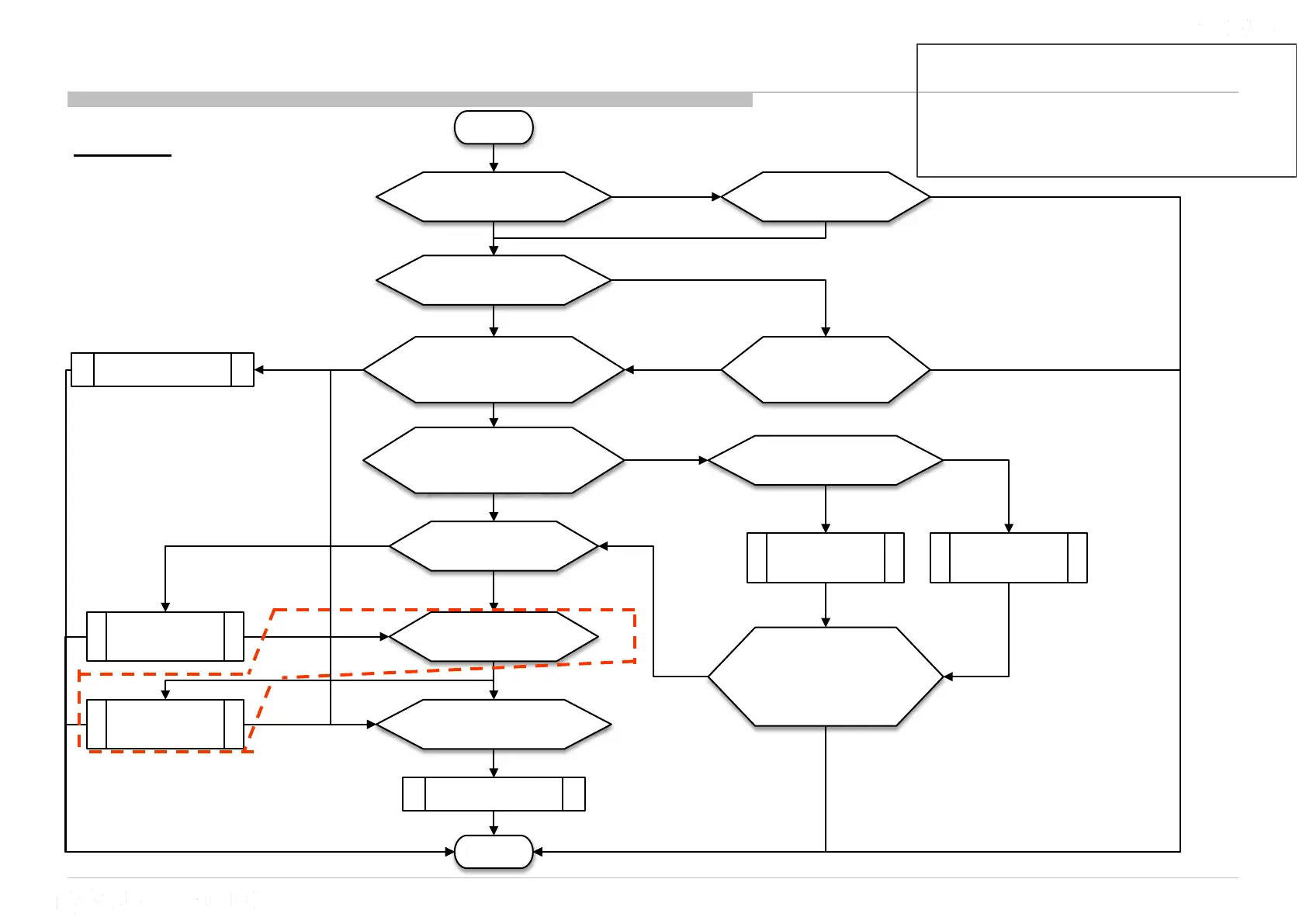
3b.1 : 3x Blinking – Audio Error
Important Note :
TV must be power OFF condition before plug
or unplug any of the FFC/FPC /wire / cable
from the board. -> This is to prevent
possibility circuit damage happen.
Note : IC4101 and F4101 available to check for model with woofer (Assist Speaker) only.
LK Board
F4001 broken,
Replace
F4001
Remove Speaker Connector
at CN4001/CN4002 and
perform AC OFF - ON
Check connectivity
of F4001
3x blinking
Check Speaker harness and
Speaker impedance
Main or Assist Speaker
Impedance ≠ 6~8 Ω
#Audio IC (IC4001/IC4101) problem
Change
Speaker
Harness
Change Main
or Assist
Speaker
START
Connect back
Speaker Connector
to CN4001/CN4002 and
perform AC OFF - ON
DONE
3x blinking
No 3x blinking
Change LK-board
No connectivity of F4001
Speaker harness
shorted
3x blinking
Correct Option bit & 3x blinking
No 3x blinking
Check connectivity
of F4101
3x blinking & F4001 OK
F4101 broken,
Replace
F4101
No connectivity of F4101
3x blinking
3x blinking & F4101 OK
For model with Assist Speaker only
Check correct Option bit is set?
Set correct Option bit and
perform AC OFF - ON
Wrong Option bit
No 3x blinking
3x blinking
Change B-board
No 3x blinking
Disconnect B-board to LK-board FFC
and check Audio Error pin
Audio Error pin no short to GND
B-board Audio Error pin
short to GND
3x blinking
Check FFC correct insert? Insert FFC correctly
3x blinking
FFC not insert correctly
3x blinking
LK-board Audio Error pin
short to GND











 To Next Page