22
HCD-EC55/EC77/GX99
[CD SERVO TEST MODE]
This mode can check the servo system operations of the optical
pick-up system (= optical unit + BD board).
Note1: Do not enter the [CD SERVO TEST MODE] while any other test
mode is in progress.
Note2: Do not enter any other test mode while the [CD SERVO TEST
MODE] is in progress.
How to Enter the CD Servo Test Mode
Procedure:
1. Press the @/1 button to turn the power on.
2. Press the FUNCTION button to select CD function.
3.
Press three buttons of CD u , PLAY MODE/TUNING MODE
and DISPLAY simultaneously.
4. It enters the CD servo test mode and displays “BDT S CU”.
How to Exit from the CD Servo Test Mode
Procedure:
1. Press three buttons of CD u , PLAY MODE/TUNING MODE
and DISPLAY simultaneously.
2. It exits from the CD Servo Test Mode and returns to the
ordinary CD function.
Key Operation:
+ , – : Use these keys to move between the five modes
contained in the CD Servo Test Mode, that are the
S-Curve Mode, the RAM Read Mode, the RAM
Write Mode, the Command Out Mode and the Error
Rate Mode as described below. Also, use these keys
to move between the menus within the respective
five modes. When + is pressed, the screen
advances to the next menu or to the next mode. When
– is pressed, the screen returns back to the
previous menu or to the previous mode. Use these
keys also to increase or decrease the numeric value
when changing the numeric value. Pressing +
increases the value and pressing – decreases the
value.
DSGX , EQ :Use these keys to move between the different layers
of the hierarchy of the CD Servo Test Mode shown
below. Press DSGX to move down to the lower
layer, and press EQ to move up to the higher layer.
TUNING+
ML
,
lm
–TUNING :
Use these keys to move the cursor to the right digit
or to the left digit in the six-digit number, when
changing the numeric value.
Press TUNING+
ML
to move the cursor to
the right, and press
lm
–TUNING to return
the cursor to the left.
FUNCTION :Use this key to execute Command Out in the
Command Out Mode.
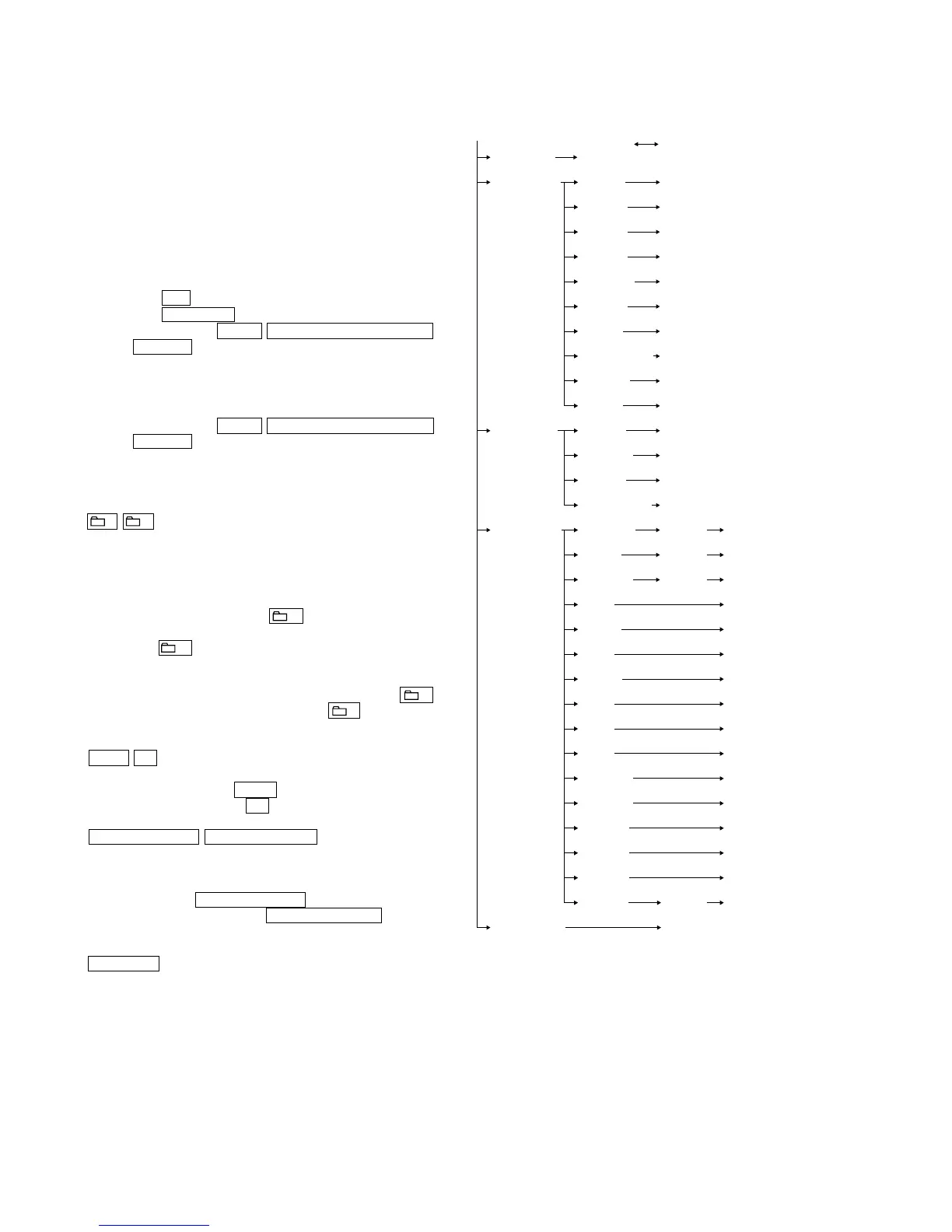
CD Servo Test Mode Tree:
S Curve Mode LD ON
(BDT S CU) (LD ON)
RAM Read Mode
Disc Type value indication
(BDTRAM R) (DISCTYPE) (0000)
Gain Index value indication
(GAININDX) (0001)
RFO GAIN value indication
(RFO_GAIN) (0009)
FEO GAIN value indication
(FEO_GAIN) (0005)
SBAD GAIN value indication
(SBAD_GAI) (0007)
TEO GAIN value indication
(TEO_GAIN) (0000)
Disc Size value indication
(DISCSIZE) (0000)
Op ABRAKE Error
value indication
(OPABRKER) (0000)
SBBT Data value indication
(SBBT DAT) (006B)
FEOOCD value indication
(FEOOCD) (F780)
RAM Write Mode
SPG Mask value edit
(BDTRAM W) (00 SPG) (Non mask:00, Mask:01)
Fix RF Gain value edit
(00 FIX) (Non Fix:00, AL Fix:01, RW Fix:02)
TMAX ON value edit
(00 TMA)
Driver Mute OFF value edit
(00 D_M) (Normal:00, Forced OFF:01)
Command Out Mode
COMOUT6X value edit command out
(BDT COMO) (COMOUT6X) (000000) (OK)
READ2X value edit command out
(READ2X) (60) (50)
REG READ value edit command out
(REG_READ) (00) (0000)
FEBC? command out
(FEBC?) (00)
FGADD? command out
(FGADD?) (10)
TEBC? command out
(TEBC?) (00)
TGADD? command out
(TGADD?) (00)
RFGC? command out
(RFGC?) (00)
FEOF? command out
(FEOF?) (FFC0)
TEOF? command out
(TEOF?) (FFC0)
TEIOCD1? command out
(TEIOCD1?) (FE80)
TEIOCD2? command out
(TEIOCD2?) (FF40)
TEIOCD3? command out
(TEIOCD3?) (FFC0)
TEOOCD? command out
(TEOOCD?) (FD00)
FEOOCD? command out
(FEOOCD?) (F780)
MONITOR value edit command out
(MONITOR) (570A00) (OK)
Error Rate Mode Error rate indication
(BDT ERR) (00000000)
Higher layer Lower layer of menu hierarchy






 To Next Page