6
HCD-MG110/MG310AV
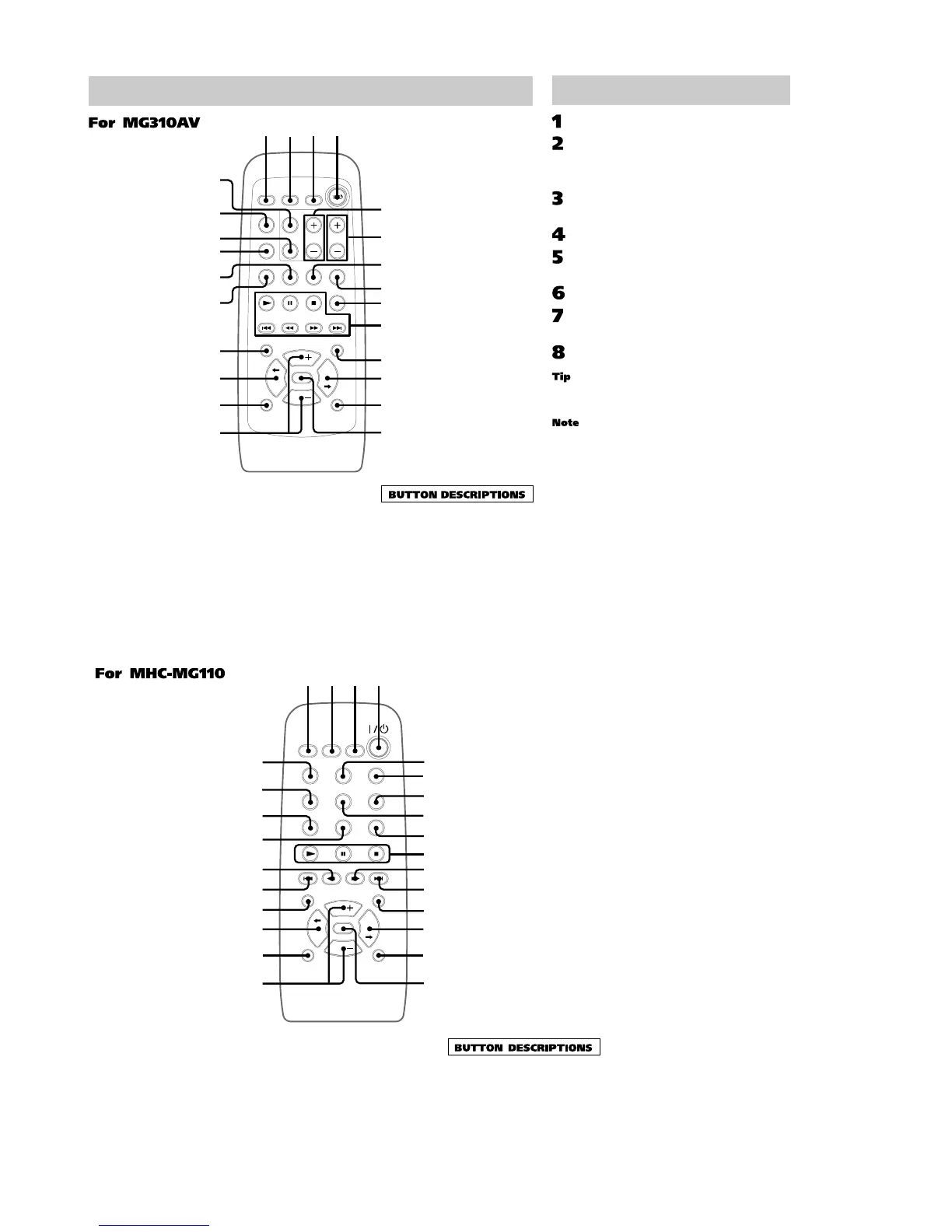
Remote Control
qg
qh
ql
qk
qj
w;
1234
wa
ws
wd
wf
6
7
8
9
5
qf
0
qd
qa
qs
5.1CH wa
CD ql
CENTER +/– 5
DBFB qd
DISPLAY 9
GAME 8
GROOVE qf
PLAY MODE 2
PRESET EQ qk
PRO LOGIC wf
REAR +/– 6
REPEAT 3
SCROLL qa
SLEEP 1
SURROUND qh
TAPE A/B w;
TEST TONE ws
TUNER/BAND 7
VIDEO (MD) wd
VOL +/– qg
@/1 (power) 4
N (play) 0
X (pause) 0
x (stop) 0
. (go back) 0
m (rewind) 0
M (fast forward) 0
>
(go forward)
0
TDISC/DISCt qs
Setting the time
Turn on the system.
Press TIMER SET.
When you set the clock for the first time, go
to step 5.
Press – . or > + repeatedly to
select “CLOCK SET”.
Press ENTER.
Press – . or > + repeatedly to set
the hour.
Press ENTER.
Press – . or > + repeatedly to set
the minute.
Press ENTER.
If you made a mistake or want to change the time,
start over from step 1.
The clock settings are canceled when you disconnect
the power cord or if a power failure occurs.
CD wf
CLOCK/TIMER SELECT 2
CLOCK/TIMER SET 3
DBFB qg
DISPLAY wh
ENTER 5
GAME 7
GROOVE qh
PLAY MODE wg
PRESET EQ w;
REPEAT 8
@/1 (power) 4
N (play) 0
X (pause) 0
x (stop) 0
. (go back) wa
m (rewind) ws
M (fast forward) qa
> (go forward) qs
TDISC/DISCt qf ql
6
7
8
9
5
qf
qg
qh
0
qd
qa
qs
ql
qk
qj
w;
12
34
wa
ws
wd
wh
wg
wf
SCROLL qd
SLEEP 1
SURROUND qk
TAPE A/B wd
TUNER/BAND 9
VIDEO (MD) 6
VOL +/
– qj







 To Next Page