Using the Menus
17
Using the Menus
This section shows the options available for setting up and adjusting
your TV.
To access a menu
1 Press .
2 Use the G or g buttons to move through the menus.
3 Use the F or buttons to highlight an option.
4 Press g or to select or access an option.
5 After adjusting or selecting an option, press g or to complete the
adjustment.
6 Press G to go to the previous menu, or press to close the menu.
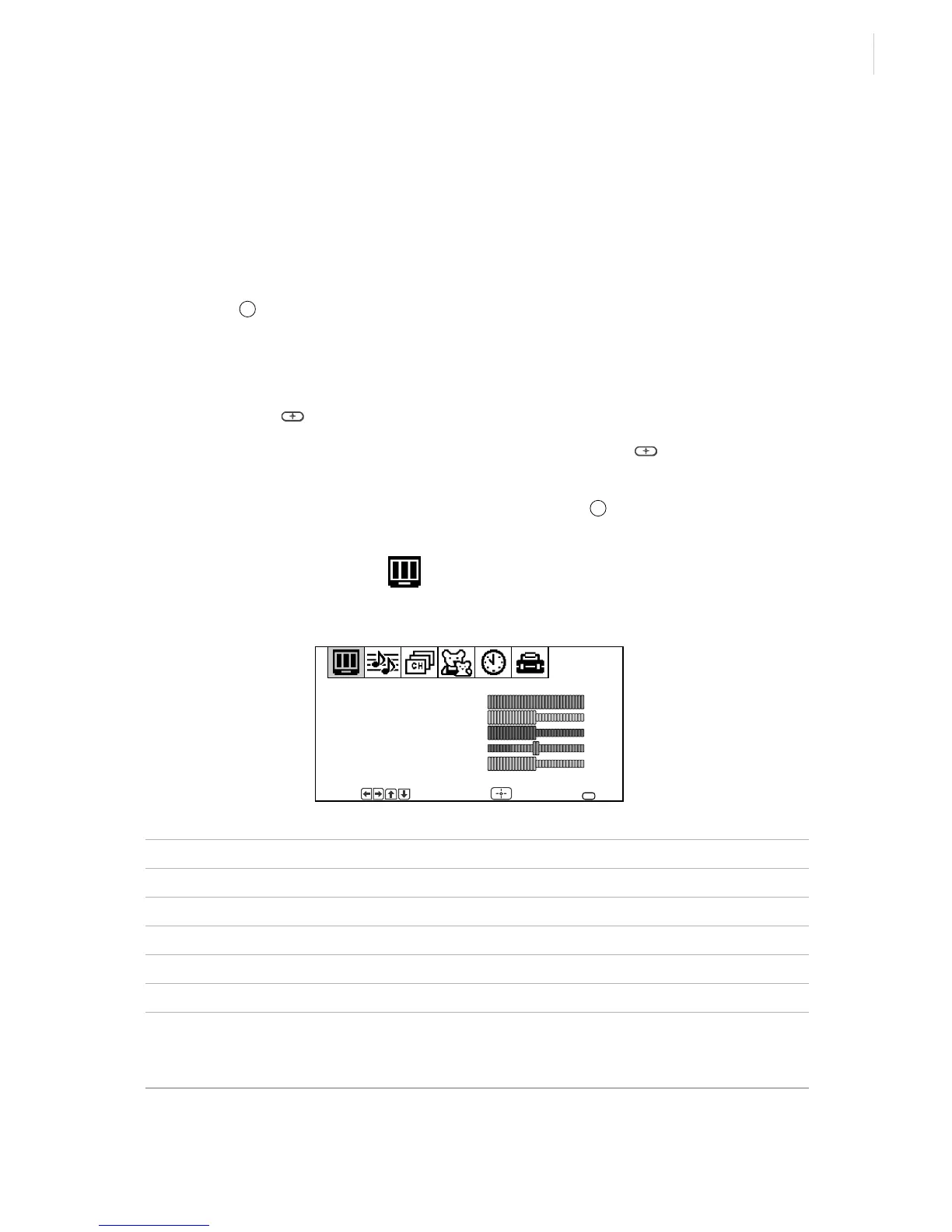
Using the Video Menu
To access the Video menu, see “To access a menu” above.
Item Press G or to Press g or F to
Picture Decrease picture contrast Increase picture contrast
Brightness Darken the picture Brighten the picture
Color Decrease color saturation Increase color saturation
Hue Increase the red tones Increase the green tones
Sharpness Soften the picture Sharpen the picture
VM
Velocity
Modulation
Sharpens picture definition to give objects a sharp, clean
edge. Use the
F or buttons to select from one of the
following options: OFF, High, Low (KV-20FS12 only).
MENU
F
MENU
Video
Move
Picture
Brightness
Color
Hue
Sharpness
Select End
VM: Low
MENU
F
F








 To Next Page