Connecting Your TV
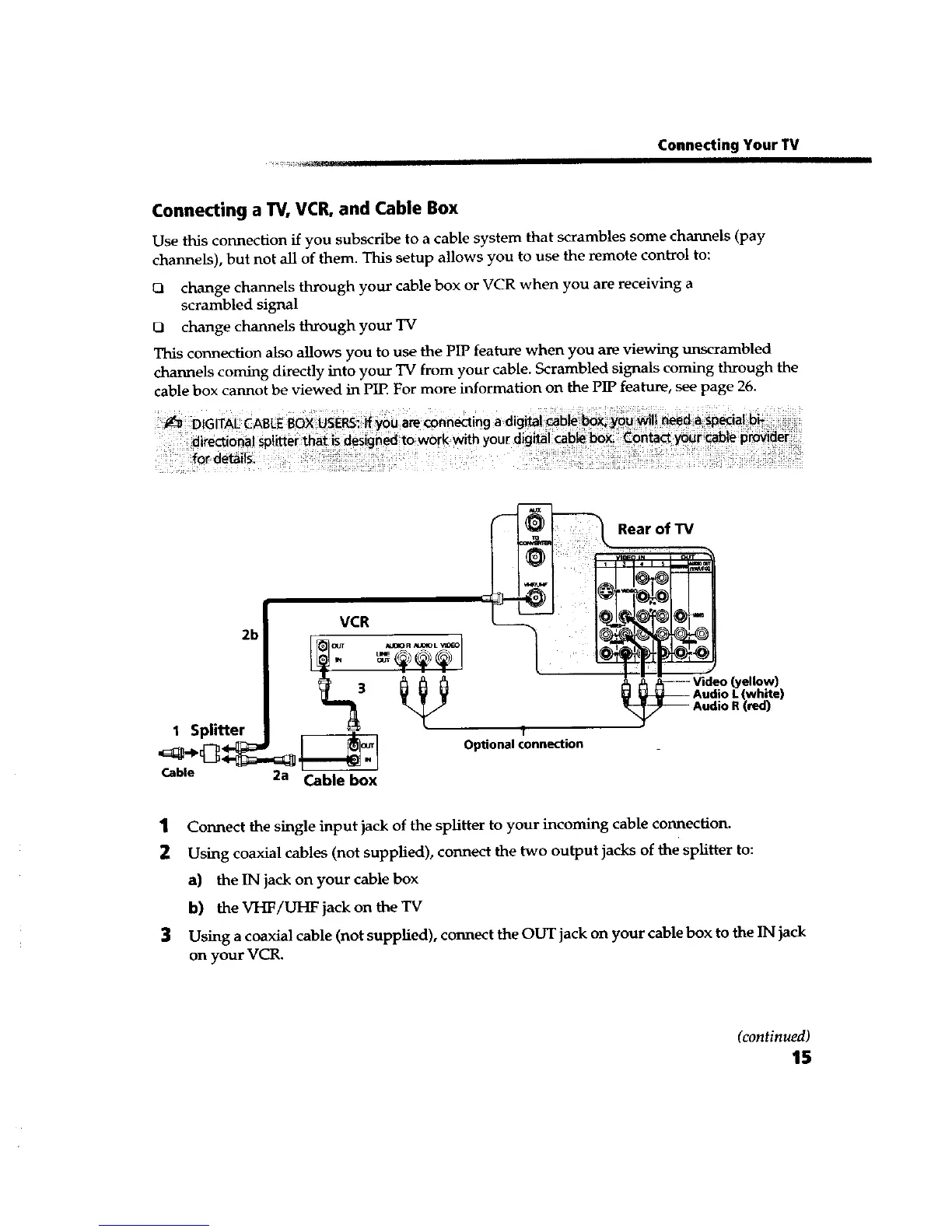
Connecting a TV, VCR, and Cable Box
Use this connection if you subscribe to a cable system that scrambles some channels (pay
channels), but not all of them. This setup allows you to use the remote control to:
CI change channels through your cable box or VCR when you are receiving a
scrambled signal
O change channels through your TV
This connection also allows you to use the PIP feature when you are viewing unscrambled
channels coming directly into your TV from your cable. Scrambled signals coming through the
cable box cannot be viewed in PIE For more information on the PIP feature, see page 26.
Rear of TV
_T
VCR (O_"
AUI_O R _dOX_ L VI_ I t
(yellow)
3 white)
red)
1 Splitter t
,_,,J.t Optional connection
Cable 2a Cable box
1 Connect the single input jack of the splitter to your incoming cable connection.
2 Using coaxial cables (not supplied), connect the two output jacks of the splitter to:
a) the IN jack on your cable box
b) the VHF/UHF jack on the TV
3 Using a coaxial cable (not supplied), connect the OUT jack on your cable box to the IN jack
on your VCR.
(continued)
15









 To Next Page