Connecting Your TV
Connecting a DVD Player
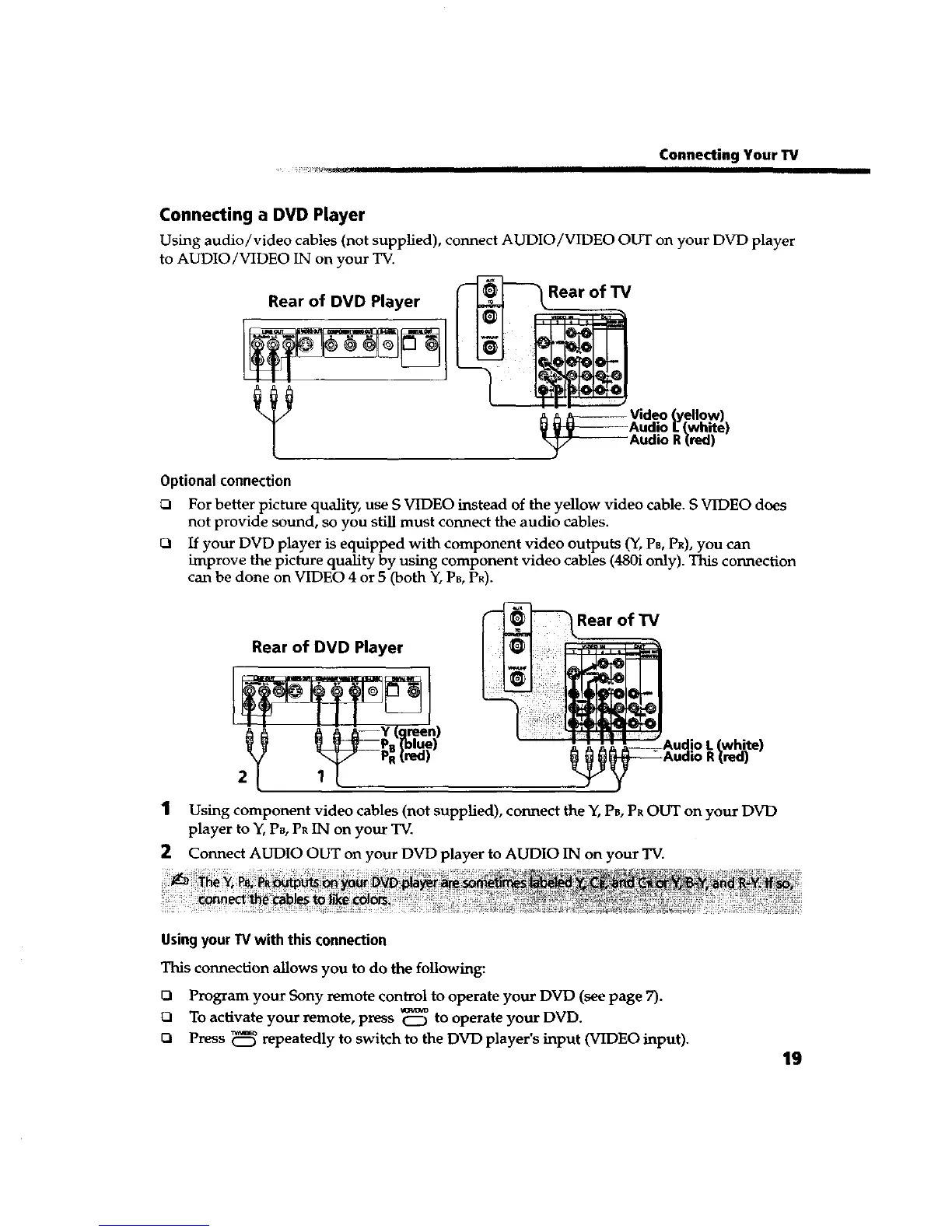
Using audio/video cables (not supplied), connect AUDIO/VIDEO OUT on your DVD player
to AUDIO/VIDEO IN on your TV.
Rear of DVD Player
Rear of TV
_ Video (yellow)
Audio [ (white)
Audio R(red)
Optionalconnection
ra For better picture quality, use S VIDEO instead of the yellow video cable. S VIDEO does
not provide sound, so you still must connect the audio cables.
_1 If your DVD player is equipped with component video outputs (Y, PB, PR),you can
improve the picture quality by using component video cables (480i only). This connection
can be done on VIDEO 4 or 5 (both Y,PB,PR).
1
2
Rear of TV
Rear of DVD Player
_white)
red)
Using component video cables (not supplied), connect the Y, P,, PROUT on your DVD
player to Y, PB, PR1N on your TV.
Connect AUDIO OUT on your DVD player to AUDIO IN on your TV.
UsingyourTV with this connection
This connection allows you to do the following:
Q Program your Sony remote control to operate your DVD (see page 7).
ca To activate your remote, press _ to operate your DVD.
ca Press _ repeatedly to switch to the DVD player's input (VIDEO input).
19









 To Next Page