— 27 —
11
Location and Function of Parts
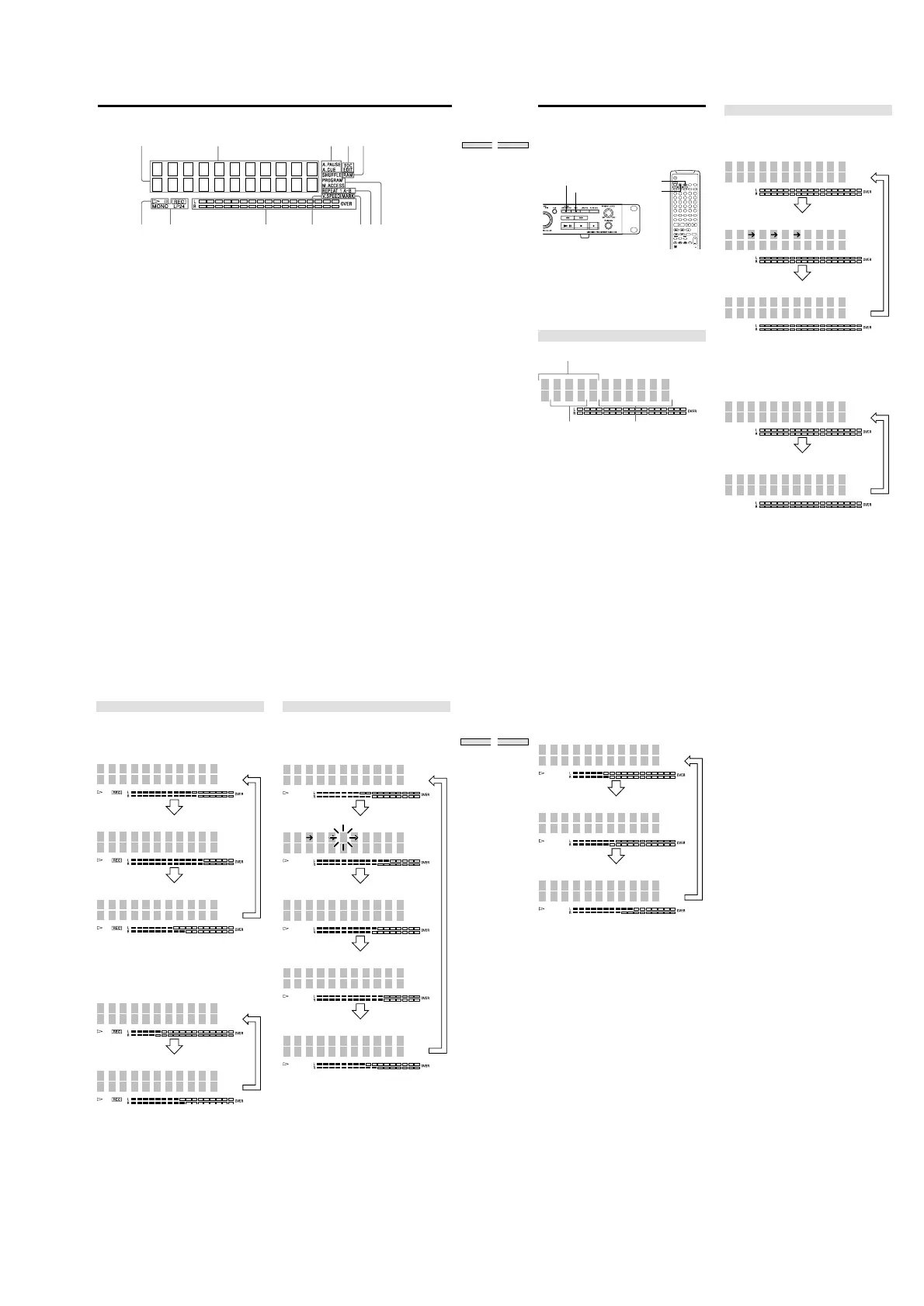
Display Window Descriptions
1 2 341
5
8 9q;qa6 7
1 Disc, track, and time display
Displays MD information, the set contents of “Edit
Menu” or “Setup Menu,” and time information.
2 AUTO PAUSE and AUTO CUE display
Lights up when AUTO PAUSE or AUTO CUE is
selected.
3 TOC EDIT display
Displays “TOC” when record contents or edit contents
are not recorded on MD. Flashes “TOC” when they are
recorded on MD.
“TOC” is displayed during edit operation.
4 RAM display
Lights up in RAM edit mode in which temporary
editing is performed for sending without recording
editing results.
5 7 (play/pause) display
Displays during play or pause.
6 Record and record mode display
REC display
Lights up during recording or pausing.
Record mode display
Lights up “MONO” for monaural recording, “LP2” for
double-length stereo recording, and “LP4” for 4-time
length stereo recording in record mode or mode when
the playing track is recorded.
7 Level meter display
Displays the loudness of the sound of play or
recording.
8 VARI SPEED display
Lights up when the VARI SPEED function is selected.
9 MARK display
Lights up when the position (MARK) of a located point
is selected.
0 REPEAT display
Displays “REPEAT” when all track repeat is selected,
“REPEAT1” when one track repeat is selected, and
“REPEAT A-B” when A-B repeat is selected.
!¡ Play mode display
Displays “SHUFFLE” when shuffle play is selected,
“PROGRAM” when program play is selected, and
“M.ACCESS” when multi-access play is selected.
12
Location and Function of Parts
Using the Display Window
The display window shows information about the MD or
track. This section describes the information that is
displayed for each recorder status.
12345
678910
11 12 13 14 15
16 17 18 19 20
21 22 23 24 25
M.ACCESS
CONTINUE SHUFFLE PROGRAM
NAME CHAR
RM-DR1J
CD-SYNC
NUM
>
25
LEVEL / DISPLAY / CHAR
TIME
TIME
DISPLAY
n
The display format that you’ve selected in each of the
recorder statuses (play, recording, etc.) will be displayed
whenever the recorder enters that status and you press
LEVEL/DISPLAY/CHAR (or DISPLAY) or TIME until you
change the format to another (see the following sections
for details).
When you insert an MD
15 46m08s
Tr
SONGS
Disk name
Total number of tracks Total recorded time
* The track name is displayed instead of the disc name
during play. When the MD or the track has no name,
“No Name” is displayed.
While the recorder is stopped
Press LEVEL/DISPLAY/CHAR (or DISPLAY)
repeatedly to change the display.
Each press of the button changes the display as follows:
15 46m08s
Tr
SONGS
4S 12m35s
/4 1 7 5/
Coax 0.0dB
Input Level
Total number of tracks and recorded time (default display)
Level of the input signal
The contents of a program
(only when “PROGRAM” lights up)
Press
Press
PROGRAM
Press
z
You can check the remaining recordable time on the MD
Press TIME when the total number of tracks and
recorded time are displayed. Each press of the button
changes the display as follows:
15 46m08s
Tr
SONGS
-27m52s
SONGS
Total number of tracks and total recorded time
(default display)
Total number of tracks and remaining
recordable time on the MD
(recordable MDs only)
*
Press
Press
* Not shown for the premastered discs.
13
Location and Function of Parts
While the recorder is recording
Press LEVEL/DISPLAY/CHAR (or DISPLAY)
repeatedly to change the display.
Each press of the button changes the display as follows:
Coax-12.0dB
Input Level
16 3m23s
Tr
FS 44.1KHz
16 3m05s
Tr
No Name
Track number and recorded time of the current track
(default display)
Level of the input signal
Sampling frequency is indicated only
when the digital signal is input.
Press
Press
Press
z You can check the remaining recordable time on the MD
Press TIME when the track number and recorded time
are displayed. Each press of the button changes the
display as follows:
-10m55s
No Name
16 3m05s
Tr
No Name
Track number and recorded time of the current track
(default display)
Recordable time
Press
Press
While the recorder is playing
Press LEVEL/DISPLAY/CHAR (or DISPLAY)
repeatedly to change the display.
Each press of the button changes the display as follows:
Anlg -6.0dB
OutputLevel
DREAM
SONGS
4 4m14s
Tr
NextNo Name
2 2m33s
Tr
DREAM
3S 2m28s
/4 1 2 5/
Track number and elapsed time of the current track
(default display)
* Only when “On” of “Next Tr Play” of “Setup Menu” is selected
Disc name and track name
The contents of a program
(only when “ROGRAM” lights up)
Press
Press
Press
Level of the output signal
Press
Press
PROGRAM
* Not displayed if PLAY MODE is PROGRAM or
SHUFFLE when “On” of “Next Tr Play” (Next Track
Play) is selected.
14
Location and Function of Parts
z You can check the remaining time
Press TIME. Each press of the button changes the
display as follows:
-24m47s
DREAM
2 -1m25s
Tr
DREAM
2 2m33s
Tr
DREAM
Track number and elapsed time of the current track
(default display)
Track number and remaining time of the current track
Remaining time of all recorded tracks
Press
Press
Press
z Press SCROLL when disc time information is displayed
The track name appears and scrolls. While the track
name is scrolling, press the button again to pause
scrolling, and again to continue scrolling.



 To Next Page