GB
58
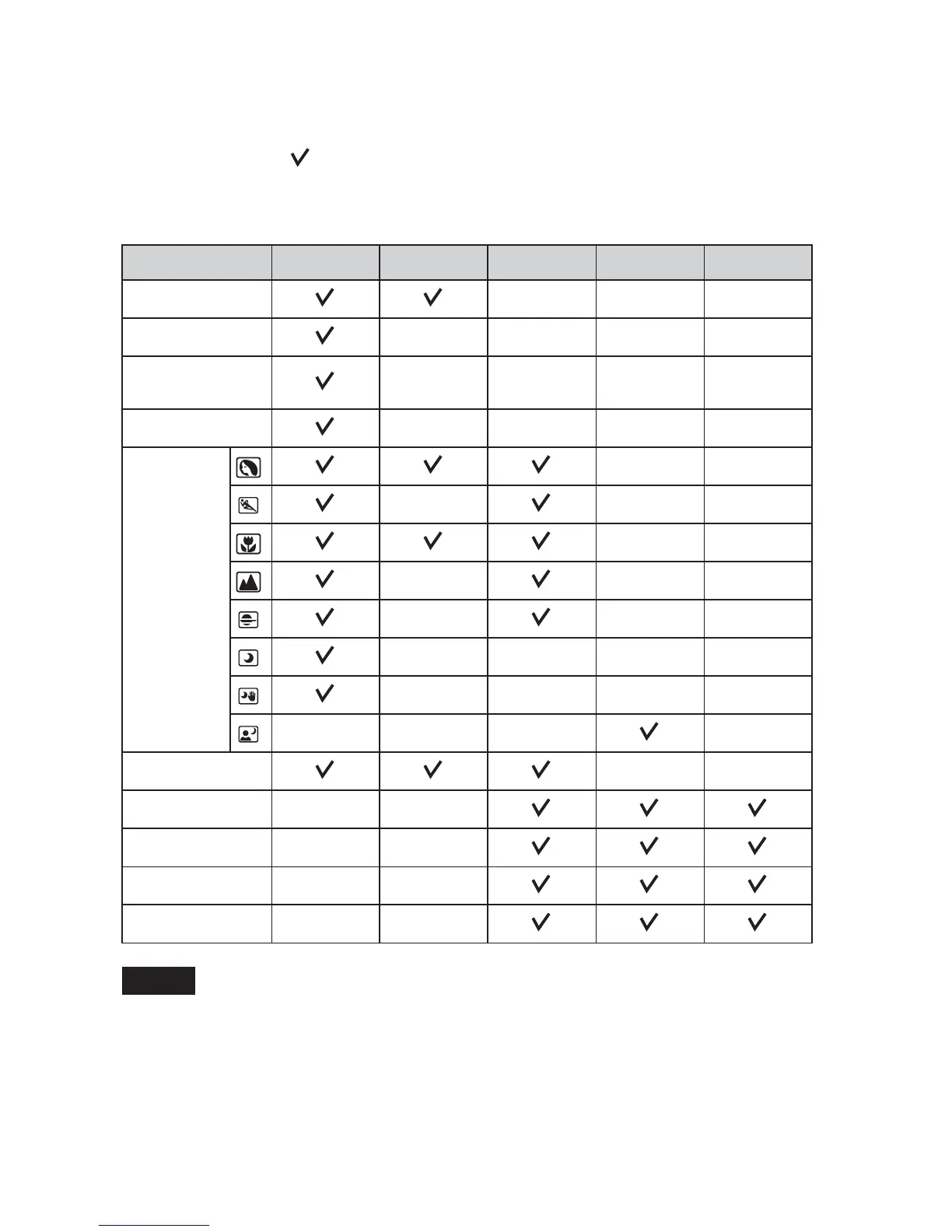
Flash modes available
The flash modes you can select depend on the shooting mode and functions
selected.
In the table below, indicates the function available. – indicates the function
not available.
The flash modes you cannot select are displayed in gray on the screen.
• The flash modes may be limited also by conditions other than the shooting mode.
• Even if you select a workable flash mode, the flash does not fire unless it is raised.
• [Autoflash] can be selected when [Shoot Mode] is set to [Intelligent Auto],
[Picture Effect], or certain [Scene Selection] modes only.
Shoot Mode Off Autoflash Fill-flash Slow Sync. Rear Sync.
Intelligent Auto
–––
Sweep Panorama
––––
3D Sweep
Panorama
––––
Anti Motion Blur
––––
Scene
Selection
––
–––
––
–––
–––
––––
––––
––– –
Picture Effect
––
Program Auto
––
Aperture Priority
––
Shutter Priority
––
Manual Exposure
––
Notes



 To Next Page