EasyManua.ls Logo

Sony SLV-340 - Page 26

Sony SLV-340
41 pages
Print Icon
To Next Page IconTo Next Page
To Previous Page IconTo Previous Page
Loading...
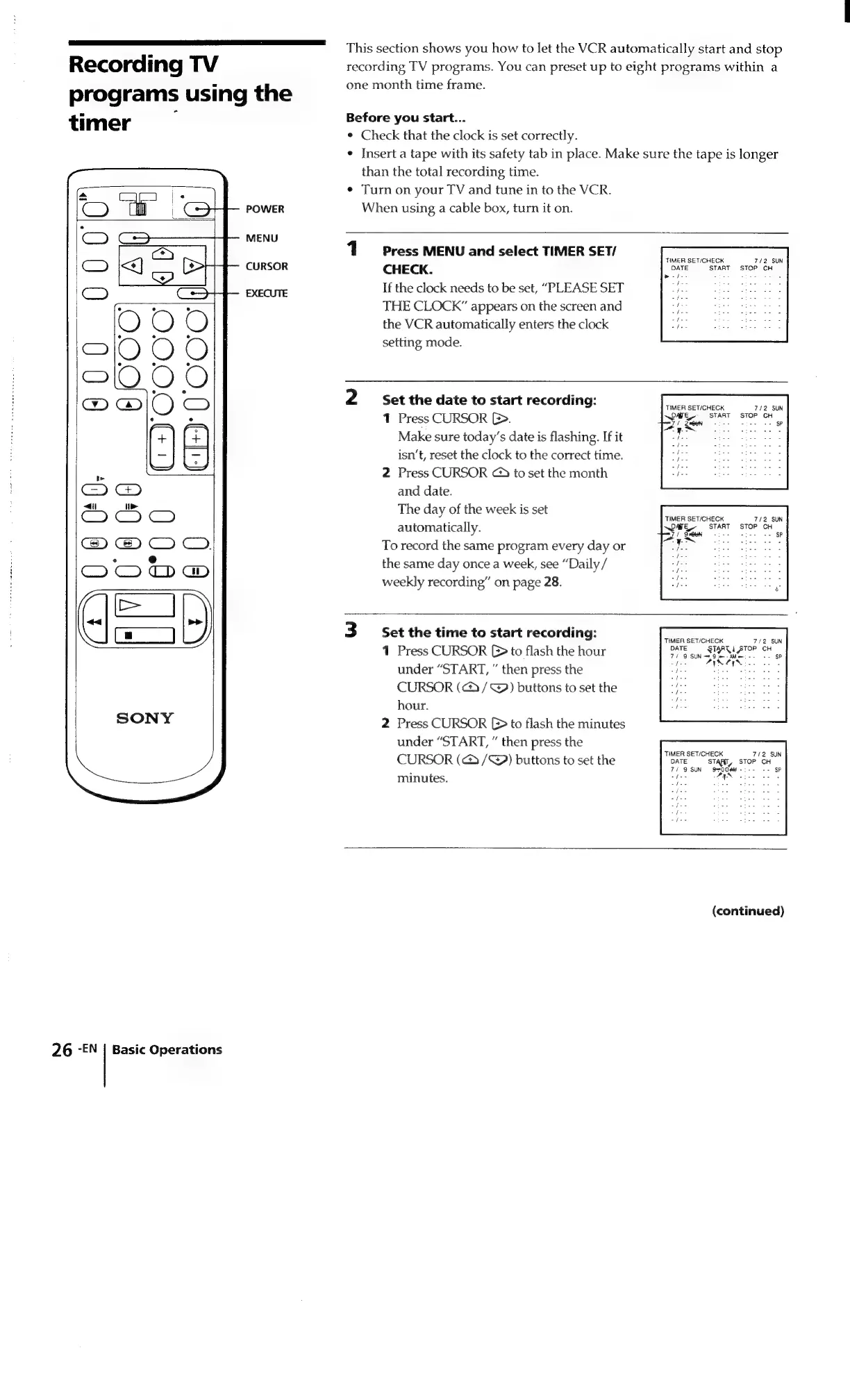
This
section
shows
you
how
to
let
the
VCR
automatically
start
and
stop
Recording
TV
recording
TV
programs.
You
can
preset
up
to
eight
programs
within
a
.
one
month
time
frame.
programs
using
the
timer
Before
you
start...
¢
Check
that
the
clock
is
set
correctly.
¢
Insert
a
tape
with
its
safety
tab
in
place.
Make
sure
the
tape
is
longer
than
the
total
recording
time.
e
Turn
on
your
TV
and
tune
in
to
the
VCR.
POWER
When
using
a
cable
box,
turn
it
on.
MENU
1
Press
MENU
and
select
TIMER
SET/
CURSOR
CHECK.
EXECUTE
If
the
clock
needs
to
be
set,
“PLEASE
SET
THE
CLOCK”
appears
on
the
screen
and
the
VCR
automatically
enters
the
clock
setting
mode.
TIMER
SET/CHECK
7/72
SUN
ie}
START
STOP
CH
bede-
2
Set
the
date
to
start
recording:
mena
TIMI
Tit
K
7/2
SUN
1
Press
CURSOR
CB.
eg
ee
Make
sure
today’s
date
is
flashing.
If
it
ee
ES
ees
isn’t,
reset
the
clock
to
the
correct
time.
2
Press
CURSOR
@
to
set
the
month
and
date.
The
day
of
the
week
is
set
:
TIMER
SET/CHECK
7/2
SUN
automatically.
pare.
START
STOP
CH
it
oan
SP
To
record
the
same
program
every
day
or
5
ie
,
the
same
day
once
a
week,
see
“Daily/
weekly
recording”
on
page
28.
3
Set
the
time
to
start
recording:
f
IMER
SET/CHECK
7/2
SUN
1
Press
CURSOR
[>
to
flash
the
hour
Ce
sree
oe
a
under
“START,
then
press
the
a
Ae
ee
CURSOR
(@/@)
buttons
to
set
the
eee
hour.
ee
2
Press
CURSOR
(>
to
flash
the
minutes
under
“START,
then
press
the
CURSOR
(@
/@)
buttons
to
set
the
DATE
START,
STOP
CH
.
7/
9
SUN
QeO0MM-:--
--
SP
minutes.
iE
HN
Sadie
25%
PIN
Liss
asiae
/
ifs
/
(continued)
26
-EN
|
Basic
Operations

Related product manuals