1-20
82
Various play mode functions (Program play, Shuffle play, Repeat play)
Various play mode functions
(Program play,
Shuffle play, Repeat play)
Yo u can set the following play modes:
•Program play (page 82), Program play MP3 audio tracks (page 92)
•Shuffle play (page 84), Shuffle play MP3 audio tracks (page 93)
•Repeat play (page 85)
Note
•The play mode is canceled when:
–you open the disc tray
–the player enters standby mode by pressing [/1.
Creating your own program (Program play)
Yo u can play the contents of a disc in the
order you want by arranging the order of the
tracks on the disc to create your own
program. You can program up to 20 tracks.
To program MP3 audio tracks, see page 92.
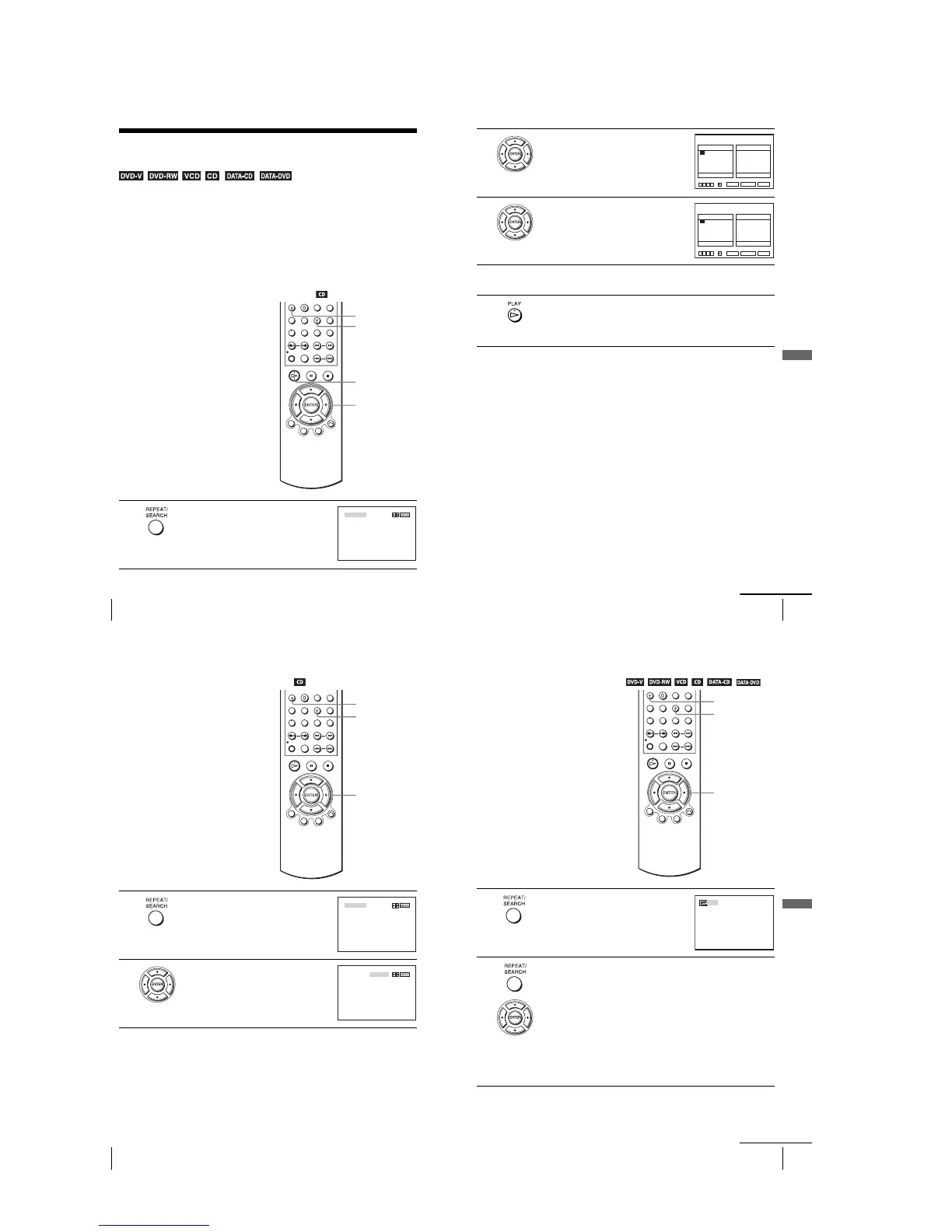
1
Press REPEAT when the DVD player is in stop
mode.
H PLAY
V/v/B/b
ENTER
CLEAR
REPEAT
PROGRAM SHUFFLE
83
Various play mode functions (Program play, Shuffle play, Repeat play)
DVD Additional Operations
To stop program play
Press CLEAR until “Off” appears at the upper left top of the TV screen during
programme play.
To change or cancel a program
To cancel all the programmed numbers
Notes
•Up to 99 tracks can be displayed.
•Up to 20 tracks can be programmed at one time.
2
Press B/b to select “PROGRAM”, then press
ENTER.
3
Press V/v/B/b to select the track number you
want to program, then press ENTER.
4
To program other tracks, repeat step 3.
The programmed track numbers are displayed in the selected order.
5
Press H PLAY to start program play.
Program play starts.
When the program ends, you can restart the same program again by
pressing H PLAY.
1
Follow steps 1 and 2 of “Creating your own program (Program play).”
2
Press v repeatedly to select “Clear last track,” then press ENTER. Each time you
press the button, the last programmed number is canceled. You can also cancel
the last programmed number by pressing CLEAR.
3
Follow step 3 for new programming.
1
Follow steps 1 and 2 of “Creating your own program (Program play).”
2
Press v repeatedly to select “Clear last track,” then press b to select “Clear all
tracks” and press ENTER.
All the programmed numbers are canceled.
01
05
09
13
17
02
06
10
14
18
03
07
11
15
19
04
08
12
16
20
––
––
––
––
––
––
––
––
––
––
––
––
––
––
––
––
––
––
––
––
Track Program Order
PROGRAM
RETURN CLEAR
Clear last track Clear all tracks
vV bB
B
ENTER
01
05
09
13
17
02
06
10
14
18
03
07
11
15
19
04
08
12
16
20
01
––
––
––
––
––
––
––
––
––
––
––
––
––
––
––
––
––
––
––
Track Program Order
PROGRAM
RETURN CLEAR
vV bB
Clear last track Clear all tracks
B
ENTER
continued
84
Various play mode functions (Program play, Shuffle play, Repeat play)
Playing in random order (Shuffle play)
To return to normal play
Press CLEAR until “Off” appears at the upper left top of the TV screen during shuffle
play.
Tips
•Shuffle play will stop when all the tracks are played back.
•You cannot repeat play while in shuffle play.
Yo u can shuffle the playback order of tracks.
Subsequent “shuffling” may produce a
different playing order.
To shuffle MP3 audio tracks, see page 93.
1
Press REPEAT when the DVD player is in stop
mode.
2
Press B/b to select “SHUFFLE”, then press
ENTER.
B/b
ENTER
REPEAT
CLEAR
PROGRAM SHUFFLE
PROGRAM SHUFFLE
85
Various play mode functions (Program play, Shuffle play, Repeat play)
DVD Additional Operations
Playing repeatedly (Repeat play)
Yo u can play all of the titles or tracks on a
disc or a single title, chapter, or track
repeatedly.
1
Press REPEAT during playback.
2
Press REPEAT or B/b repeatedly to select the item to be repeated.
When playing a DVD
•Chapter: repeats the current chapter.
•Title: repeats the current title on a disc.
When playing a VIDEO CD (with PBC function off) or CD
•Track: repeats the current track.
•Disc: repeats all of the tracks.
When playing a DATA CD/DATA DVD (MP3 audio)
•FILE: repeats the current track (file).
•DIR: repeats the current album (directory).
•DISC: repeats the current disc.
REPEAT
CLEAR
B/b
Off
continued














 To Next Page