1-6
24
Setting up the VCR with the Auto Set Up function
Notes
• If you stop the Auto Set Up function during step 3, you must repeat set up from
step 1.
• Whenever you operate the Auto Set Up function, some of the settings
(ShowView*, timer, etc.) will be reset. If this happens, you have to set them again.
* not available on SLV-SE610N/K
Getting Started
25
Setting the clock
Step 6 : Setting the clock
You must set the time and date on the VCR to use the timer features properly.
The Auto Clock Set function (not available on SLV-SE610N/K) works only if a station
in your area is broadcasting a time signal. If the Auto Set Up function did not set the
clock correctly for your local area, try another station for the Auto Clock Set function.
Setting the clock manually
Before you start
…
• Turn on the VCR and the TV.
• Set the TV to the video channel.
• Refer to “Index to parts and controls” for button locations.
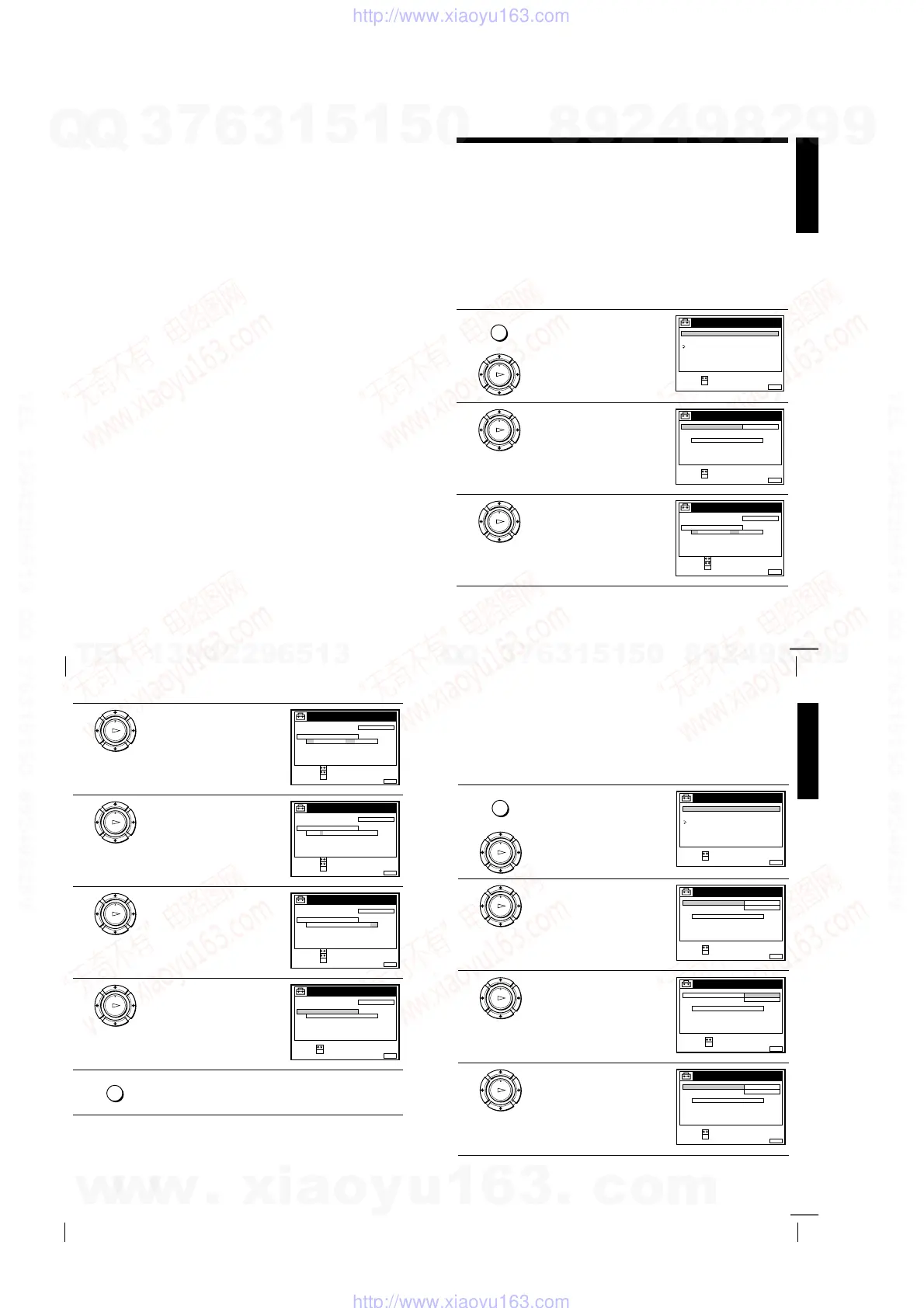
1
Press MENU, then press
M
/
m
to
highlight SETTINGS and press OK.
2
Press
M
/
m
to highlight CLOCK,
then press OK.
For SLV-SE610N/K, only the clock
setting menu appears. Skip the next
step and go to step 4.
3
Press
M
/
m
to highlight MANUAL
ADJUST, then press OK.
MENU
OK
PLAY
SET :
SELECT :
OK
MENUEXIT :
SETTINGS
RETURN
TUNER
CLOCK
LANGUAGE
OK
PLAY
SET :
SELECT :
OK
MENUEXIT :
CLOCK
OFFAUTO ADJUST
CLOCK PROGRAM
MANUAL ADJUST
.1 1.2001 MON 0:00
OK
PLAY
CONFIRM :
SET :
OK
MENUEXIT :
CLOCK
OFFAUTO ADJUST
CLOCK PROGRAM
MANUAL ADJUST
1 . 1 .2001 MON 0:00
SELECT :
continued
26
Setting the clock
Tips
• To change the digits while setting, press
<
to return to the item to be changed, and
select the digits by pressing
M
/
m
.
• If you want to return to the previous menu, highlight RETURN and press OK.
Note
• The menu disappears automatically if you don’t proceed for more than a few
minutes.
4
Press
M
/
m
to set the day.
5
Press
,
to highlight the month and
set the month pressing
M
/
m
.
6
Set the year, hour, and minutes in
sequence, pressing
,
to highlight
the item to be set, and press
M
/
m
to
select the digits.
The day of the week is set
automatically.
7
Press OK to start the clock.
8
Press MENU to exit the menu.
OK
PLAY
CONFIRM :
SET :
OK
MENUEXIT :
CLOCK
OFFAUTO ADJUST
CLOCK PROGRAM
MANUAL ADJUST
8 . 1 .2001 SUN 0 :00
SELECT :
2
OK
PLAY
CONFIRM :
SET :
OK
MENUEXIT :
CLOCK
OFFAUTO ADJUST
CLOCK PROGRAM
MANUAL ADJUST
8 . 9 .2001 FRI 0 : 00
SELECT :
2
OK
PLAY
CONFIRM :
SET :
OK
MENUEXIT :
CLOCK
OFFAUTO ADJUST
CLOCK PROGRAM
MANUAL ADJUST
8. FRI 8:00
SELECT :
21.20019
OK
PLAY
MENUEXIT :
CLOCK
OFFAUTO ADJUST
CLOCK PROGRAM
MANUAL ADJUST
8. FRI 8:00
21
SET :
SELECT :
OK
.20019
MENU
Getting Started
27
Setting the clock
Changing the station for the Auto Clock Set function
(not available on SLV-SE610N/K)
Before you start…
• Turn on the VCR and the TV.
• Set the TV to the video channel.
• Refer to “Index to parts and controls” for button locations.
1
Press MENU, then press
M
/
m
to
highlight SETTINGS and press OK.
2
Press
M
/
m
to highlight CLOCK,
then press OK.
AUTO ADJUST is highlighted.
3
Press OK.
4
Press
M
/
m
to highlight ON, then
press OK.
MENU
OK
PLAY
SET :
SELECT :
OK
MENUEXIT :
SETTINGS
RETURN
TUNER
CLOCK
LANGUAGE
OK
PLAY
SET :
SELECT :
OK
MENUEXIT :
CLOCK
ON
1 AAB
AUTO ADJUST
CLOCK PROGRAM
MANUAL ADJUST
.8 FRI 8 : 0 0
12 .20019
OK
PLAY
CONFIRM :
SELECT :
OK
MENUEXIT :
CLOCK
OFF
AUTO ADJUST
CLOCK PROGRAM
MANUAL ADJUST
FRI 8 : 00
8.
ON
21.20019
OK
PLAY
SET :
SELECT :
OK
MENUEXIT :
CLOCK
ON
1 AAB
AUTO ADJUST
CLOCK PROGRAM
MANUAL ADJUST
.8 FRI 8 : 0 0
12 .20019
continued
w
w
w
.
x
i
a
o
y
u
1
6
3
.
c
o
m
Q
Q
3
7
6
3
1
5
1
5
0
9
9
2
8
9
4
2
9
8
T
E
L
1
3
9
4
2
2
9
6
5
1
3
9
9
2
8
9
4
2
9
8
0
5
1
5
1
3
6
7
3
Q
Q
TEL 13942296513 QQ 376315150 892498299
TEL 13942296513 QQ 376315150 892498299
http://www.xiaoyu163.com
http://www.xiaoyu163.com



 To Next Page