1-7
28
Setting the clock
Tips
• If you set AUTO ADJUST to ON, the Auto Clock Set function is activated
whenever the VCR is turned off. The time is adjusted automatically by making
reference to the time signal from the station whose programme position is
displayed in the “CLOCK PROGRAM” row. If you do not need the Auto Clock
Set, select OFF.
• If you want to return to the previous menu, highlight RETURN and press OK.
Note
• The menu disappears automatically if you don’t proceed for more than a few
minutes.
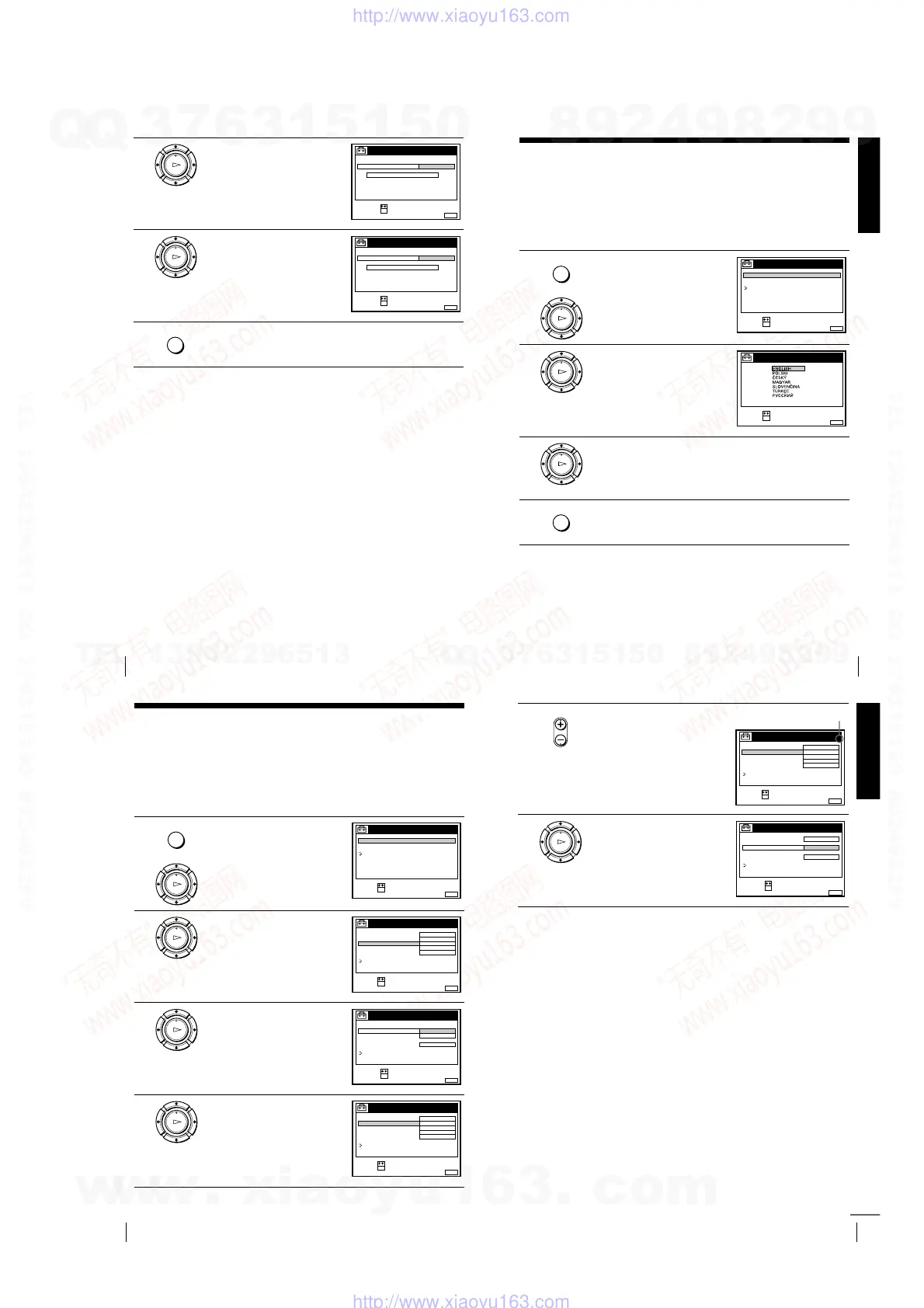
5
Press
m
to highlight CLOCK
PROGRAM, then press OK.
6
Press
M
/
m
repeatedly until the
programme position of the station
that carries a time signal appears.
If the VCR does not receive a time
signal from any station, AUTO
ADJUST returns to OFF
automatically.
7
Press MENU to exit the menu.
OK
PLAY
CONFIRM :
SELECT :
OK
MENUEXIT :
CLOCK
AUTO ADJUST
CLOCK PROGRAM
MANUAL ADJUST
FRI 8 : 00
8.
1 AAB
21.20019
OK
PLAY
CONFIRM :
SELECT :
OK
MENUEXIT :
CLOCK
AUTO ADJUST
CLOCK PROGRAM
MANUAL ADJUST
.2001 FRI 8:00
8. 9
2 CDE
21
MENU
Getting Started
29
Selecting a language
Selecting a language
Tip
• If you want to return to the previous menu, highlight RETURN and press OK.
Note
• The menu disappears automatically if you don’t proceed for more than a few
minutes.
You can change the on-screen display language from the one you selected with the
Auto Set Up function.
Before you start…
• Turn on the VCR and the TV.
• Set the TV to the video channel.
• Refer to “Index to parts and controls” for button locations.
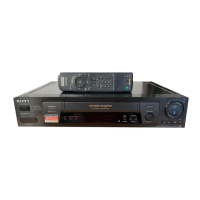
1
Press MENU, then press
M
/
m
to
highlight SETTINGS and press OK.
2
Press
M
/
m
to highlight
LANGUAGE, then press OK.
3
Press
M
/
m
to highlight the desired language, then press OK.
4
Press MENU to exit the menu.
MENU
OK
PLAY
SET :
SELECT :
OK
MENUEXIT :
SETTINGS
RETURN
TUNER
CLOCK
LANGUAGE
OK
PLAY
SET :
SELECT
OK
MENUEXIT :
LANGUAGE
:
OK
PLAY
MENU
30
Presetting channels
Presetting channels
If some channels could not be preset using the Auto Set Up function, you can preset
them manually.
Before you start…
• Turn on the VCR and the TV.
• Set the TV to the video channel.
• Refer to “Index to parts and controls” for button locations.
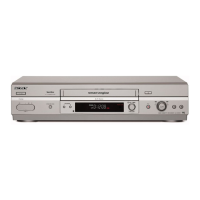
1
Press MENU, then press
M
/
m
to
highlight SETTINGS and press OK.
2
Press
M
/
m
to highlight TUNER,
then press OK.
3
Press
M
/
m
to highlight NORMAL/
CATV, then press OK.
4
Press
M
/
m
to highlight NORMAL,
then press OK.
To preset CATV (Cable Television)
channels, select CATV.
MENU
OK
PLAY
SET :
SELECT :
OK
MENUEXIT :
SETTINGS
RETURN
TUNER
CLOCK
LANGUAGE
OK
PLAY
SET :
SELECT :
OK
MENUEXIT :
TUNER
C
AAB12
PROG. 1
NORMAL / CATV
CHANNEL SET
PAY - TV / CANAL+
AFT
FINE TUNING
NORMAL
OFF
ON
RETURN
SYSTEM D / K
OK
PLAY
MENUEXIT :
TUNER
CATV
PROG.
NORMAL / CATV
CHANNEL SET
PAY - TV / CANAL+
AFT
FINE TUNING
NORMAL
ON
RETURN
1
CONFIRM :
SELECT :
OK
SYSTEM
OK
PLAY
SET :
SELECT :
OK
MENUEXIT :
TUNER
C
AAB12
PROG. 1
NORMAL / CATV
CHANNEL SET
PAY - TV / CANAL+
AFT
FINE TUNING
NORMAL
OFF
ON
RETURN
SYSTEM D / K
Getting Started
31
Presetting channels
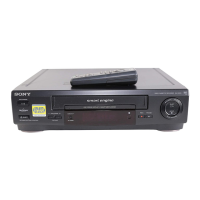
5
Press PROG +/– to select the
programme position.
6
Press
M
/
m
to highlight CHANNEL
SET, then press OK.
• PROG
SET :
SELECT :
OK
MENUEXIT :
TUNER
C
AAB12
PROG. 4
NORMAL / CATV
CHANNEL SET
PAY - TV / CANAL+
AFT
FINE TUNING
NORMAL
OFF
ON
RETURN
SYSTEM D / K
Selected programme position
OK
PLAY
MENUEXIT :
TUNER
C
AAB12
PROG.
NORMAL / CATV
CHANNEL SET
PAY - TV / CANAL+
AFT
FINE TUNING
ON
RETURN
4
CONFIRM :
SELECT :
OK
SYSTEM D / K
continued
w
w
w
.
x
i
a
o
y
u
1
6
3
.
c
o
m
Q
Q
3
7
6
3
1
5
1
5
0
9
9
2
8
9
4
2
9
8
T
E
L
1
3
9
4
2
2
9
6
5
1
3
9
9
2
8
9
4
2
9
8
0
5
1
5
1
3
6
7
3
Q
Q
TEL 13942296513 QQ 376315150 892498299
TEL 13942296513 QQ 376315150 892498299
http://www.xiaoyu163.com
http://www.xiaoyu163.com



 To Next Page