1-8
32
Presetting channels
7
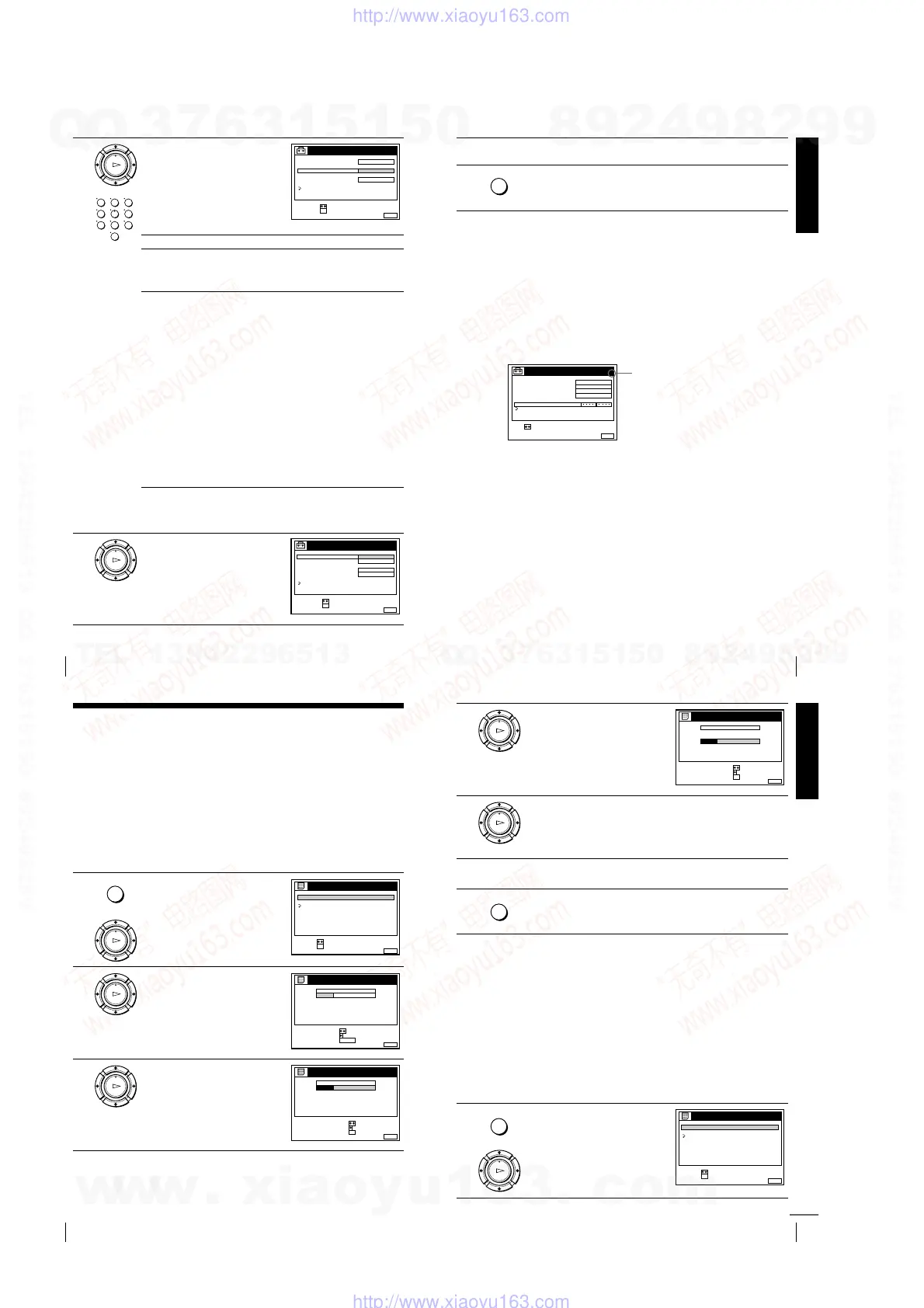
Press
M
/
m
repeatedly until the
channel you want is displayed.
The channels appear in the following
order:
If you know the number of the channel you want, press the
programme number buttons. For example, for channel 5, first press
“0” and then press “5.”
8
If the TV sound is distorted or noisy,
press
M
/
m
to highlight SYSTEM
and press OK. Then press
M
/
m
to
select B/G or D/K so that you get
better sound.
OK
PLAY
123
456
789
0
MENUEXIT :
TUNER
C
27
PROG.
NORMAL / CATV
CHANNEL SET
PAY - TV / CANAL+
AFT
FINE TUNING
ON
RETURN
4
CONFIRM :
SELECT :
OK
SYSTEM D / K
B/G TV system D/K TV system
Channel
number in the
CHANNEL
SET field
Receivable
Channel
Channel
number in the
CHANNEL
SET field
Receivable
Channel
C02 E2 C02 R1
C03 E3 C05 R6
C04 E4 C06 R7
C05 E5 C12 R12
C06 E6 C13 R2
C07 E7 C14 R3
C08 E8 C15 R4
C09 E9 C16 R5
C10 E10 C17 R8
C11 E11 C18 R9
C12 E12 C19 R10
C21–C69 E21–E69 C20 R11
S01–S41 S1–S41 C21–C69 R21–R69
S42–S46 S01–S05
OK
PLAY
MENUEXIT :
TUNER
PROG.
NORMAL / CATV
CHANNEL SET
SYSTEM
AFT
FINE TUNING
B / G
D / K
RETURN
4
ON
CONFIRM :
SELECT :
OK
PAY - TV / CANAL+ OFF
Getting Started
33
Presetting channels
If the picture is not clear
Normally, the Auto Fine Tuning (AFT) function automatically tunes in
channels clearly. However, if the picture is not clear, you may also use the
manual tuning function.
Tip
• If you want to return to the previous menu, highlight RETURN and press OK.
Notes
• The menu disappears automatically if you don’t proceed for more than a few
minutes.
• When adjusting FINE TUNING, the menu may become difficult to read due to
interference from the picture being received.
9
To preset another programme position, repeat steps 5 through 7.
10
Press MENU to exit the menu.
1
Press PROG +/– or the programme number buttons to select the
programme position for which you cannot obtain a clear picture.
2
Press MENU, then select SETTINGS and press OK.
3
Select TUNER, then press OK.
4
Select FINE TUNING, then press OK.
The fine tuning meter appears.
5
Press
<
/
,
to get a clearer picture, then press MENU to exit the menu.
Note that the AFT (Auto Fine Tuning) setting switches to OFF.
MENU
SET :
MENUEXIT :
TUNER
C
27
PROG.
NORMAL / CATV
CHANNEL SET
PAY - TV / CANAL+
AFT
FINE TUNING
NORMAL
OFF
RETURN
4
SYSTEM D / K
Selected programme
position
34
Changing/disabling programme positions
Changing/disabling programme positions
After setting the channels, you can change the programme positions as you like. If
any programme positions are unused or contain unwanted channels, you can disable
them.
You can also change the station names (not available on SLV-SE610N/K). If the
station names are not displayed, you can enter them manually.
Changing programme positions
Before you start…
• Turn on the VCR and the TV.
• Set the TV to the video channel.
• Refer to “Index to parts and controls” for button locations.
1
Press MENU, then press
M
/
m
to
highlight LISTS and press OK.
2
Press
M
/
m
to highlight CHANNEL
LIST, then press OK.
3
Press
M
/
m
to highlight the row
which you want to change the
programme position, then press
,
.
To display other pages for
programme positions 6 to 60, press
M
/
m
repeatedly.
MENU
OK
PLAY
RETURN
SET :
SELECT :
OK
MENUEXIT :
LISTS
CHANNEL LIST
TIMER LIST
OK
PLAY
MENUEXIT :
CHANNEL LIST
ERASE PROGRAM
MOVE PROGRAM
:
:
PROG
SELECT :
1
2
3
4
5
AAB
CDE
FGH
C
C
C
C
1
0
5
0
2
3
6
9
NAME
CH
C
27
CLEAR
OK
PLAY
MENUEXIT :
CHANNEL LIST
PROG
1
2
3
4
5
AAB
CDE
FGH
C
C
C
C
1
0
5
0
2
3
6
9
NAME
CH
C
27
CONFIRM
SET STATION NAME
:
:
SELECT :
OK
Getting Started
35
Changing/disabling programme positions
Tip
• If you want to return to the previous menu, highlight RETURN and press OK.
Note
• The menu disappears automatically if you don’t proceed for more than a few
minutes.
4
Press
M
/
m
until the selected channel
row moves to the desired
programme position.
The selected channel is inserted at
the new programme position and the
intermediate channels are displaced
to fill the gap.
5
Press OK to confirm the setting.
6
To change the programme position of another station, repeat steps 3
through 5.
7
Press MENU to exit the menu.
Disabling unwanted programme positions
After presetting channels, you can disable unused programme positions. The disabled
positions will be skipped later when you press the PROG +/– buttons.
Before you start…
• Turn on the VCR and the TV.
• Set the TV to the video channel.
• Refer to “Index to parts and controls” for button locations.
1
Press MENU, then press
M
/
m
to
highlight LISTS, and press OK.
OK
PLAY
MENUEXIT :
CHANNEL LIST
CONFIRM
SET STATION NAME
:
:
PROG
SELECT :
1
2
3
4
5
CDE
AAB
FGH
C
C
C
C
0
5
1
0
3
6
2
9
NAME
CH
C
27
OK
OK
PLAY
MENU
MENU
OK
PLAY
RETURN
SET :
SELECT :
OK
MENUEXIT :
LISTS
CHANNEL LIST
TIMER LIST
continued
w
w
w
.
x
i
a
o
y
u
1
6
3
.
c
o
m
Q
Q
3
7
6
3
1
5
1
5
0
9
9
2
8
9
4
2
9
8
T
E
L
1
3
9
4
2
2
9
6
5
1
3
9
9
2
8
9
4
2
9
8
0
5
1
5
1
3
6
7
3
Q
Q
TEL 13942296513 QQ 376315150 892498299
TEL 13942296513 QQ 376315150 892498299
http://www.xiaoyu163.com
http://www.xiaoyu163.com



 To Next Page