1-9
36
Changing/disabling programme positions
Tip
• If you want to return to the previous menu, highlight RETURN and press OK.
Notes
• The menu disappears automatically if you don’t proceed for more than a few
minutes.
• Be sure to select the programme position you want to disable correctly. If you
disable a programme position by mistake, you need to reset that channel manually.
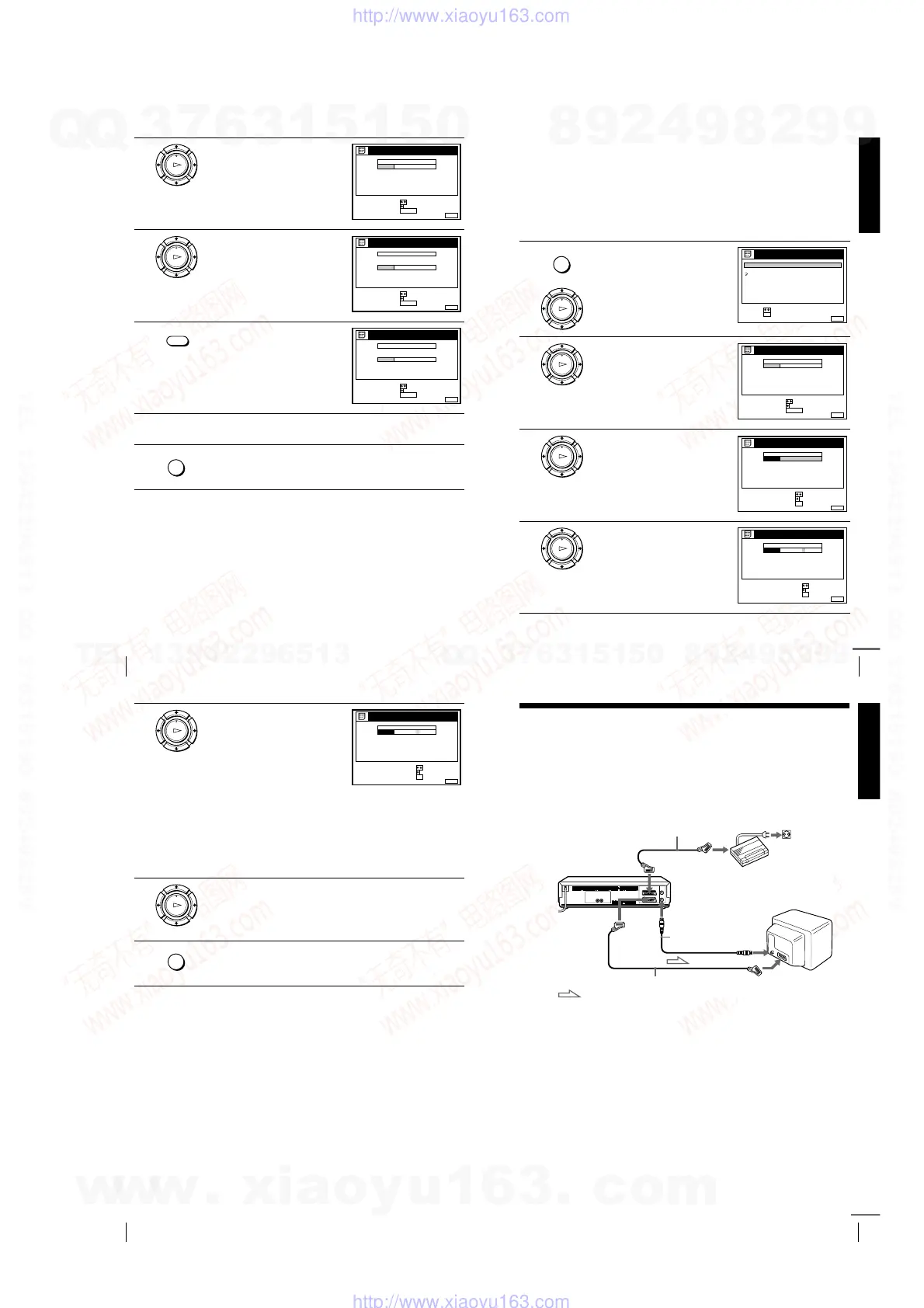
2
Press
M
/
m
to highlight CHANNEL
LIST, then press OK.
3
Press
M
/
m
to highlight the row
which you want to disable.
4
Press CLEAR.
The selected row will be cleared as
shown on the right.
5
Repeat steps 3 and 4 for any other programme positions you want to
disable.
6
Press MENU to exit the menu.
OK
PLAY
MENUEXIT :
CHANNEL LIST
PROG
1
2
3
4
5
AAB
CDE
FGH
C
C
C
C
1
0
5
0
2
3
6
9
NAME
CH
C
27
ERASE PROGRAM
MOVE PROGRAM
:
:
SELECT :
CLEAR
OK
PLAY
MENUEXIT :
CHANNEL LIST
PROG
1
2
3
4
5
AAB
CDE
FGH
C
C
C
C
1
0
5
0
2
3
6
9
NAME
CH
C
27
ERASE PROGRAM
MOVE PROGRAM
:
:
SELECT :
CLEAR
CLEAR
MENUEXIT :
CHANNEL LIST
PROG
1
2
3
4
5
AAB
CDE
FGH
C
C
C
1
0
0
2
3
9
NAME
CH
C
27
ERASE PROGRAM
MOVE PROGRAM
:
:
SELECT :
CLEAR
MENU
Getting Started
37
Changing/disabling programme positions
Changing the station names (not available on SLV-SE610N/K)
You can change or enter the station names (up to 5 characters). The VCR must
receive channel information (for instance, SMARTLINK information) for station
names to appear automatically.
Before you start…
• Turn on the VCR and the TV.
• Set the TV to the video channel.
• Refer to “Index to parts and controls” for button locations.
1
Press MENU, then press
M
/
m
to
highlight LISTS and press OK.
2
Press
M
/
m
to highlight CHANNEL
LIST, then press OK.
3
Press
M
/
m
to highlight the row
which you want to change or enter
the station name, then press
,
.
To display other pages for
programme positions 6 to 60, press
M
/
m
repeatedly.
4
Press
,
.
MENU
OK
PLAY
RETURN
SET :
SELECT :
OK
MENUEXIT :
LISTS
CHANNEL LIST
TIMER LIST
OK
PLAY
MENUEXIT :
CHANNEL LIST
PROG
1
2
3
4
5
AAB
CDE
FGH
C
C
C
C
1
0
5
0
2
3
6
9
NAME
CH
C
27
ERASE PROGRAM
MOVE PROGRAM
:
:
SELECT :
CLEAR
OK
PLAY
MENUEXIT :
CHANNEL LIST
PROG
1
2
3
4
5
AAB
CDE
FGH
C
C
C
C
1
0
5
0
2
3
6
9
NAME
CH
C
27
CONFIRM
SET STATION NAME
:
:
SELECT :
OK
OK
PLAY
MENUEXIT :
CHANNEL LIST
CONFIRM OK
NEXT
:
:
PROG
SELECT A CHARACTER :
1
2
3
4
5
AAB
CDE
FGH
C
C
C
C
1
0
5
0
2
3
6
9
NAME
CH
C
27
continued
38
Changing/disabling programme positions
Tip
• If you want to return to the previous menu, highlight RETURN and press OK.
Notes
• The menu disappears automatically if you don’t proceed for more than a few
minutes.
• If you enter a symbol in step 5, it will appear as a blank space in the display
window.
5
Enter the station name.
1
Press
M
/
m
to select a character.
Each time you press
M
, the
character changes as shown
below.
A
t
tt
t B t
tt
t … t
tt
t Z t
tt
t a t
tt
t b t
tt
t
… t
tt
t z t
tt
t 0 t
tt
t 1 t
tt
t … t
tt
t 9 t
tt
t
(symbols) t
tt
t (blank space) t
tt
t
A
2
Press
,
to set the next character.
The next space is highlighted.
To correct a character, press
<
/
,
until the character you want
to correct is highlighted, then reset it.
You can set up to 5 characters for the station name.
6
Press OK to confirm the new name.
7
Press MENU to exit the menu.
OK
PLAY
MENUEXIT :
CHANNEL LIST
CONFIRM OK
NEXT
:
:
PROG
SELECT A CHARACTER :
1
2
3
4
5
CAB
CDE
FGH
C
C
C
C
1
0
5
0
2
3
6
9
NAME
CH
C
27
OK
PLAY
MENU
Getting Started
39
Setting the Canal Plus decoder (not available on SLV-SE610N/K)
Setting the Canal Plus decoder
(not available on SLV-SE610N/K)
You can watch or record Canal Plus programmes if you connect a decoder
(not supplied) to the VCR.
Connecting a decoder
Setting Canal Plus channels
To watch or record Canal Plus programmes, set your VCR to receive the channels
using the on-screen display.
In order to set the channels correctly, be sure to follow all of the steps below.
Before you start…
• Turn on the VCR, the TV, and the decoder.
• Set the TV to the video channel.
• Refer to “Index to parts and controls” for button locations.
DECODER/
t
LINE-3 IN*
1
or
DECODER/
t
LINE-2 IN*
2
AERIAL IN
i
LINE-1 (TV)
Aerial cable
(supplied)
AERIAL OUT
Scart cable
(not supplied)
Scart
(EURO-AV)
Scart cable (not supplied)
Canal Plus decoder
: Signal flow
Scart
(EURO-AV)
continued
w
w
w
.
x
i
a
o
y
u
1
6
3
.
c
o
m
Q
Q
3
7
6
3
1
5
1
5
0
9
9
2
8
9
4
2
9
8
T
E
L
1
3
9
4
2
2
9
6
5
1
3
9
9
2
8
9
4
2
9
8
0
5
1
5
1
3
6
7
3
Q
Q
TEL 13942296513 QQ 376315150 892498299
TEL 13942296513 QQ 376315150 892498299
http://www.xiaoyu163.com
http://www.xiaoyu163.com



 To Next Page