1-10
40
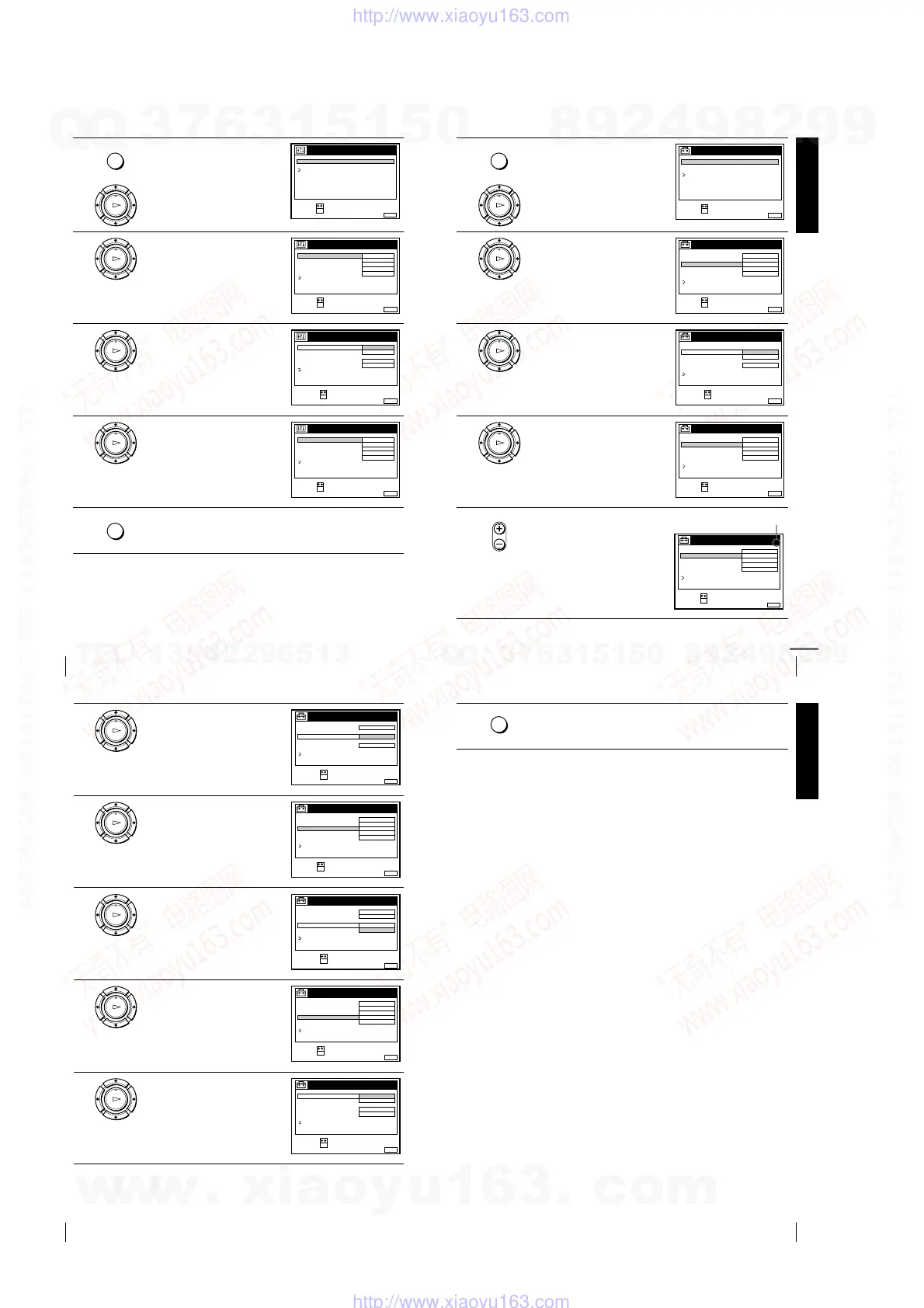
Setting the Canal Plus decoder (not available on SLV-SE610N/K)
1
Press MENU, then press
M
/
m
to
highlight OPTIONS and press OK.
2
Press
M
/
m
to highlight OPTIONS-2,
then press OK.
3
Press
M
/
m
to highlight DECODER/
LINE3*
1
(or DECODER/LINE2*
2
),
then press OK.
4
Press
M
/
m
to highlight DECODER,
then press OK.
5
Press MENU to exit the menu.
The menu disappears from the TV screen.
MENU
OK
PLAY
RETURN
SET :
SELECT :
OK
MENUEXIT :
OPTIONS
OPTIONS - 1
OPTIONS - 2
OK
PLAY
SET :
SELECT :
OK
MENUEXIT :
OPTIONS - 2
TIMER OPTIONS
DECODER / LINE3
POWER SAVE
VARIABLE
DECODER
OFF
TV DIRECT REC ON
NORMALRR
RETURN
OK
PLAY
MENUEXIT :
OPTIONS - 2
TIMER OPTIONS
DECODER / LINE3
POWER SAVE
TV DIRECT REC
LINE3
DECODER
ON
NORMALRR
RETURN
CONFIRM :
SELECT :
OK
OK
PLAY
SET :
SELECT :
OK
MENUEXIT :
OPTIONS - 2
TIMER OPTIONS
DECODER / LINE3
POWER SAVE
VARIABLE
DECODER
OFF
TV DIRECT REC ON
NORMALRR
RETURN
MENU
Getting Started
41
Setting the Canal Plus decoder (not available on SLV-SE610N/K)
6
Press MENU again. Then press
M
/
m
to highlight SETTINGS and press
OK.
7
Press
M
/
m
to highlight TUNER,
then press OK.
8
Press
M
/
m
to highlight NORMAL/
CATV, then press OK.
9
Press
M
/
m
to highlight NORMAL,
then press OK.
To preset CATV (Cable Television)
channels, select CATV.
10
Press PROG +/– to select the desired
programme position.
MENU
OK
PLAY
SET :
SELECT :
OK
MENUEXIT :
SETTINGS
RETURN
TUNER
CLOCK
LANGUAGE
OK
PLAY
SET :
SELECT :
OK
MENUEXIT :
TUNER
C
AAB12
PROG. 1
NORMAL / CATV
CHANNEL SET
PAY - TV / CANAL+
AFT
FINE TUNING
NORMAL
OFF
ON
RETURN
SYSTEM D / K
OK
PLAY
MENUEXIT :
TUNER
CATV
PROG.
NORMAL / CATV
CHANNEL SET
PAY - TV / CANAL+
AFT
FINE TUNING
NORMAL
ON
RETURN
1
CONFIRM :
SELECT :
OK
SYSTEM
OK
PLAY
SET :
SELECT :
OK
MENUEXIT :
TUNER
C
AAB
12
PROG. 1
NORMAL / CATV
CHANNEL SET
PAY - TV / CANAL+
AFT
FINE TUNING
NORMAL
OFF
ON
RETURN
SYSTEM D / K
• PROG
SET :
SELECT :
OK
MENUEXIT :
TUNER
C
AAB
12
PROG.
NORMAL / CATV
CHANNEL SET
PAY - TV / CANAL+
AFT
FINE TUNING
NORMAL
OFF
ON
RETURN
51
SYSTEM D / K
Selected programme position
continued
42
Setting the Canal Plus decoder (not available on SLV-SE610N/K)
11
Press
M
/
m
to highlight CHANNEL
SET, then press OK.
12
Press
M
/
m
to select the Canal Plus
channels, then press OK.
13
Press
M
/
m
to highlight PAY-TV/
CANAL+, then press OK.
14
Press
M
/
m
to highlight ON, then
press OK.
15
If the TV sound is distorted or noisy,
press
M
/
m
to highlight SYSTEM
and press OK. Then press
M
/
m
to
select B/G or D/K so that you get
better sound.
OK
PLAY
MENUEXIT :
TUNER
C
AAB12
PROG.
NORMAL / CATV
CHANNEL SET
PAY - TV / CANAL+
AFT
FINE TUNING
ON
RETURN
51
CONFIRM :
SELECT :
OK
SYSTEM D / K
OK
PLAY
SET :
SELECT :
OK
MENUEXIT :
TUNER
C
LMN
02
PROG. 5
NORMAL / CATV
CHANNEL SET
PAY - TV / CANAL+
AFT
FINE TUNING
NORMAL
OFF
ON
RETURN
1
SYSTEM D / K
OK
PLAY
MENUEXIT :
TUNER
PROG. 5
NORMAL / CATV
CHANNEL SET
PAY - TV / CANAL+
AFT
FINE TUNING
NORMAL
ON
OFF
RETURN
1
CONFIRM :
SELECT :
OK
SYSTEM D / K
OK
PLAY
SET :
SELECT :
OK
MENUEXIT :
TUNER
C
LMN
02
PROG. 5
NORMAL / CATV
CHANNEL SET
PAY - TV / CANAL+
AFT
FINE TUNING
NORMAL
ON
ON
RETURN
1
SYSTEM D / K
OK
PLAY
MENUEXIT :
TUNER
PROG. 5
NORMAL / CATV
CHANNEL SET
PAY - TV / CANAL+
AFT
FINE TUNING
B / G
ON
ON
RETURN
1
CONFIRM :
SELECT :
OK
SYSTEM D / K
Getting Started
43
Setting the Canal Plus decoder (not available on SLV-SE610N/K)
Tip
• If you want to return to the previous menu, highlight RETURN and press OK.
Notes
• The menu disappears automatically if you don’t proceed for more than a few
minutes.
• To superimpose subtitles while watching Canal Plus programmes, make both
decoder-VCR and VCR-TV connections using 21-pin Scart cables that are
compatible with the RGB signals. You cannot record subtitles on the VCR.
• When you watch Canal Plus programmes through the RFU input of the TV, press
t
TV/VIDEO so that the VIDEO indicator appears in the display window.
• If POWER SAVE is set to FULL, you cannot watch or record Canal Plus
programmes during standby mode. Set POWER SAVE in the OPTIONS-2 menu
to OFF or PARTIAL.
*
1
SLV-SE810N/K only
*
2
SLV-SE710N/K and SX710N/K only
16
Press MENU to exit the menu.
MENU
w
w
w
.
x
i
a
o
y
u
1
6
3
.
c
o
m
Q
Q
3
7
6
3
1
5
1
5
0
9
9
2
8
9
4
2
9
8
T
E
L
1
3
9
4
2
2
9
6
5
1
3
9
9
2
8
9
4
2
9
8
0
5
1
5
1
3
6
7
3
Q
Q
TEL 13942296513 QQ 376315150 892498299
TEL 13942296513 QQ 376315150 892498299
http://www.xiaoyu163.com
http://www.xiaoyu163.com



 To Next Page