83
4-4 CUE Menu
Chapter 4 Menu Settings
• Set the VTR SETUP menu item 124 “Tele-File MENU
auto popup” to “on”, then in the HOME, VIDEO,
AUDIO, TC, CUE, or SETUP menu screen, insert a
cassette that has an MLB-1M-100 memory label
(option) attached.
To scroll the Tele-File menu screen horizontally
Press the cursor T or t button.
There are two ways of displaying log (IN/OUT point) data
in the Tele-File menu screen, as follows.
• In the Tele-File menu screen, press the [F2] (ENTRY
POINT) button, and select “IN/OUT point”.
• Set the VTR SETUP menu item 126 “Tele-File ENTRY
POINT” to “IN/OUT point”.
While the data is being changed, if the write-protect setting
has been made for the whole Tele-File menu, then data
changed before the setting was made is rewritten.
To exit the Tele-File menu without overwriting the
changed point(s)
Press the EJECT button, or press the ALT/[F2] (UNDO
ALL) buttons. After a window that confirms cancelation is
displayed, hold down the SFT button, and press the [F2]
(UNDO ALL) button. The memory label contents when
the cassette was inserted are restored.
If you inadvertently press the EJECT button
without rewriting the data
Reinsert the ejected cassette within 30 seconds, and press
the [F10] (WRITE/EXIT) button. This writes the data from
immediately before ejection.
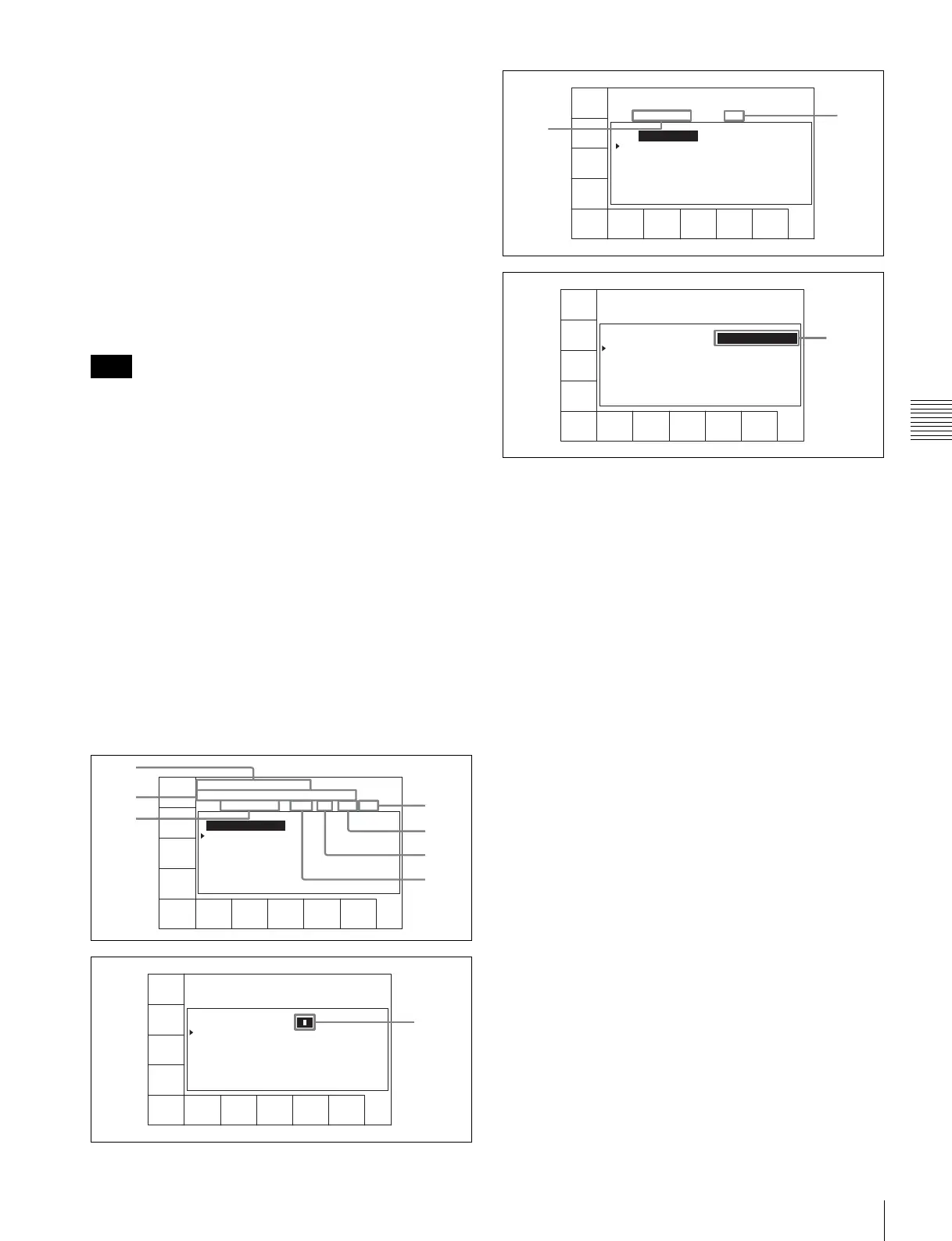
The Tele-File menu screen scrolls in the following four
stages. Scroll the screen with the cursor T or t button.
a REC DATE (recording data date)
Shows the last date of recording.
b TITLE
Shows the title of the cassette content.
c Time
Shows the time data of a cue point.
d Mrk (mark)
Shows an indication of a cue point attribute (OK/NG/KP/
blank).
e Recording start point
When a cue point is the recording start point, shows @.
For how to select “on” or “off” for the recording starting
point setting, see “Changing the recording starting point
setting” on page 85.
f IN
Shows log (IN point) data.
g OUT
Shows log (OUT point) data.
h Tk (take)
Shows the take number of a cue point.
i Cut
Shows the cut number of a cue point.
j Scn (scene)
Shows the scene number of a cue point.
Note
CUE
SCAN
ENTRY
POINT
CUE
COMMNT
EDIT
CHANGE
DATA
DEL
POINT
PRO-
TECT
TAPE
INFO
CUENUM
POINT
WRITE/
EXIT
MARK
REC DATE[2003/02/25] EOS[01:01:24:15]
TITLE[ ] Rast100%
No. Time Mrk Tk Cut Scn
0 00:14:10:10
1 --:--:--:--
1
2
3
0
9
8
4
CUE
SCAN
ENTRY
POINT
CUE
COMMNT
EDIT
CHANGE
DATA
DEL
POINT
PRO-
TECT
TAPE
INFO
CUENUM
POINT
WRITE/
EXIT
MARK
REC DATE[2003/02/25] EOS[01:01:24:15]
TITLE[ ] Rast100%
No. Time Mrk Tk Cut Scn
0 00:14:10:10
1 --:--:--:--
5
CUE
SCAN
ENTRY
POINT
INOUT
COMMNT
EDIT
CHANGE
DATA
DEL
POINT
PRO-
TECT
TAPE
INFO
CUENUM
POINT
WRITE/
EXIT
MARK
REC DATE[2003/02/25] EOS[01:01:24:15]
TITLE[ ] Rast100%
No. In Out
0 00:14:16:05 00:14:17:02
1 --:--:--:-- --:--:--:--
6
7
CUE
SCAN
ENTRY
POINT
CUE
COMMNT
EDIT
CHANGE
DATA
DEL
POINT
PRO-
TECT
TAPE
INFO
CUENUM
POINT
WRITE/
EXIT
MARK
REC DATE[2003/02/25] EOS[01:01:24:15]
TITLE[ ] Rast100%
No. Time Mrk Comment
0 00:14:10:10
1 --:--:--:--
qa



 To Next Page