MULTI CHANNEL AV RECEIVER
STR-DN1050/STR-DN850
Using bi-amplifier connections
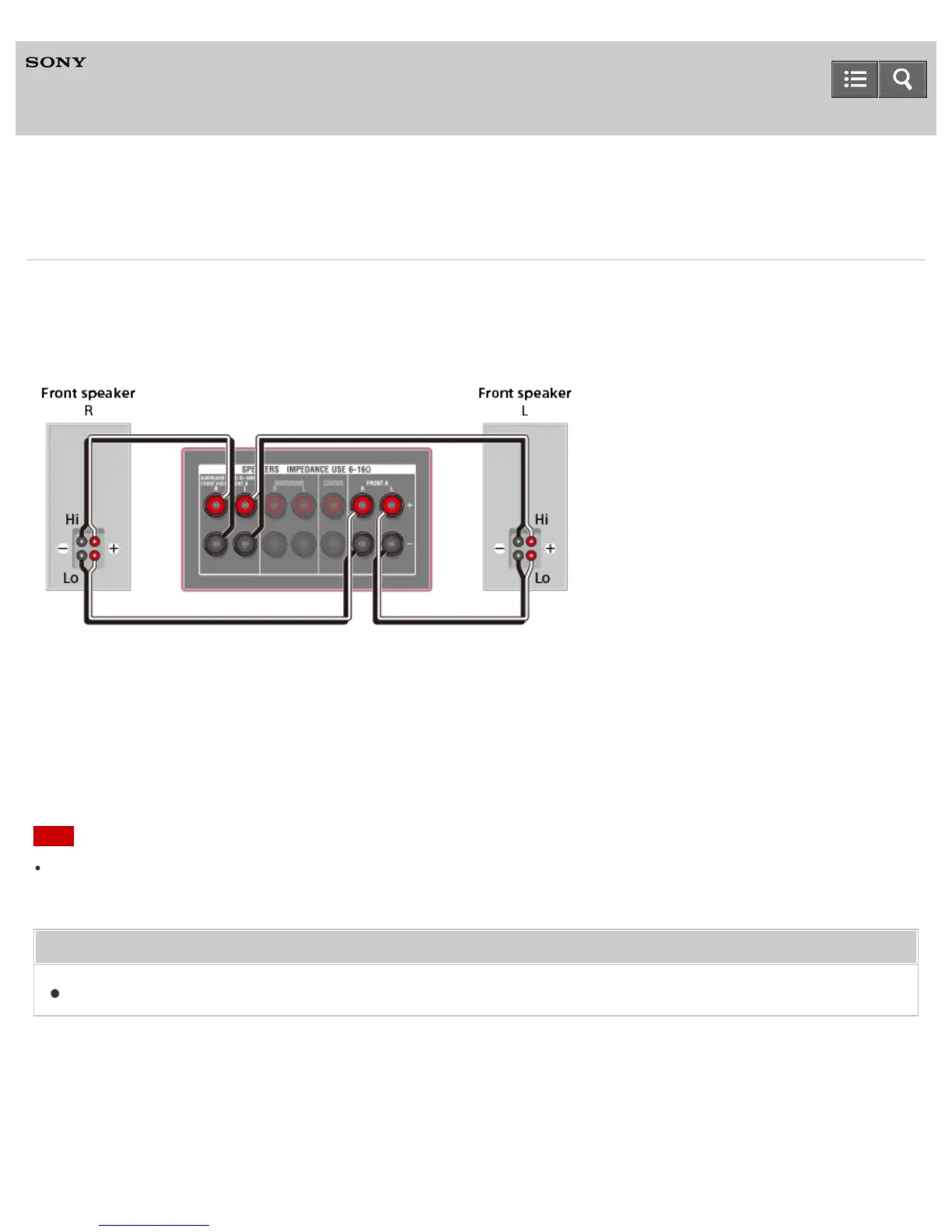
If you are not using surround back speakers or front high speakers, you can connect the front speakers to the
SPEAKERS SURROUND BACK/BI-AMP/FRONT HIGH/FRONT B terminals using a bi-amplifier connection.
STR-DN850 is used for illustration purpose in this section.
Connect the jacks on the Lo (or Hi) side of the front speakers to the SPEAKERS FRONT A terminals, and connect the
jacks on the Hi (or Lo) side of the front speakers to the SPEAKERS SURROUND BACK/BI-AMP/FRONT HIGH/FRONT
B terminals.
Make sure that metal fittings of Hi/Lo attached to the speakers have been removed from the speakers to avoid receiver
malfunction.
After you have made the bi-amplifier connection, set [SB Speaker Assign] in the Speaker Settings menu to [Bi-Amp].
Note
You can only set [SB Speaker Assign] if the speaker pattern is set to a setting that does not have surround back and
front high speakers.
Related Topic
Notes on connecting cables
Notes on use
4-488-938-11(1)
Copyright 2014 Sony Corporation
Help Guide


 To Next Page
 Loading...











