16
Connections
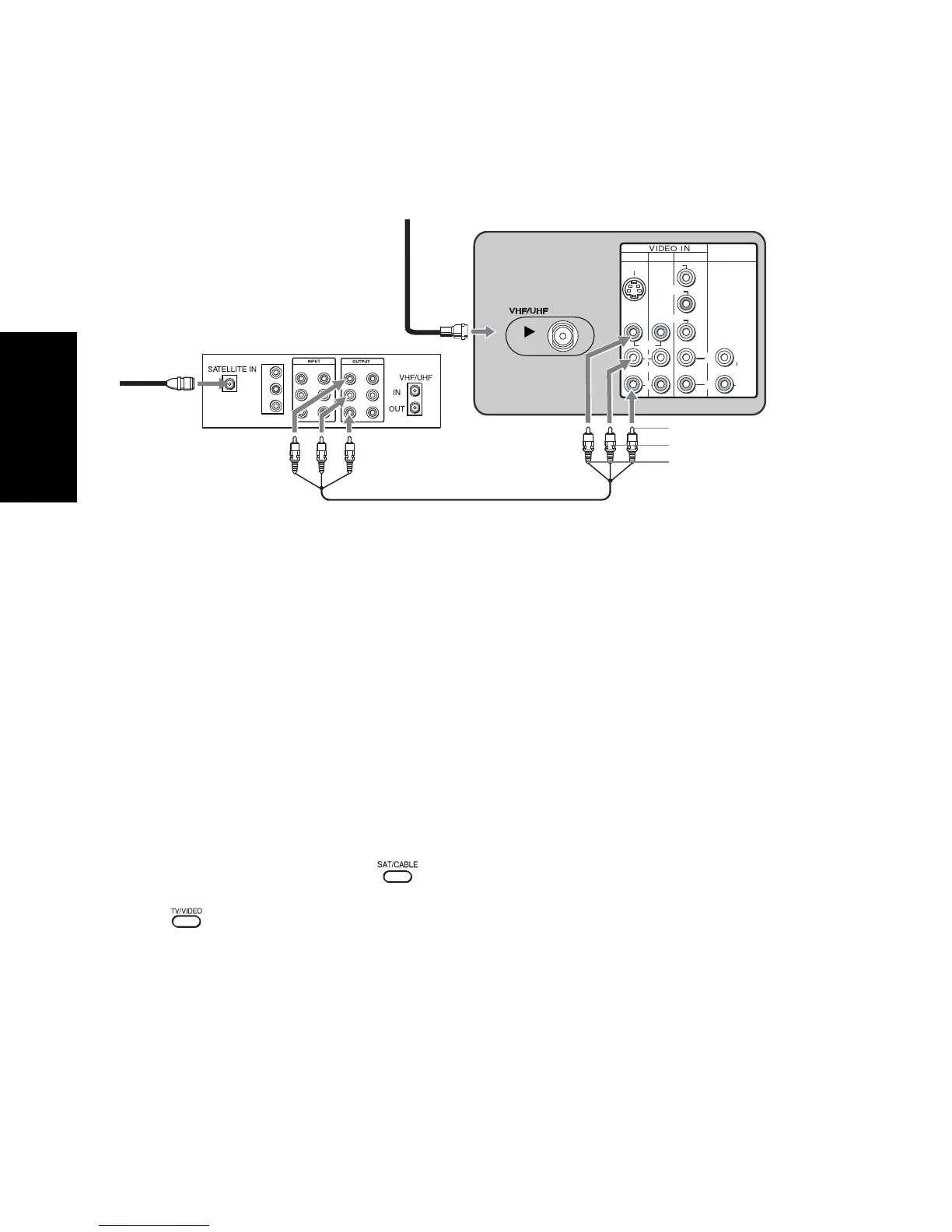
Connecting a TV and Satellite Receiver
1 Connect the cable from your satellite antenna to SATELLITE IN on your satellite receiver.
2 Connect the coaxial cable from your cable service or antenna to the VHF/UHF jack on
your TV.
3 Using audio/video cables (not supplied), connect AUDIO/VIDEO OUT on your satellite
receiver to AUDIO/VIDEO IN on your TV.
Using your TV with this connection
This connection allows you to do the following:
❏ Program your Sony remote control to operate your satellite receiver (see page 5).
❏ To activate your remote, press (FUNCTION button) to operate your satellite
receiver. See page 7 on how to operate other functions.
❏ Press repeatedly to switch to satellite receiver input (VIDEO input).
1
3
4
AUDIO OUT
(VAR/FIX)
VIDEO
L
(MONO)
R
L
R
(MONO)
S VIDEO
Y
P B
P
R
L
R
L
R
L
R
Y
B
P
P
R
VIDEO 1
VIDEO 1
VIDEO 2
VIDEO 2
Satellite receiver
Satellite
antenna
cable
1
2
3
From
cable/
antenna
Audio R (red)
Video (yellow)
Audio L (white)
Rear of TV












 To Next Page