Chapter 1: Setting Up
ConnectingTVAntenna/Cable
Although you can use either an indoor or outdoor antenna with the TV, an outdoor antenna will provice you with better picture
quality. You can receive cable TV by connecting a cable supplied by your local cable company.
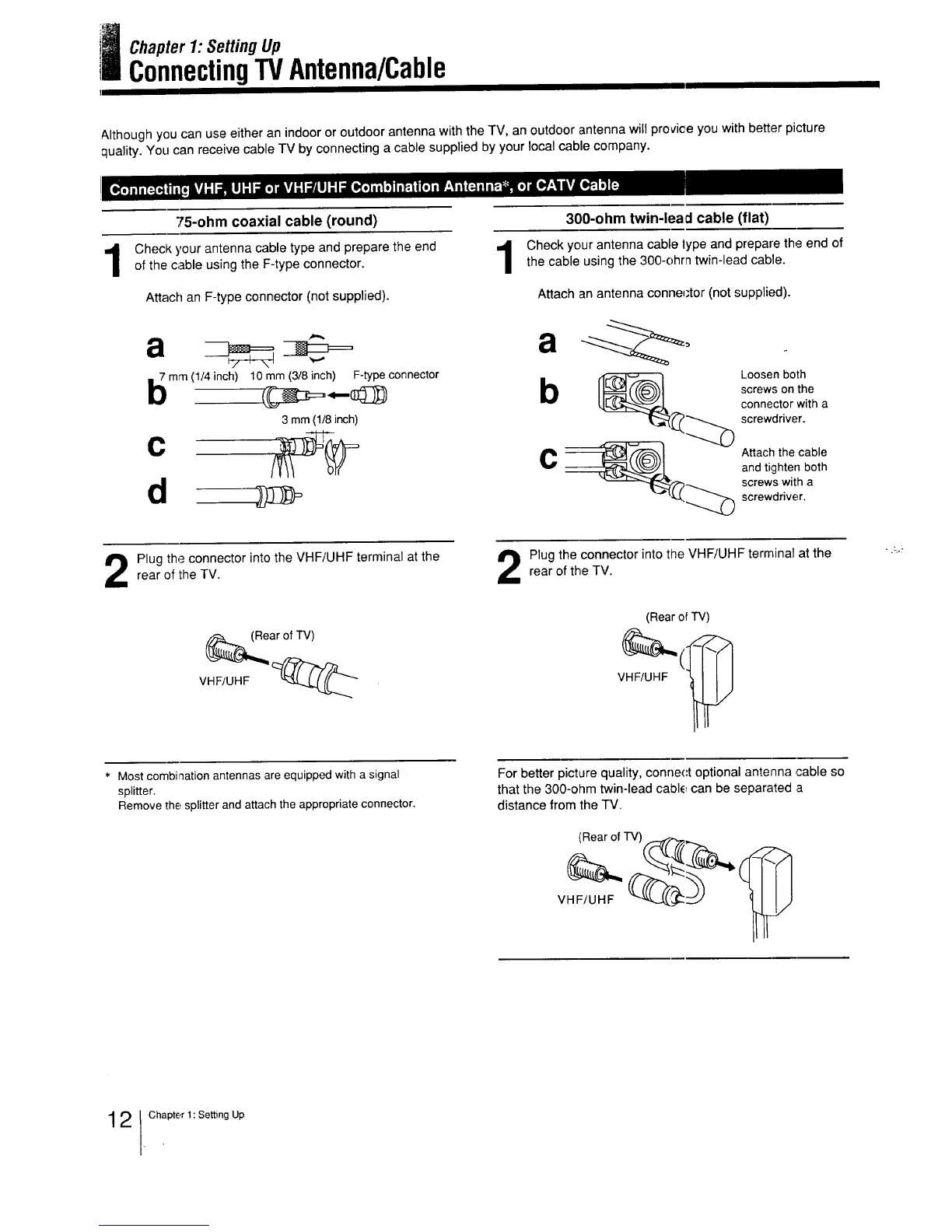
75-ohm coaxial cable (round)
Checkyour antennacabletypeandpreparethe end
ofthecableusingthe F-typeconnector.
Attach an F-type connector (not supplied).
a
mm (1/4 inch) 10mm (3/8 inch) F-type connector
3 mm (1/8inch)
c
d
300-ohm twin-lead cable (flat)
Check your antenna cable lype and prepare the end of
the cable using the 300-ohrn twin-lead cable.
Attach an antenna conne_;tor (not supplied).
a
b
C
Loosen both
screws on the
connector with a
screwdriver.
Attach the cable
and tighten both
screws with a
screwdriver.
Plug the connector into the VHF/UHF terminal at the
rear of the TV.
Plug the connector into the VHF/UHF terminal at the
rear of the TV.
(Rear of TV)
VHF/UHF
Most combination antennas are equipped with a signal
splitter.
Remove the splitter and attach the appropriate connector.
For better picture quality, conne(:t optional antenna cable so
that the 300-ohm twin-lead cable can be separated a
distance from the TV.
2 1chlpter 1: Setting Up



 To Next Page