ConnectingOtherEquipment
After connecting, you will be able to...
-- Play back video tapes
-- Watch two TV programs at once using a window picture
(Picture-in-Picture, pp. 38-43)
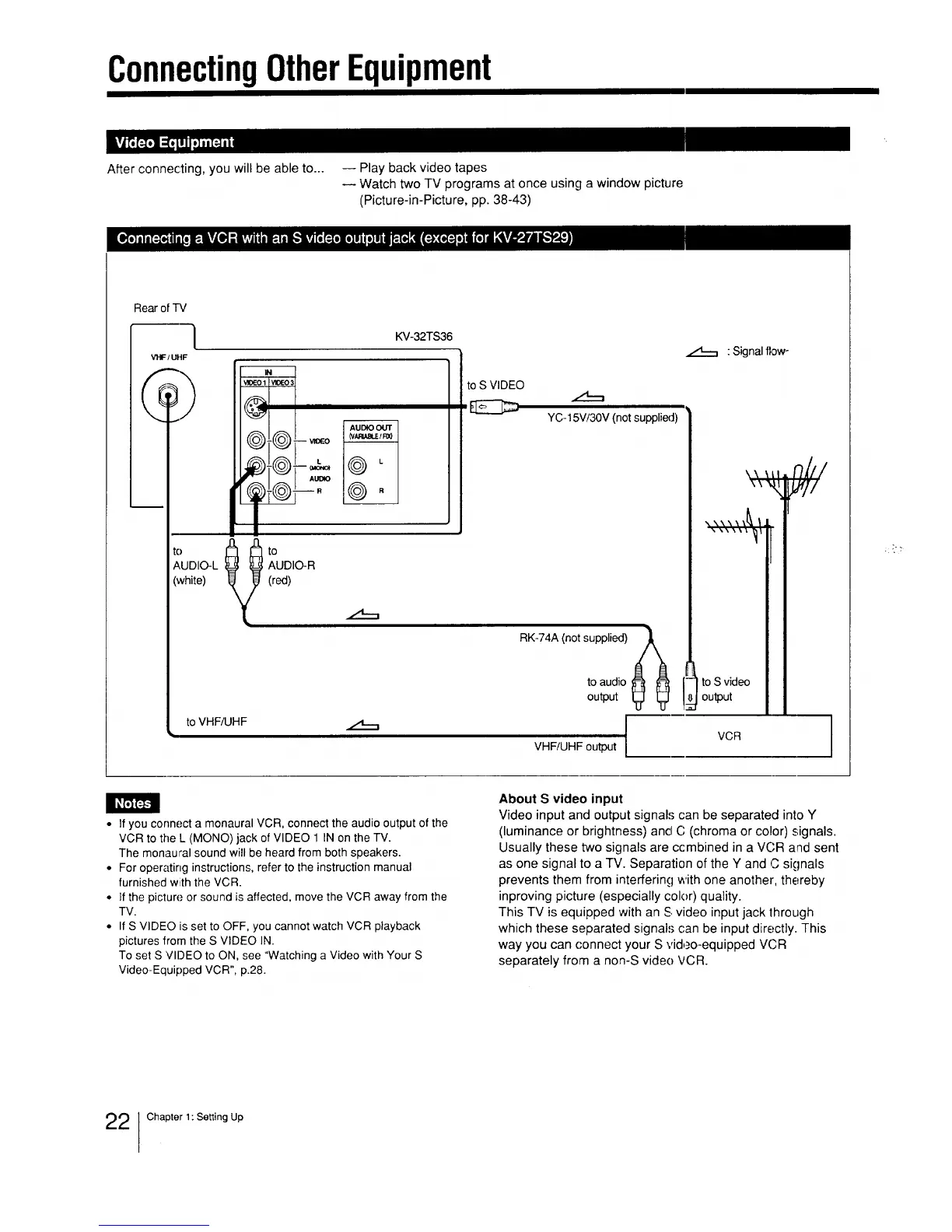
Rear of TV
I
VI"F/UHF
IN
VlSeO 1 _(3€-o 3
©
AUDIO Ot/'r
(W_,_tE 1RX_
-- VIQEO
AUDIO
to _ to
AUDIO-L AUDIO-R
(white) (red)
KV-32TS36
to VHF/UHF
i
to S VIDEO
t,1__,
YC-15V/30V (not supplied)
"l
RK-74A (not supplied) A
0O
to audio
output
VHF/UHF output
Signal flow-
\\ \LI
\\N,I
toS video
output
nil/
VCR
J
• If you connect a monaural VCR, connect the audio output of the
VCR to the L (MONO) jack of VIDEO 1 IN on the TV.
The monaural sound will be heard from both speakers.
• For operating instructions, refer to the instruction manual
furnished with the VCR.
• If the picture or sound is affected, move the VCR away from the
TV.
• If S VIDEO is set to OFF, you cannot watch VCR playback
pictures from the S VIDEO IN.
To set S VIDEO to ON, see "Watching a Video with Your S
Video-Equipped VCR", p.28.
About S video input
Video input and output signals can be separated into Y
(luminance or brightness) and C (chroma or color) signals.
Usually these two signals are ccmbined in a VCR and sent
as one signal to a TV. Separation of the Y and C signals
prevents them from interfering with one another, thereby
inproving picture (especially color) quality.
This TV is equipped with an S video input jack through
which these separated signals can be input directly. This
way you can connect your S vid,_o-equipped VCR
separately from a non-S vide() VCR.
22 ]Chapter 1: Setting Up






 To Next Page