PresettingW Channels
F
MUTING(_ _..._SLEEP
T V CABLEPOWER
VOL OH
IODESET CABLEBOXW
RESET _ MENU
__ RETURN
db
CH AUDIO "rVNIDEO
_i F.E_ZE
c_ :cDj c::3
CH • II
I_FIFJ
C_ CZ) _
REC • TVNTR
C2_ _ C2_
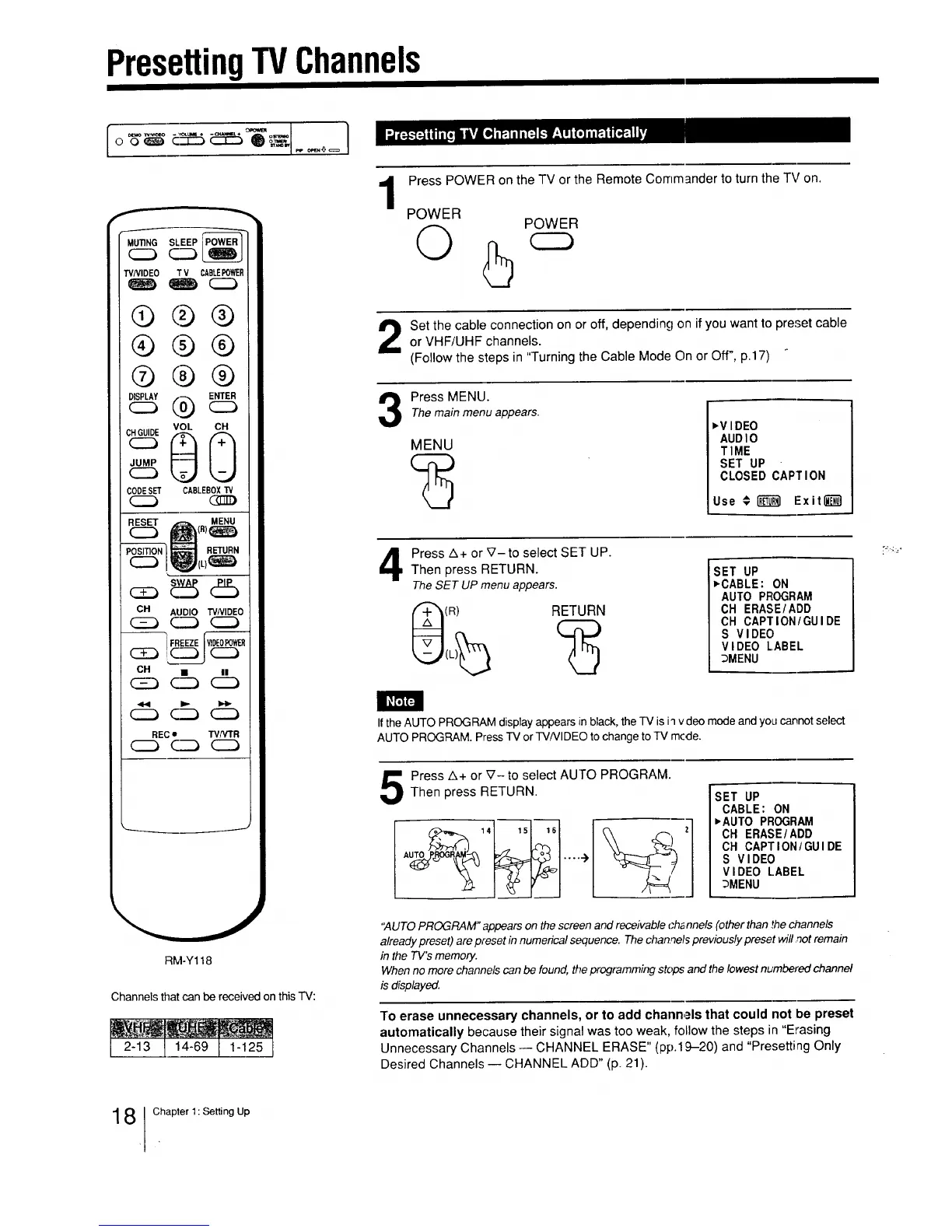
RM-Y118
Channels that can be received on this TV:
I 2-13Ij4-69I 1-125I
1
Press POWER on the TV or the Remote Commander to turn the TV on.
POWER
Q
POWER
Set the cable connection on or off, depending on if you want to preset cableor VHF/UHF channels.
(Follow the steps in "Turning the Cable Mode On or Off", p.17)
Press MENU.
The main menu appears.
MENU
,V IDEO
AUDIO
TIME
SET UP
CLOSED CAPTION
Use € _ Exitl_l
4
Press A+ or _7- to select SET UP.
Then press RETURN.
The SET UP menu appears.
(R) RETURN
SET UP
,CABLE: ON
AUTO PROGRAM
OH ERASE/ADD
CH CAPTION/GUIDE
S VIDEO
VIDEO LABEL
i _MENU
I
If the AUTO PROGRAM display appears in black, the TV is iq vdeo mode and you cannot select
AUTO PROGRAM. Press TV or TVNIDEO to change to TV mcde.
Press A+ or V- to select AUTO PROGRAM.Then press RETURN.
;ET UP
CABLE: ON
•AUTO PROGRAM
OH ERASE/ADD
CH CAPTION/GUIDE
S VIDEO
VIDEO LABEL
_MENU
"AUTO PROGRAM" appears on the screen and receivable ch_ nnels (other than ,thechannels
already preset) are preset in numerical sequence. The channels previously preset will not remain
in the TV's memory.
When no more channels can be found, the programming stops and the lowest nt,,mbered channel
is displayed.
To erase unnecessary channels, or to add channels that could not be preset
automatically because their signal was too weak, follow the steps in "Erasing
Unnecessary Channels -- CHANNEL ERASE" (pp.19-20) and "Presetting Only
Desired Channels -- CHANNEL ADD" (p. 21).
8 Chapter 1: Setting Up






 To Next Page