Chapter 2: Using Basic Features
WatchingTVPrograms
I °i I 1o O _ C::E:D C-J::D _,_
i
r
MUTING SLEEP
CD (223
TVNIDEO T V CABLEPOWER
_) qE;b C:)
®®®
@®®
DISPLAY
VOL CH
3HGUIDE
CD
JUMP
C_
CODESET CABLEBOXTV
c_ L
c_c5
C:H AUDIO TVNIDE0
C-:_ C:::D _
---I _.E_z__----_
CH • II
4M b,,- [IHI,,
REC • "I'VNTR
RM-Y118
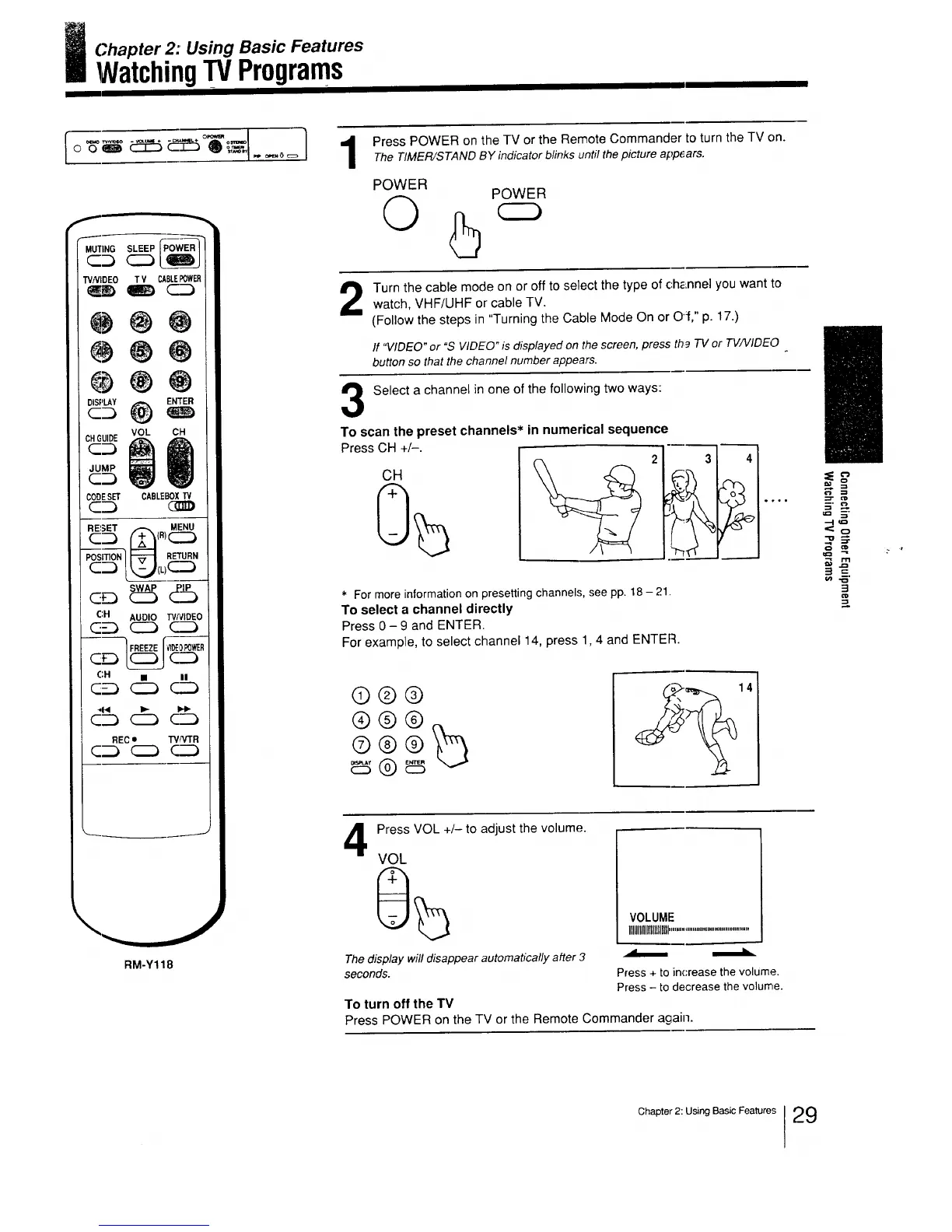
Press POWER on the TV or the Remote Commander to turn the TV on.The TIMER/STAND BY indicator blinks until thepicture app6ars.
POWER
©
POWER
Turn the cable mode on or off to select the type of channel you want towatch, VHF/UHF or cable TV.
(Follow the steps in "Turning the Cable Mode On or Off," p. 17.)
If "VIDEO" or "S VIDEO" is displayed on the screen, press th9 TV or TV/VIDEO
button so that the channel number appears.
Select a channel in one of the following two ways:
To scan the preset channels* in numerical sequence
Press CH +/-.
CH
-_ . =,
2 31
_r-., I
41
.....
._' , ,
* For more information on presetting channels, see pp. 18- 21.
To select a channel directly
Press 0- 9 and ENTER.
For example, to select channel 14, press 1,4 and ENTER.
0®@
®@@
4
Press VOL +/- to adjust the volume.
VOL
VOLUME
IIIIIIIIIIIIllllllllll...........................................
The display will disappear automabcally after 3 _
seconds. Press + to increase the volUme.
Press - to decrease the volume.
To turn off the TV
Press POWER on the TV or the Remote Commander again.
?=-,_
m. €._
u=l __"
=1 =
o') -_"
3
Chapter 2: Using Basic Features 29



 To Next Page