Troubleshooting
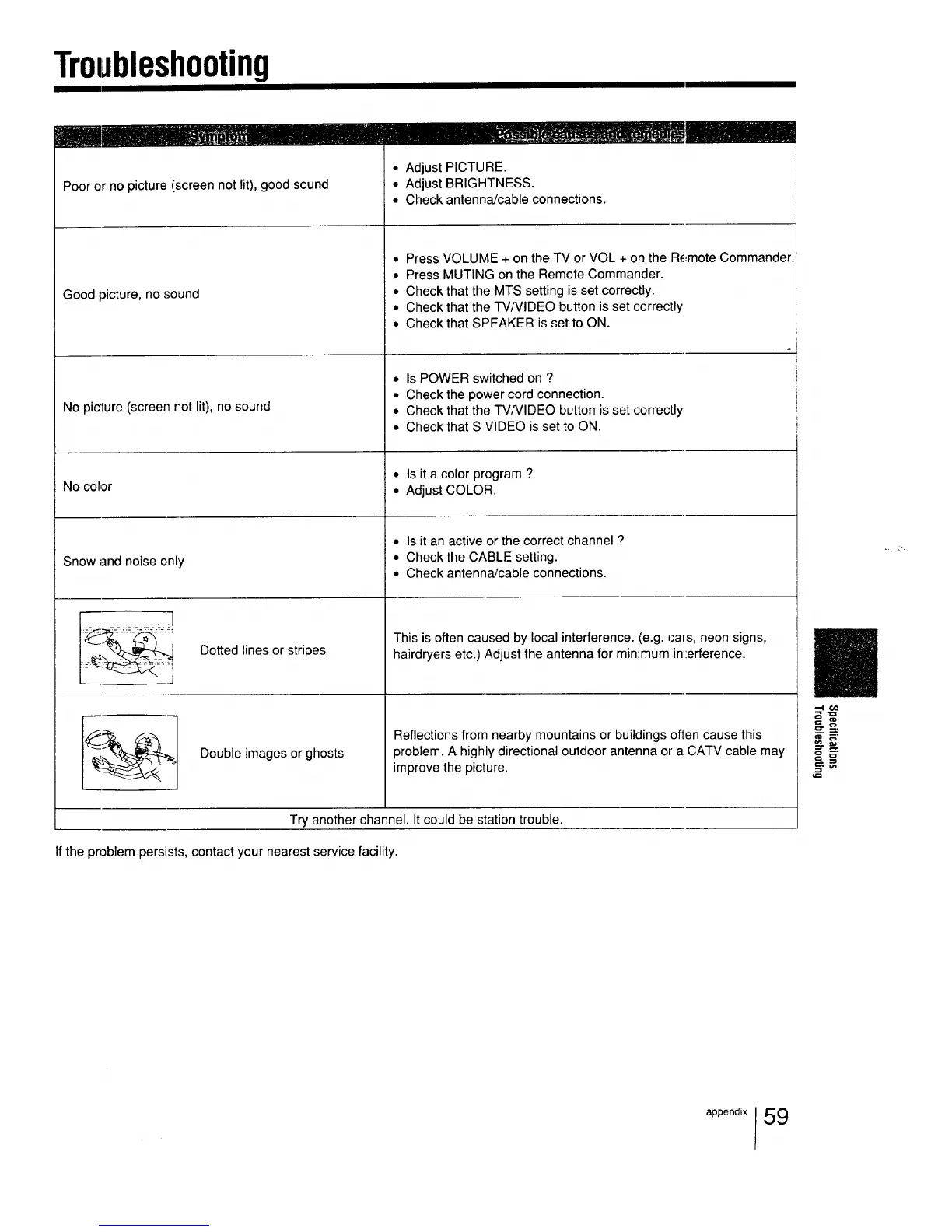
Poor or no picture (screen not lit), good sound
Good picture, no sound
No picture (screen not lit), no sound
• Adjust PICTURE.
• Adjust BRIGHTNESS.
• Check antenna/cable connections.
• Press VOLUME + on the TV or VOL + on the Remote Commander.
• Press MUTING on the Remote Commander.
• Check that the MTS setting is set correctly.
• Check that the TV/VIDEO button is set correctly
• Check that SPEAKER is set to ON.
• Is POWER switched on ?
• Check the power cord connection.
• Check that the TV/VIDEO button is set correctly
No color
Snow and noise only
• Check that S VIDEO is set to ON.
• Is it a color program ?
• Adjust COLOR.
• Is it an active or the correct channel ?
• Check the CABLE setting.
• Check antenna/cable connections.
Dotted lines or stripes
Double images or ghosts
This is often caused by local interference. (e.g. cats, neon signs,
hairdryers etc.) Adjust the antenna for minimum in':erference.
Reflections from nearby mountains or buildings often cause this
problem. A highly directional outdoor antenna of" a CATV cable may
improve the picture.
Try another channel. It could be station trouble.
If the problem persists, contact your nearest service facility.
.-IC_
appeo ix59






 To Next Page