MUTING(_ (_SLEEP
W/VIDEO T V CABLEPOWER
DISPLAY
VOL CH
CODESET CABLEBOX'W
4<1 I=,,- IH=,,
C_ CZ_ _
REC• TVNTR
RM-Y118
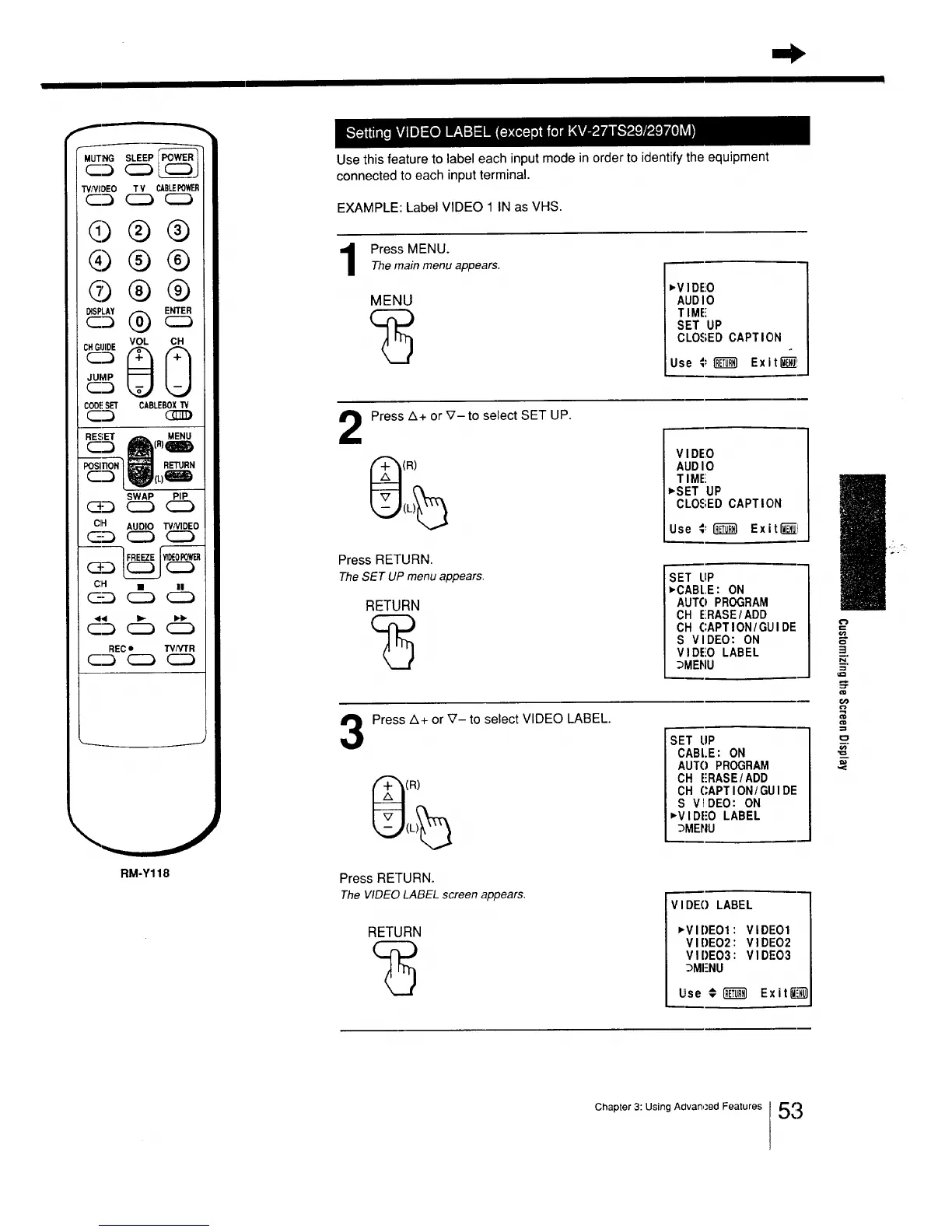
Use this feature to label each input mode in order to identify the equipment
connected to each input terminal.
EXAMPLE: Label VIDEO 1 IN as VHS.
Press MENU.
Themain menu appears.
MENU
='V IDEO
AUD I0
T IME
SET UP
CLO.£ED CAPTION
Use ;" _ Exit_
2
Press Z_+or V-to select SET UP.
(R)
Press RETURN.
TheSET UP menu appears.
RETURN
V IDE:O
AUD I0
T IME!
vSET UP
CLOSED CAPTION
Use €; _ ExitUEI_I
SET LiP
_-CABI..E: ON
AUTO PROGRAM
CH ERASE/ADD
CH CAPTION/GLII DE
S VI DEO: ON
V I DEO LABEL
_IMENU
Press A+ or _'- to select VIDEO LABEL.
(R)
Press RETURN.
The VIDEOLABEL screen appears.
RETURN
"_T tiP
CABLE: ON
AUTO PROGRAM
CH ERASE/ADD
CH (;APTION/ GUI DE
S VIDEO: ON
_'VIDI'O LABEL
_MENU
V I DE() LABEL
_'VIDEOI: VIDE-O1
VIDEO2:VIDEO2
VI I)EO3: VI DEO3
_MENU
Use # _ Exit_
m,
N
==
co
€o
€=
Chapter 3: Using Advan,;ed Features 5_






 To Next Page