Usingthe Timer-ActivatedFunctions
MUTING(_ _._..)SLEEP
TVHIDEO T V CABLEPOWER
®®®
Q®®
Q®®
voL. 0
COOES_ CABLEBOXW
RESET _ MENU
_ "El'URN
SWAP PIP
CH AUDIO "IV/VIDEO
CH • II
<HI In,,-
REC • "rv/vr R
RM-Y118
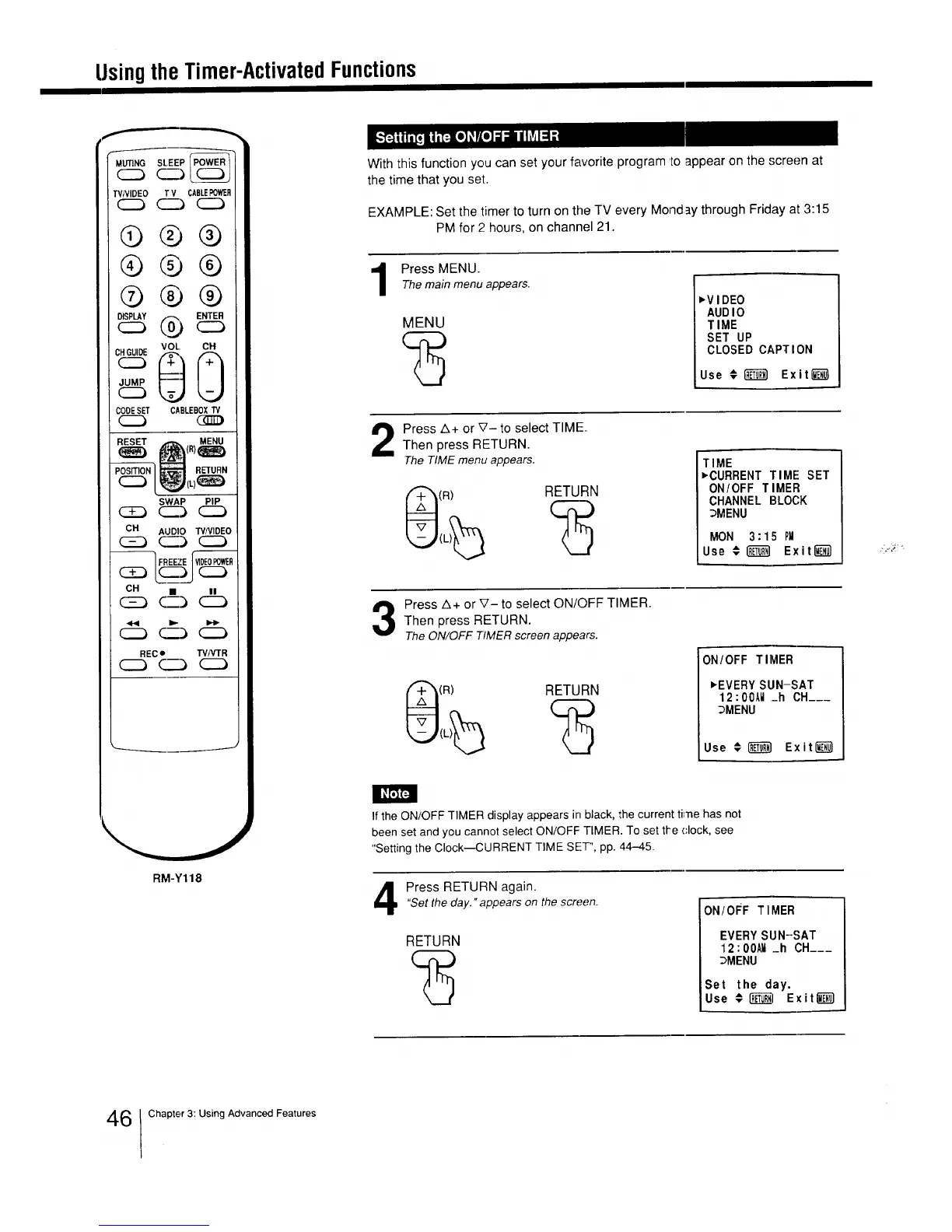
With this function you can set your favorite program to appear on the screen at
the time that you set.
EXAMPLE: Set the timer to turn on the TV every Monday through Friday at 3:15
PM for 2 hours, on channel 21.
Press MENU.Themain menu appears.
MENU
_VIDEO
AUDIO
TIME
SET UP
CLOSED CAPTION
Use # _ Exitli_
Press A+ or V- to select TIME.
Then press RETURN.
The TIMEmenu appears.
(R) RETURN
TIME
_CURRENT TIME SET
ON/OFF TIMER
CHANNEL BLOCK
_MENU
MON 3:1;5 PM
Use € _ Exiting)
Press A+ or V- to select ON/OFF TIMER.
Then press RETURN.
TheON/OFF TIMERscreen appears.
(R) RETURN
ON/OFF TIMER
_EVERY SUN-SAT
12:00AU._h CH___
_MENU
Use # _ Exit_
If the ON/OFF TIMER display appears in black, the current ti'ne has not
been set and you cannot select ON/OFF TIMER. To set tt'e dock, see
"Setting the Clock--CURRENT TIME SET", pp. 44-45.
Press RETURN again."Setthe day." appears on the screen.
RETURN
ON/OFF TIMER
EVERY SUN-SAT
12 : OOAII_h CH___
3MENU
Set the day.
Use _ R_['_I Exit l_
6 Chapter 3: Using Advanced Features






 To Next Page