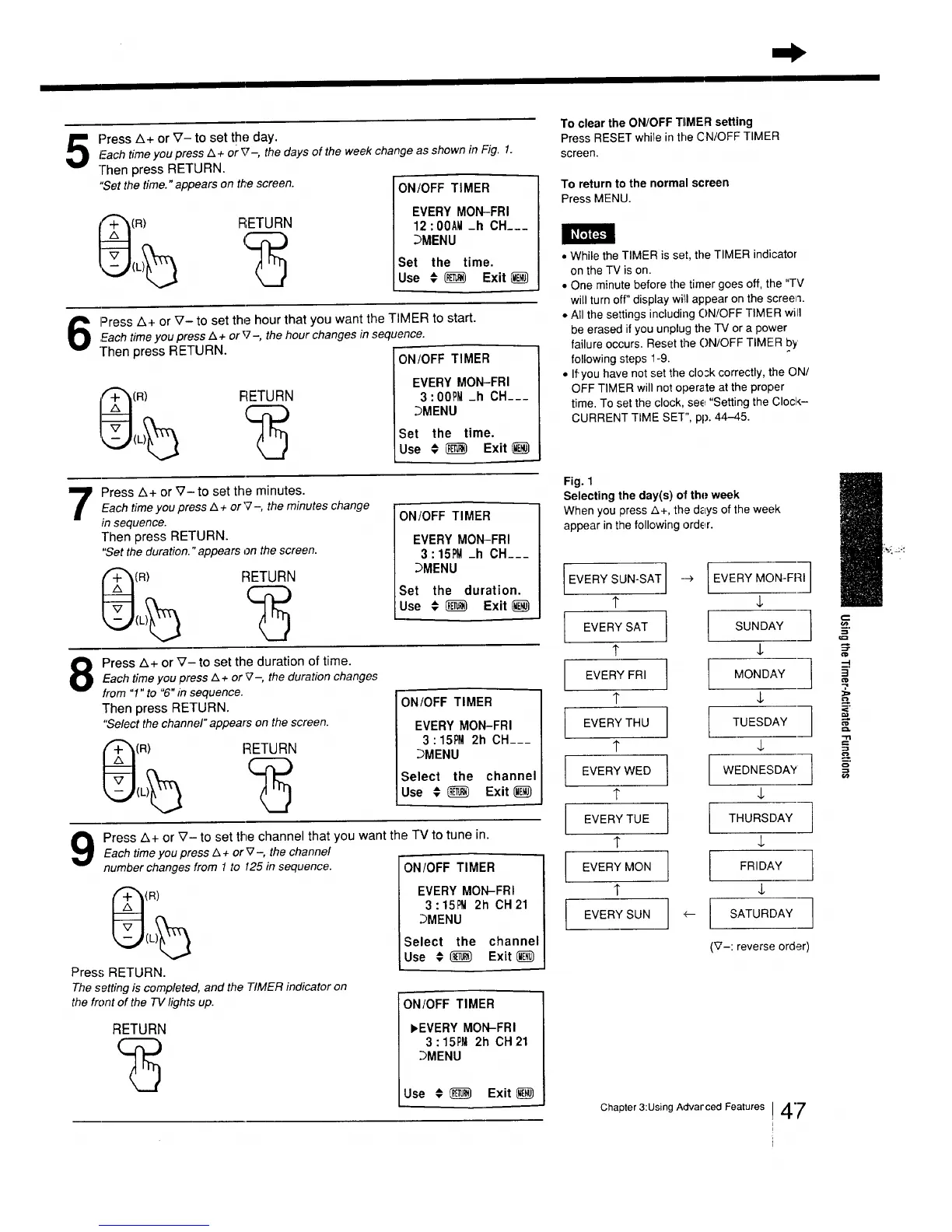
Press A+ or _- to set the day.Fach timeyou press A + or _z-, the days of the week change as shown in Fig. 1.
-lhen press RETURN.
"Setthe time." appears on the screen.
(R)
RETURN
ON/OFF TIMER
EVERY MON-FRI
12 :OOAM-h OH___
.bMENU
Set the time.
Use € _ Exit
Press A+ or V- to set the hour that you want the TIMER to start.
,Eachtime you press Z_+ or_7-, the hour changes in sequence.
]-hen press RETURN.
FiETURN
ON/OFF TIMER
EVERY MON-FRI
3:00PM _h CH___
_MENU
Set the time.
Use € _ Exit
7
Press A+ or V-to set the minutes.
Each time you press & + or'7-, the minutes change
in sequence.
Then press RETURN.
"Set the duration. "appears on the screen.
(R) RETURN
ON/OFF TIMER
EVERY MON-FRI
3 : 151_ _h CH___
_MENU
Set the duration.
Use € _) Exit
Press A+ or V- to set the duration of time.
Each time you press Z_+ or _-, the duration changes
from "1" to "6" in sequence.
Then press RETURN.
"Select the channel" appears on the screen.
1R) RETURN
ON/OFF TIMER
EVERY MON-FRI
3 : 15PM2h CH___
_MENU
Select the channel
Use €_ Exit_J)
Each time you press Z&+ or V-, the channel
number changes from 1 to 125 in sequence.
Press z_+ or _7- to set the channel that you want the TV to tune in.
(R)
Press RETURN.
The setting is completed, and the TIMER indicator on
the front of the TV lights up.
RETURN
ON/OFF TIMER
EVERY MON-FRI
3:15_ 2h CH21
3MENU
Select the channel
Use # _ Exit
ON/OFF TIMER
_EVERY MON-FRI
3 : 15P_12h CH 21
_MENU
Use # _ Exit
To clear the ON/OFF TIMER setting
Press RESET while in the CN/OFF TIMER
screen.
To returnto the normal screen
Press MENU.
• While the TIMER is set, the TIMER indicator
on the TV is on.
• One minute before the timer goes off, the "TV
will turn off" display will appear on the screen.
• All the settings including ON/OFF TIMER will
be erased if you unplug the IV or a power
failure occurs. Reset the ON/OFF TIMER by'
following steps 1-9.
• If you have not set the closk correctly, the ON/
OFF TIMER will not operate at the proper
time. To set the clock, see "Setting the ClocI,_-
CURRENT TIME SET", pp. 44-45.
Fig. 1
Selecting the day(s) of the week
When you press A+, the days of the week
appear in the following order.
EVERY SUN-SAT]
t
EVERY SAT
t
EVERY FRI
1"
EVERY THU
1"
I EVERY WED
?
EVERY TUE
1"
I EVERY MON
"r
EVERY SUN I
--> I EVERY MON-FRI]
4,
SUNDAY ] ==_=--
MONDAY _"
'7,
] -
TUESDAY
WEDNESDAY
4,
THURSDAY
4,
I FRIDAY
4,
'_ I SATURDAY
(_7-: reverse order)
Chapter 3:Using Advarced Features 47






 To Next Page