UsingtheOn-ScreenMenus
I -vOluI,,z+ -_, °P°wl_ o_n_zo ]
f
MUTING_ c_)SLEEP
W/VIDEO T V CABLEPOWER
Q®®
Q®®
®®®
®ES
vl ,
CODESET CABLEBOXTV
SWAP PIP
_ C22) (Z_
CH AUDIO W/VIDEO
(Z2) C3 _
CH • II
REC • TV/VTR
__________----_
RM-Y118
To return to the normal screen
Press MENU
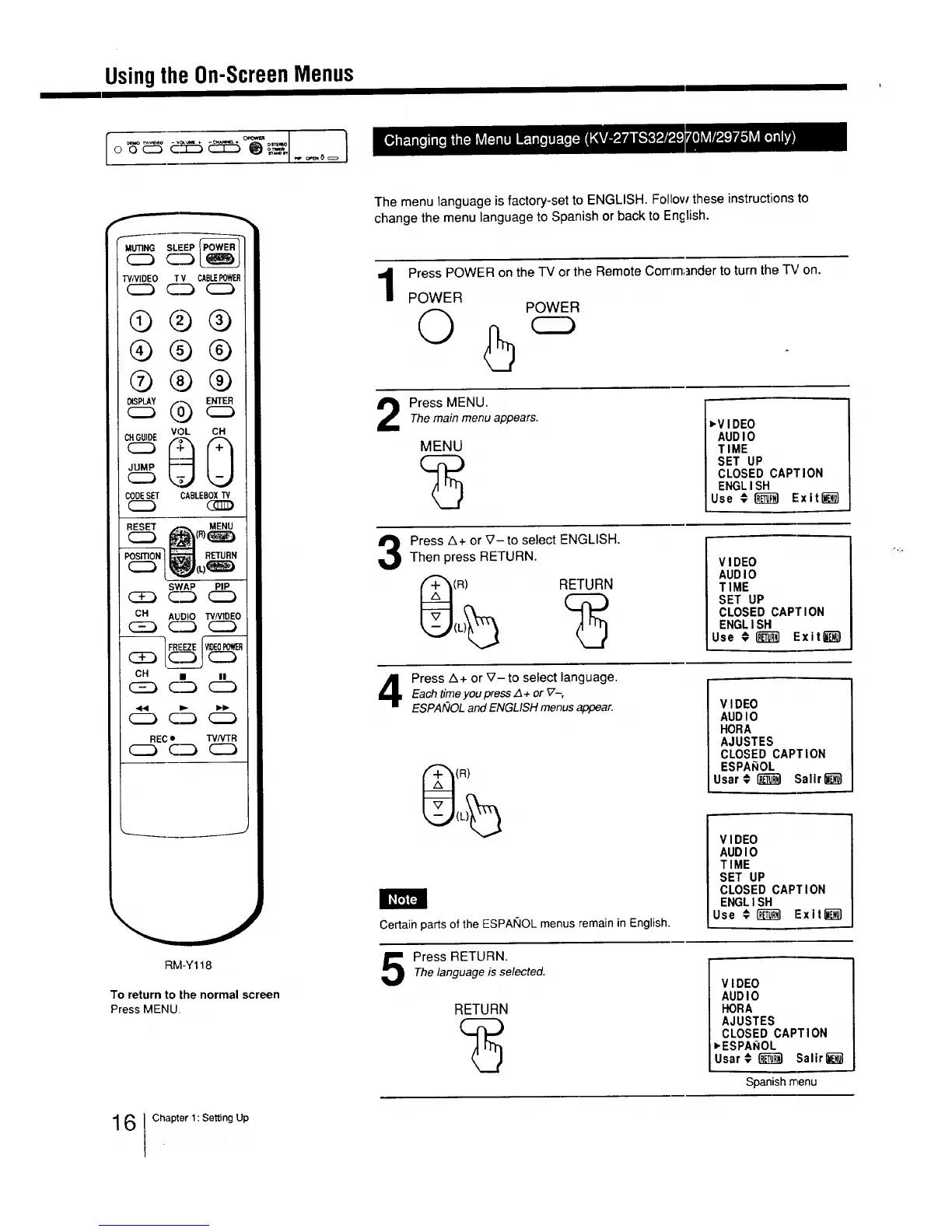
The menu language is factory-set to ENGLISH. Follow these instructions to
change the menu language to Spanish or back to En£1ish.
1
Press POWER on the TV or the Remote Cornm;]nder to turn the TV on.
POWER
©
POWER
2
Press MENU.
The main menu appears.
MENU
_V IDEO
AUD I0
TIME
SET UP
CLOSED CAPTION
ENGL ISH
Use € _ Exit_}
Press A+ or _7- to select ENGLISH.
Then press RETURN.
RETURN
V IDEO
AUD IO
TIME
SET UP
CLOSED CAPTION
ENGL I SH
Use # _ Exit1_)
Press A+ or _7-to select language.
Each time you press z_+ or V.-,
ESPAfilOL and ENGLISH menus ,_pear.
(R)
Certain parts of the ESPANOL menus remain in English.
VIDEO
AUDIO
HORA
AJUSTES
CLOSED CAPTION
ESPAROL
Usar#_ Salir_
VIDEO
AUDIO
TIME
SET UP
CLOSED CAPTION
ENGLISH
Use € RI'_-_ Exit_
Press RETURN.Thelanguage is selected.
RETURN
VIDEO
AUDIO
FLORA
AJUSTES
CLOSED CAPTION
_ESPAROL
Usar¢_-]J._ :Salir_T_l
Spanish menu
6 Chapter 1: Setting Up






 To Next Page