AdjustingPictureandSoundQuality
f
-MUTING SLEEP
W/VIDEO T V CABLEPOWER
G®®
Q®®
®®®
VOL CH
CODESET CABLEBOX"iV
RESET _ MENU
_ RETURN
SWAP PIP
CH AUDIO TV/VIDEO
C2_ __.3 C2_
CH • II
REC • TV/VTR
____JJ
RM-Y118
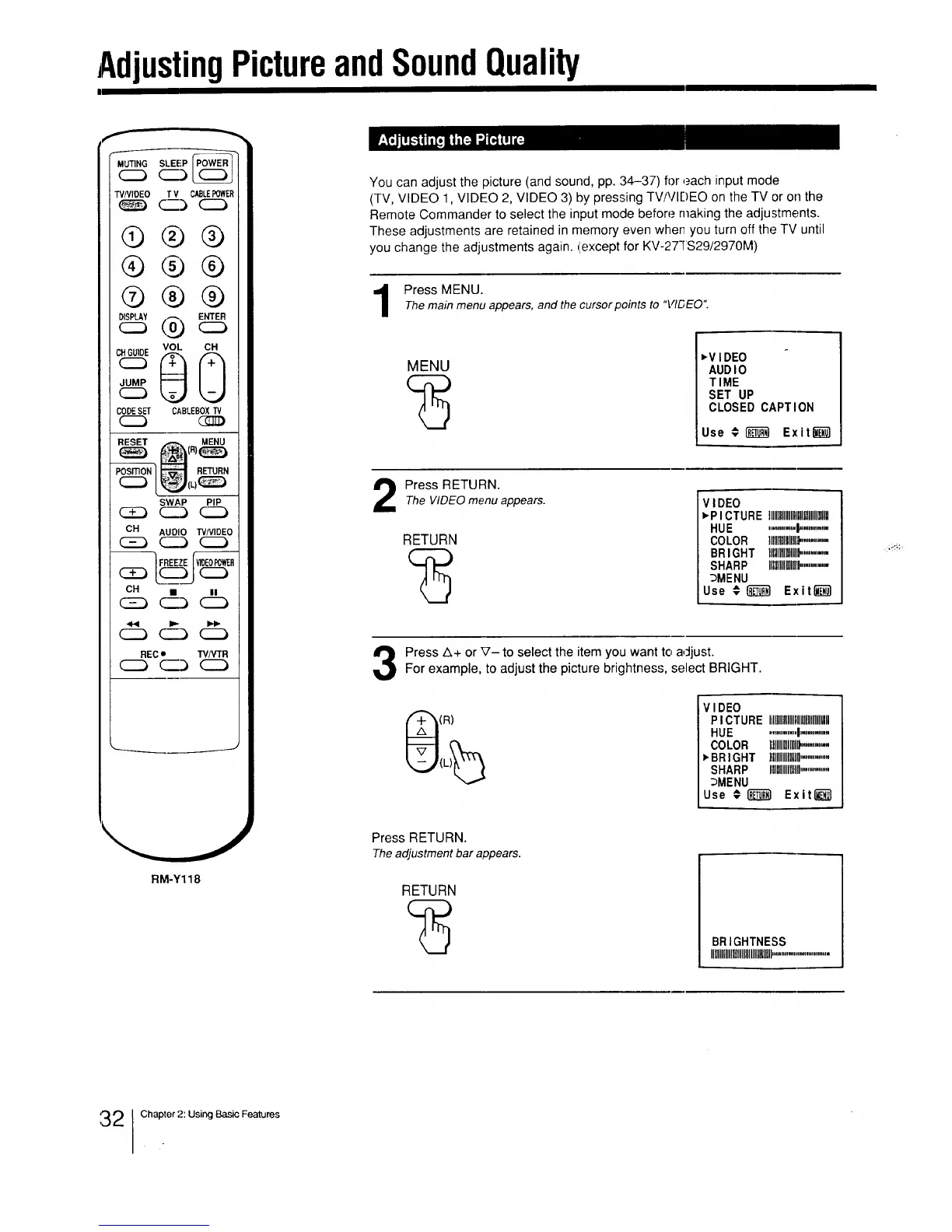
You can adjust the picture (and sound, pp. 34-37) for each input mode
(TV, VIDEO 1, VIDEO 2, VIDEO 3) by pressing TV/VIDEO on the TV or on the
Remote Commander to select the input mode before making the adjustments.
These adjustments are retained in memory even when you turn off the TV until
you change the adjustments again. (except for KV-27TS29/2970M)
Press MENU.Themain menu appears, and the cursorpoints to "VIDEO".
MENU
,VIDEO
AUDIO
TIME
SET UP
CLOSED CAPTION
Use €1__1 Exit_
2
Press RETURN.
The VIDEOmenu appears.
RETURN
VIDEO
,P ICTURE IIIIl]lllllllllllllllllllllllllH
HUE ............._...........
COLOR tlHIIIIIIIIIIII_.........
BRIGHT IIItllllllllllll_......... :'_;_
SHARP IltlllUIIIIIgll.............
_MENU
Use #_} Exit_
Press A+ or V- to select the item you want to adjust.For example, to adjust the picture brightness, select BRIGHT.
(R)
VIDEO
P ICTURE Illll]lIKIIIIlllHIHIII
HUE ............I...........
COLOR lilllllllllllll).........
_BRIGHT I!llgllllllllln.............
SHARP Illllllllllllllll...............
_MENU
Use € _ Exit_
Press RETURN.
Theadjustment bar appears.
RETURN
BRIGHTNESS
IIIIIIIIIHIIIIlUlIIIIIIIIIII' '
i mm_ul immmllmlN
32 Chapter 2: Using Basic Features






 To Next Page