TurningtheCableModeOnorOff
All of the controls are on _#eRemote
Commar_ler.
MUTING(_t (_SLEEP _@___
1NNIDFO T V CABLEPOWER
C, ® @
Q ® @
(_DISPLAY @ c_ENTER
VOL CH
(_':HGUIDE 88_;
CODESET CABLEBOXTV
RESET _ MENU
_-'_0-_ _ RETURN
CH AUDIO WNIDEO
CZ) C_ CZ_
CH • II
CZ) (ZZ) c._.;)
[_FIFJ
<1-<1 b.- I_-
REC • TV/VrR
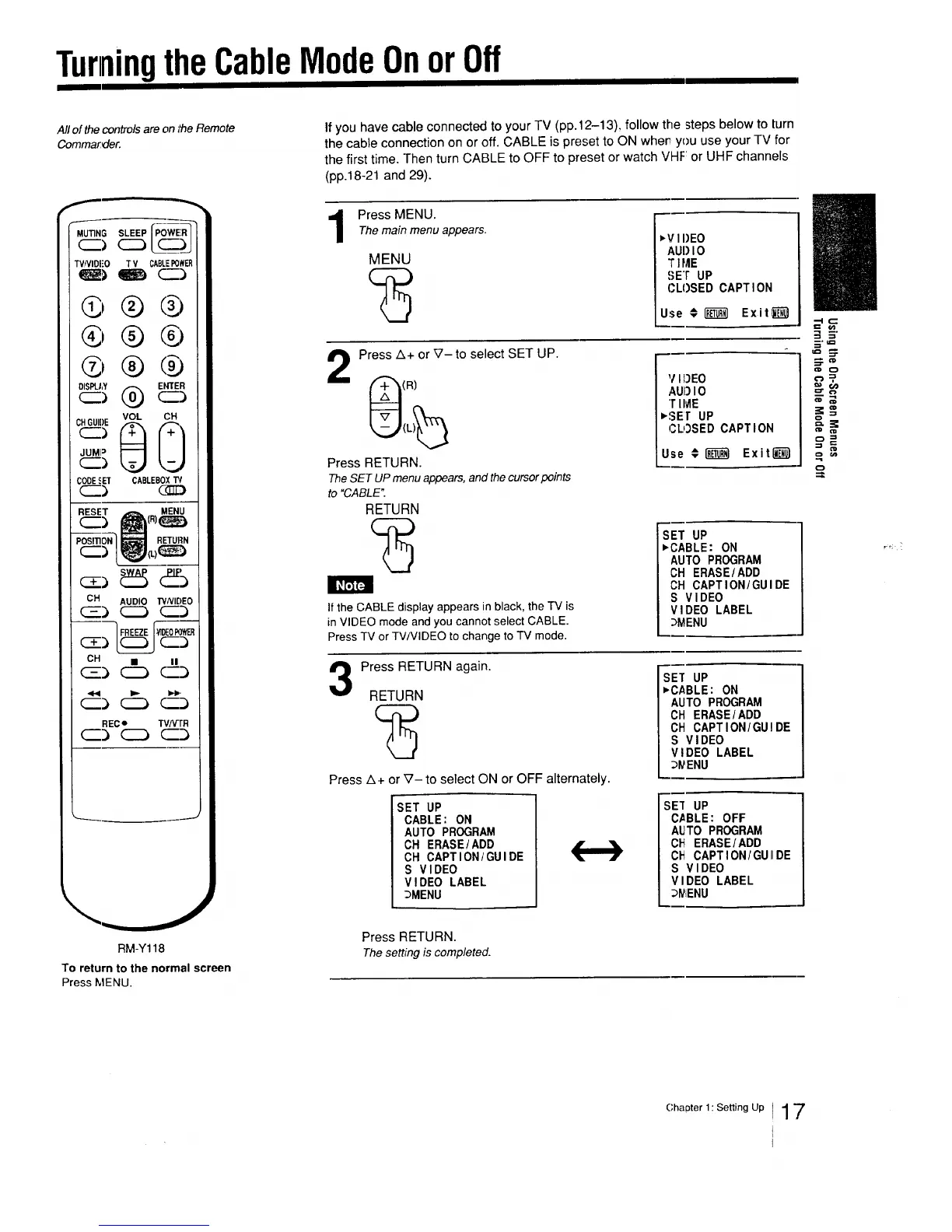
If you have cable connected to your TV (pp.12-13), follow the steps below to turn
the cable connection on or off. CABLE is preset to ON when you use your TV for
the first time. Then turn CABLE to OFF to preset or watch VHF: or UHF channels
(pp.18-21 and 29).
Press MENU.The main menu appears.
MENU
,v I I)EO
AUI)IO
T ]ME
SET UP
CLOSED CAPTION
Use € _ Exitl_-'_
Press A+ or V- to select SET UP.
(R)
Press FIETURN.
TheSET UPmenuappears,and thecursorpoints
to "CABLE".
RETURN
]f the CABLE display appears in black, the TV is
in VIDEO mode and you cannot select CABLE.
Press TV or TV/VIDEO to change to TV mode.
V I})EO
AUI)I O
T IME
,SEt UP
CLOSED CAPTI ON
Use # _ Exit_}_)
SET UP
,CABLE: ON
AUTO PROGRAM
CH ERASE/ADD
CH CAPTION/GUIDE
S VIDEO
VIDEO LABEL
DMENU
3
Press RETURN again.
RETURN
Press z3+ or V- to select ON or OFF alternately.
SET UP
CABLE: ON
AUTO PROGRAM
CH ERASE/ADD
CH CAPTION/GUIDE
S VIDEO
VIDEO LABEL
_MENU
SET UP
,CABLE: ON
AUTO PROGRAM
CH ERASE/ADD
OH CAPTION/GUIDE
S VIDEO
VIDEO LABEL
D_ENU
s_ uP
CABLE: OFF
AUTO PROGRAM
C_ ERASEIADD
C_ CAPTION/GUIIDE
S VIDEO
VIDEO LABEL
D_iENU
=3
RM-Y118
To return to the normal screen
Press MENU.
Press RETURN.
Thesetting is completed.
Chapter I:SettingUp 17



 To Next Page