ConnectingOtherEquipment
f
WN]DEO T V CABLEPOWER
®®®
®®®
VOL CH
CODESET CABLEBOXTV
RESET _ MENU
_ RETURN
SWAP PIP
CH AUDIO W/VIDEO
(2_ C_ C2)
CH II II
C_Z) CZ) CZ)
REC • TVNTR
CD C_D CD
___jJ
RM-Y118
To return to the normal screen
Press MENU.
If you set S VIDEO to ON, the TV
automatically receives S video signals
whenever a VCR with S video is connected.
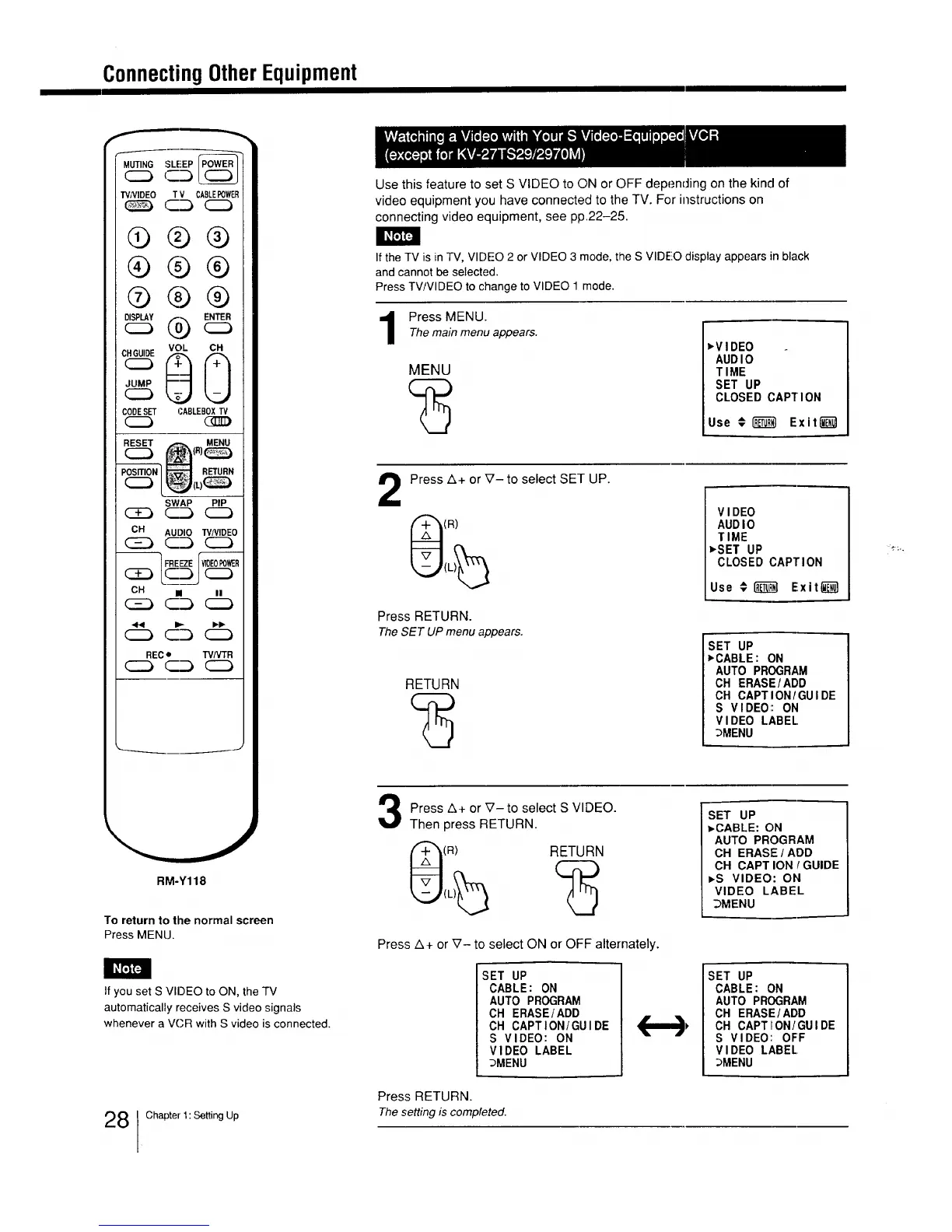
Use this feature to set S VIDEO to ON or OFF depending on the kind of
video equipment you have connected to the TV. For instructions on
connecting video equipment, see pp.22-25.
If the TV is in TV, VIDEO 2 or VIDEO 3 mode, the S VIDEO display appears in black
and cannot be selected.
Press TV/VIDEO to change to VIDEO 1 mode.
Press MENU.
Themain menu appears.
MENU
vV I DEO
AUDI0
TIME
SET UP
CLOSED CAPTION
Use € REI'__Exit_
2
Press z&+ or _7- to select SET UP.
(R)
Press RETURN.
TheSET UP menu appears.
RETURN
VIDEO
AUDIO
TIME
_SET UP
CLOSED CAPTION
Use € _ Exitii_l
SET UP
_CABLE: ON
AUTO PROGRAM
CH ERASE/ADD
CH CAPTION/GUIDE
S VIDEO: ON
VIDEO LABEL
_MENU
Press A+ or V-to select S VIDEO.
Then press RETURN.
(R) RETURN
Press A+ or V- to select ON or OFF alternately.
SET UP
CABLE: ON
AUTO PROGRAM
CH ERASE/ADD
CH CAPTION/GUIDE
S VIDEO: ON
VIDEO LABEL
_MENU
SET UP
=.CABLE: ON
AUTO PROGRAM
CH ERASE / ADD
CH CAPT ION ! GUIDE
_,S VIDEO: ON
VIDEO LABEL
_MENU
SET UP
CABLE: ON
AUTO PROGRAM
CH ERASE/ADD
CH CAPTION/GUIDE
S VIDEO: OFF
VIDEO LABEL
_MENU
Press RETURN.
28 Chapter 1:SettingUp The setting is completed.






 To Next Page