UsingClosedCaption
MUTING SLEEP
"rVNICEO T V CABLEPOWER
DISPt.AY ENTER
VOL CH
JUMP
CD
CODESET CAgLEBOX 1"V
SWAP PiP
_Z) CD C__
CH AUDIO W/VIDEO
CH • II
_-_ CZ_ C_
REC • TVP/TR
CZ) _ C.C_
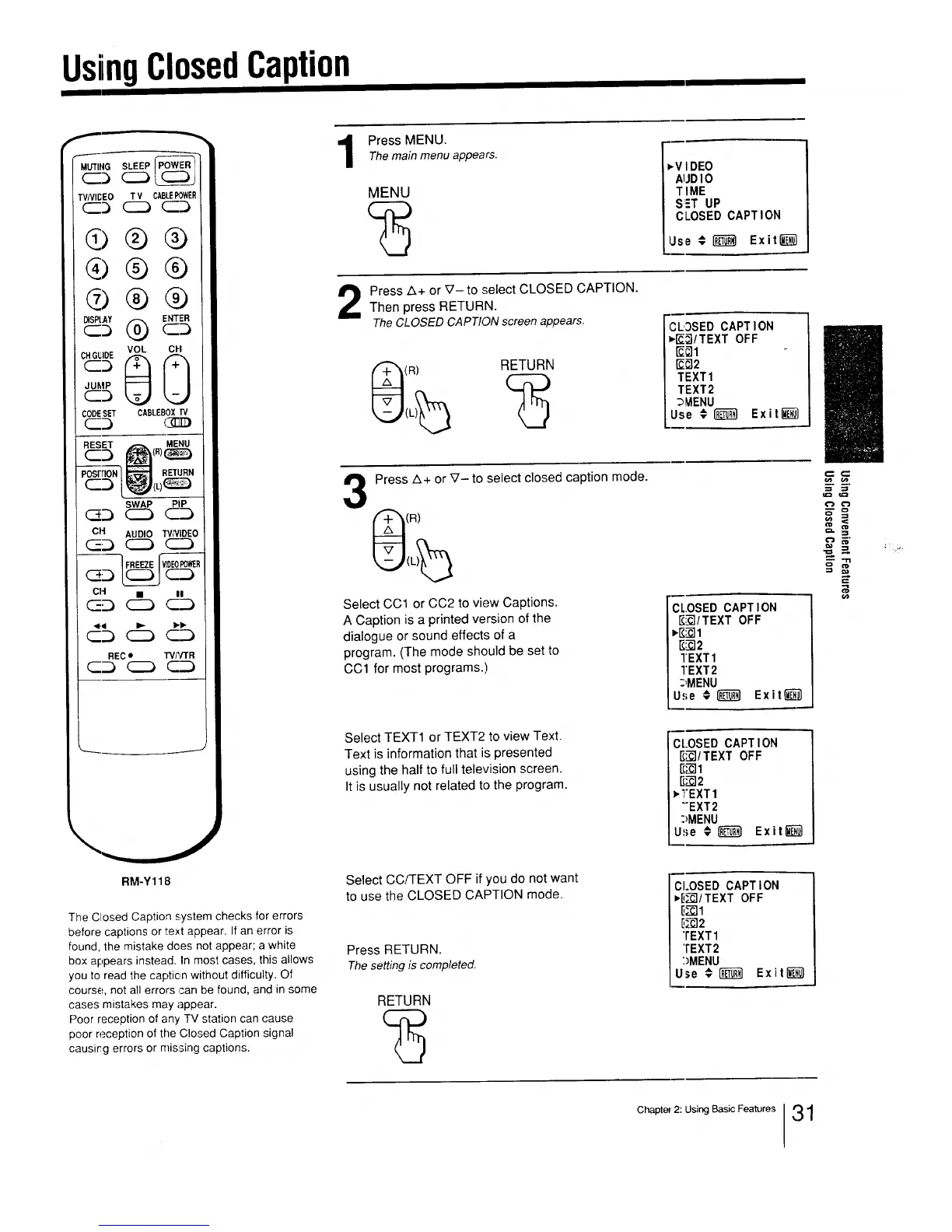
Press MENU.Themain menu appears.
MENU
D,VI DEO
AIJDI O
TIME
SET UP
CLOSED CAPT ION
Use # _ Exit_
i
Press A+ or V- to select CLOSED CAPTION,
Then press RETURN.
TheCLOSED CAPTION screen appears.
(R)
RETURN
CLOSED CAPTION
_/TEXT OFF
_1
_2
TEXT1
TEXT2
_MENU
Use #(_} Exit_)
L_
3
Press A+ or V- to select closed caption mode.
(R)
Select CC1 or CC2 to view Captions.
A Caption is a printed version of the
dialogue or sound effects of a
program. (The mode should be set to
CC1 for most programs.)
!CL.OSEDCAPTION
_/TEXT OFF
_1
g_2
TEXT1
I"EXT2
_,MENU
Use #I'__;I Exit_
Select TEXT1 or TEXT2 to view Text.
Text is information that is presented
using the half to full television screen.
It is usually not related to the program.
CLOSED CAPTION
_/TEXT OFF
E_I
_2
vTEXT1
"'EXT2
:>MENU
Use # I'_ Exit_}
1
RM-Y118
The Closed Caption system checks for errors
before captions or text appear. If an error is
found, the mistake does not appear; a white
box appears instead. In most cases, this allows
you to read the caption without difficulty. Of
course, net all errors ,san be found, and in some
cases mistakes may appear.
Poor reception of any TV station can cause
poor reception of the Closed Caption signal
causing errors or missing captions.
Select CC/TEXT OFF if you do not want
to use the CLOSED CAPTION mode.
Press RETURN.
Thesetting is completed.
RETURN
CLOSED CAPT ION
=,D-_I/TEXTOFF
D--_I
_2
'rEXT1
'tEXT2
:)MENU
Use € _ Exit_
Chapter 2" U#ng Basic Features 31




 To Next Page