UsingtheTimer-ActivatedFunctions
f
MUTING_ (_)SLEEP
TVNIDEO T V CABLEPOWER
(b®®
®®®
VOL OH
CODESET CABLEBOX"IV
SWAP PIP
C_C) _ CC3
CH AUDIO WHIDEO
_c) _ cc3
OH • II
REC • TvN'rR
CC3 C___ CD
RM-Y118
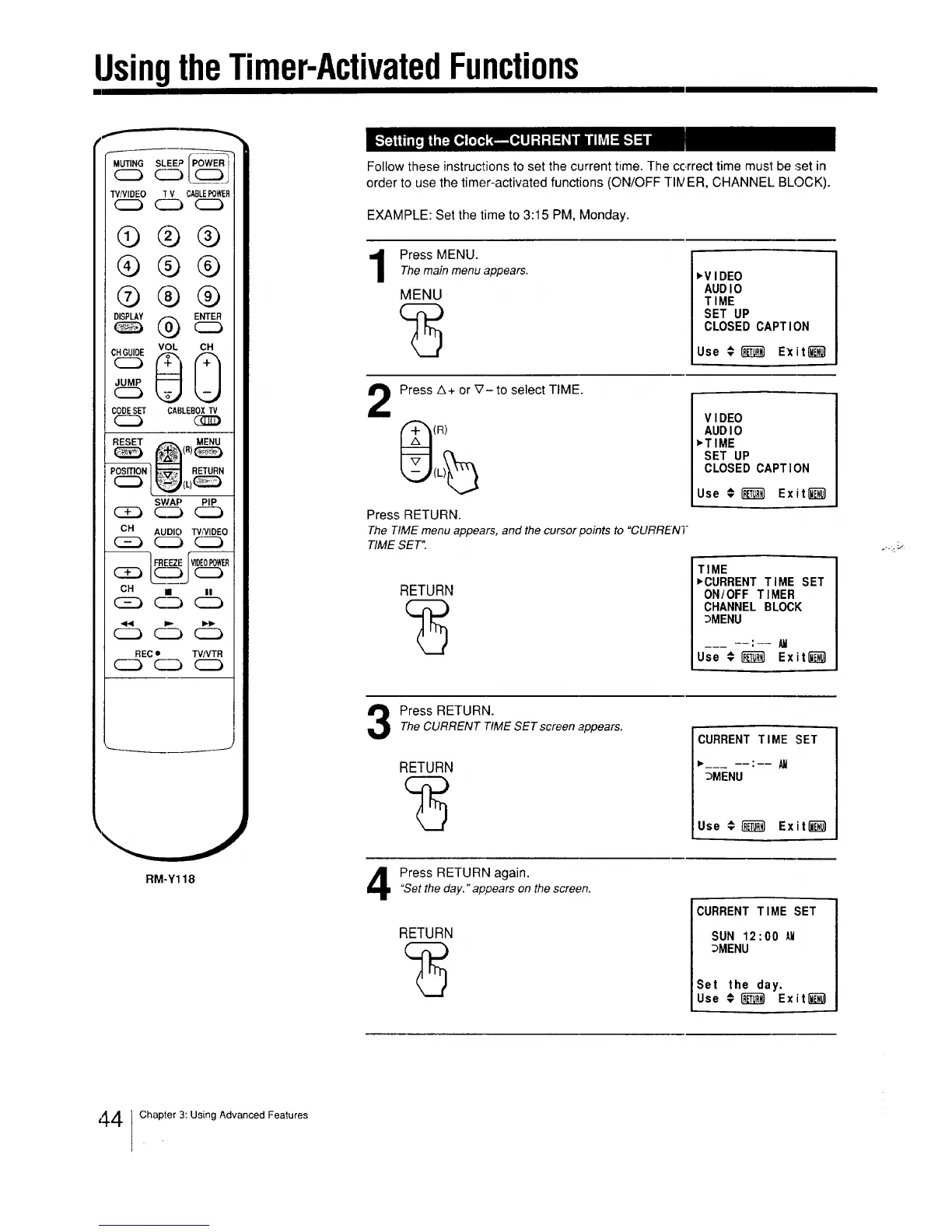
Follow these instructions to set the current time. The correct time must be set in
order to use the timer-activated functions (ON/OFF -HIVER, CHANNEl. BLOCK).
EXAMPLE: Set the time to 3:15 PM, Monday.
1
Press MENU.
Themain menuappears.
MENU
,VIDEO
AUDIO
TIME
SET UP
CLOSED CAPTION
Use € _ E_it_
2
Press A+ or _'- to select TIME.
(R)
Press RETURN.
The TIME menu appears, and the cursor points to "CURRENT
TIME SET".
RETURN
VIDEO
AUDIO
,TIME
SET UP
CLOSED CAPTION
Use € _ Exiti__
TIME
,CURRENT TIME SET
ON/OFF TIMER
CHANNEL BLOCK
3MENU
:
Use # _ Exit""""""""""_
Press RETURN.TheCURRENT TIMESET screen appears.
RETURN
CURRENT TIME SET
,___ : All
_MENU
Use €_ Exit l__l
Press RETURN again."Setthe day." appears on the screen.
RETURN
CURRENT TIME SET
SUN 12:00 AM
3MENU
Set the day.
Use #1"__1 Exit_
,+41Chapter 3: Using Advanced Features






 To Next Page