f
MUT_NGc__SLEEP ___
TVNK)EO T V CABLEPOWER
DISPLAY
VOL CH
;HGUIDE00C_C_JUMP
COOESET CABLEBOXTV
CD _
t
OH AUDIO W/VIDEO
------/FREEZE
Cl-I • II
_-D <_ C..._
CZ) CZ) _
REC • TV/V'rR
CZ) C_ _
RM-Y118
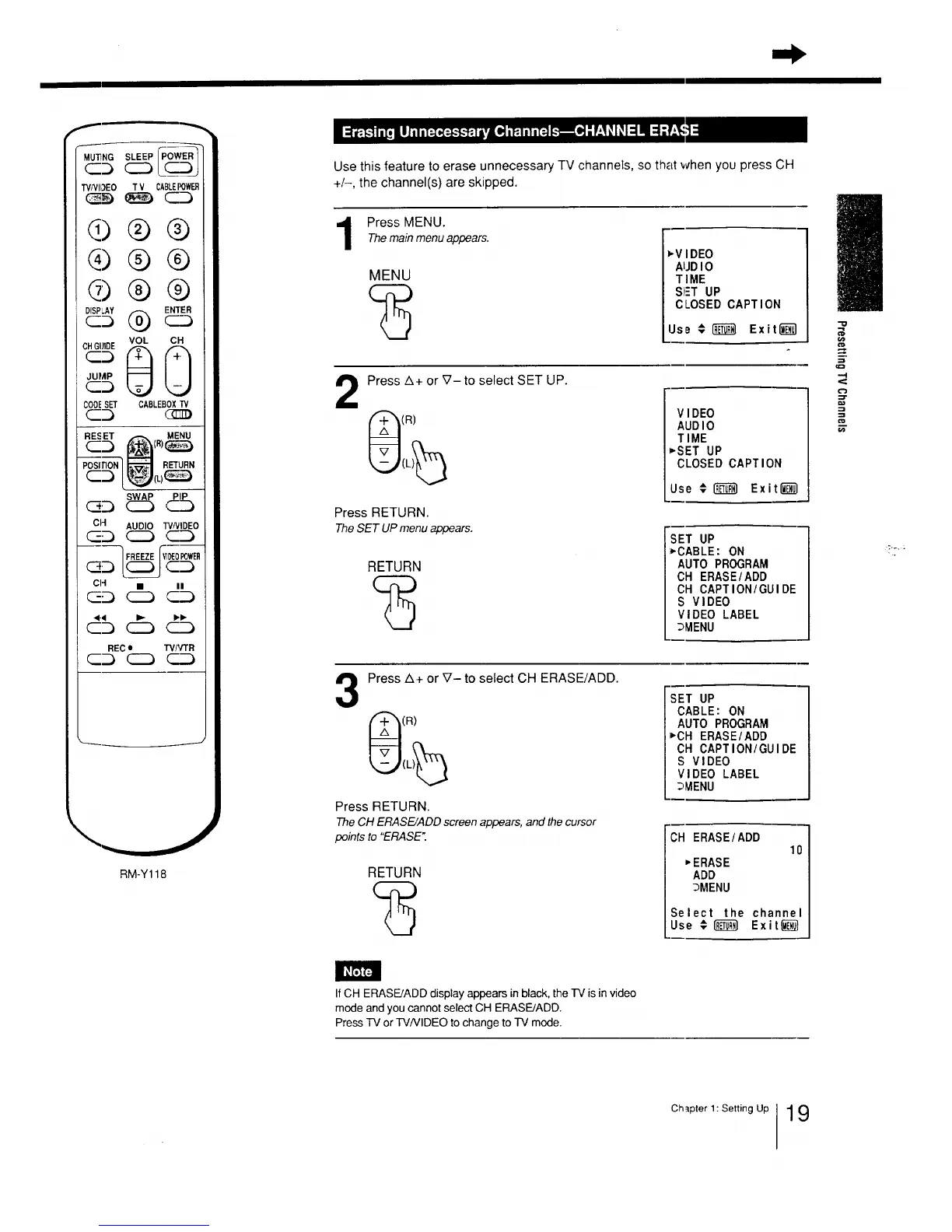
Use this feature to erase unnecessary TV channels, so that when you press CH
+/-, the channel(s) are skipped.
Press MENU.Themainmenuappears.
MENU
vVIDEO
AUDIO
TIME
S!_T UP
CLOSED CAPTION
IJse € _ Exited]
2
Press A+ or _7- to select SET UP.
(R)
Press RETURN.
TheSET UPmenuappears.
RETURN
V I DEO
AUDI0
TIME
*'SET UP
CLOSED CAPTION
Use # _ Exit_l
.m
SET UP
*CABLE: ON
AUTO PROGRAM
CH ERASE/ADD
CH CAPTION/GUIDE
S VIDEO
VIDEO LABEL
_MENU
3
Press Zl+ or V- to select CH ERASE/ADD.
(R)
Press RETURN.
The CH ERASE/ADD screen appears, and the cursor
points to "ERASE".
RETURN
SET UP
CABLE: ON
AUTO PROGRAM
*CH ERASE/ADD
CH CAPTION/GUIDE
S VIDEO
VIDEO LABEL
_MENU
"CH ERASE/ADD
10
_ERASE
ADD
3MENU
Select the channel
Use €1_ Exit_
!/
-o
-.I
c'J
o0
IfCH ERASE/ADD display appears in black, the IV is in video
mode and you cannot select CH ERASE/ADD.
Press TV or W/VIDEO to change to TV mode.
Chapter 1: Setting Up 19






 To Next Page