4
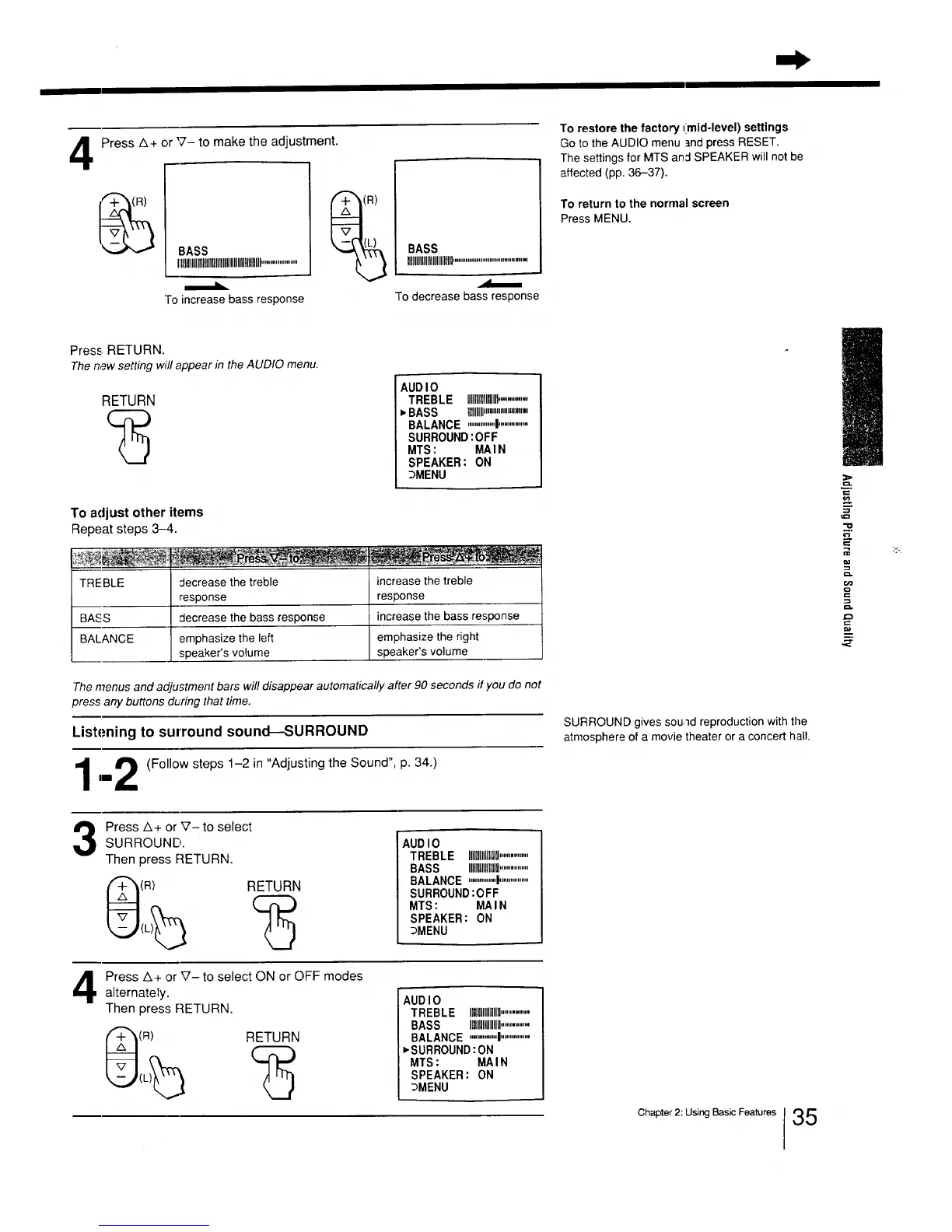
Press A+ or '7- to make the adjustment.
BASS
Illllllllllllllllllltlllllllllllllllltllllllll....................
To increase bass response
(R)
BASS
IIIIIIlllllltllllllllllll.........................................
To decrease bass response
To restore the factory (mid-level) settings
Go to the AUDIO menu and press RESET.
The settings for MTS and SPEAKER will not be
affected (pp. 36-37).
To return to the normal screen
Press MENU.
Press, RETURN.
Thenew setting will appear in theAUDIO menu.
RETURN
AUDIO 1
TREBLE IIIIllll]llllllfl..............
,BASS Hill,,,",""""
BALANCE ..............._..............
SURROUND:OFF
MTS: MAIN
SPEAKER: ON
_MENU
TREBLE
To adjust other items
Repeat steps 3-4.
decrease the treble
response
BASS decrease the bass response
BALANCE emphasize the left
speaker's volume
increase the treble
response
increase the bass response
emphasize the right
speaker's volume
The menus and adjustment bars will disappear automatically after 90 seconds if you do not
press any buttons during that time.
Listening to surround sound---SURROUND
,,4 _ (Follow steps 1-2 in "Adjusting the Sound", p. 34.)
I
im
t
Press A+ or V- to select
SURROUND gives sound reproduction with the
atmosphere of a movie theater or a concert hall.
o'}
5"
_°
t_
==.
3
SURROUND.
Then press RETURN.
(R)
RETURN
AUDIO
TREBLE IHIlUllllll...............
BASS IHIIIIH ...............
BALANCE ..............!................
SURROUND:OFF
MTS: MAIN
SPEAKER: ON
_MENU
Press A+ or V- to select ON or OFF modes
alternately.
Then press RETURN.
(R)
RETURN
AUDIO
TREBLE IIIIIllllllH..............
BASS Itlllflllllllllll.............
BALANCE ............I................
_SURROUND:ON
MTS: MAIN
SPEAKER: ON
_MENU
Chapter 2: Using Basic Features
35






 To Next Page