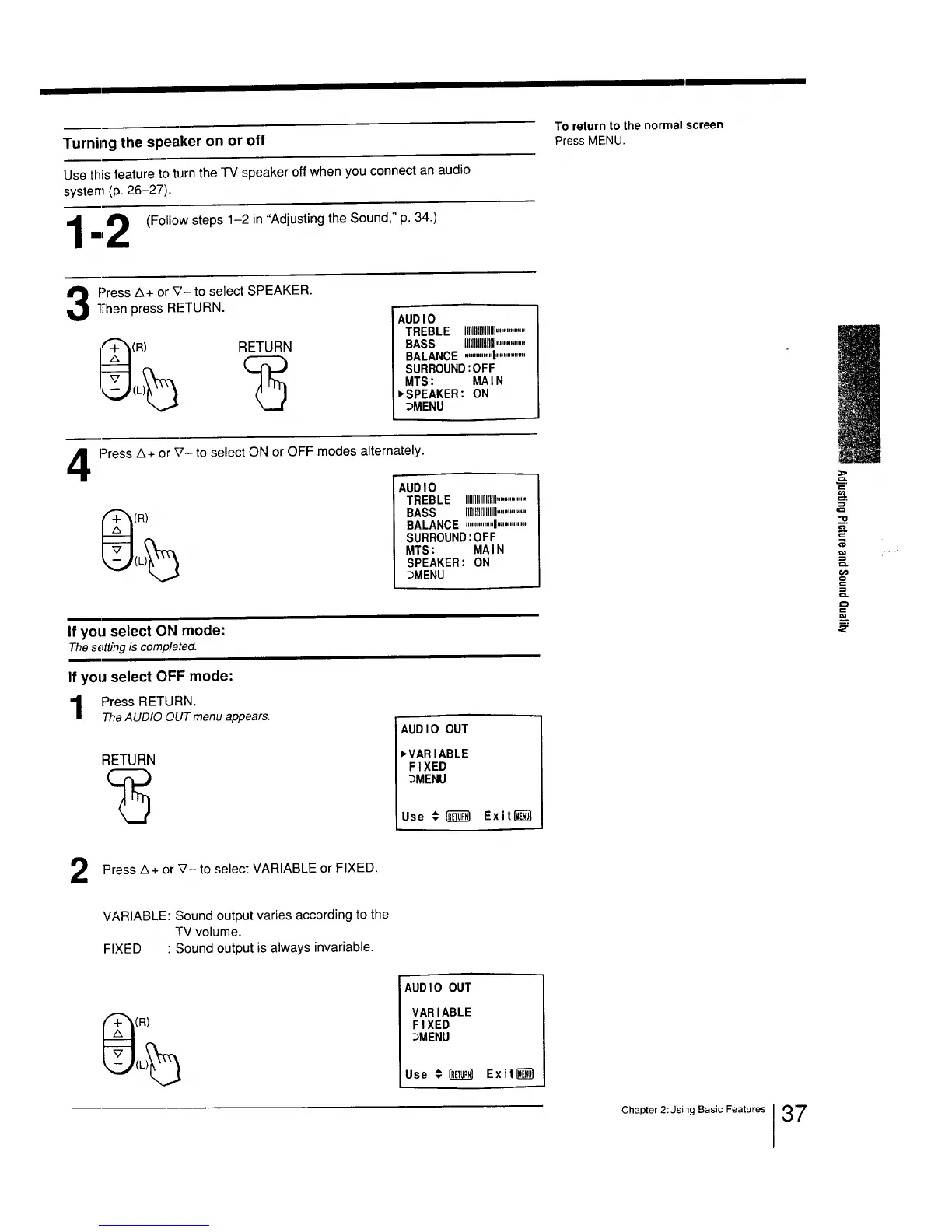
Turning the speaker on or off
Use this feature to turn the TV speaker off when you connect an audio
system (p. 26-27).
"4 _ (Follow steps 1-2 in "Adjusting the Sound," p. 34.)
/
mmI
To return to the normal screen
Press MENU.
3 ress Z_+ or x;,_ to select SPEAKER.
"Then press RETURN.
i__(R) RETURN
AUDIO
TREBLE I_1_1_111111...............
BASS IIHlilIIII................
BALANCE ..............I................
SURROUND:OFF
MTS: MAIN
_SPEAKER: ON
_MENU
4
Press A+ or _7- to select ON or OFF modes alternately.
(R)
AUDIO
TREBLE IIIIIIIIIllllllll................
BASS IMI_IIIIlUll................
BALANCE ...............!..........'.....
SURROUND:OFF
MTS: MAIN
SPEAKER: ON
_MENU
If you select ON mode:
Thesetting is completed.
If you select OFF mode:
Press RETURN.
TheAUDIO OUT menu appears.
RETURN
AUD I0 OUT
_VARIABLE
FIXED
_MENU
Use € _ Exit_
=>
=-__
._=
=_
,=,
Press z_+ or _'- to select VARIABLE or FIXED.
VARIABLE: Sound output varies according to the
TV volume.
FIXED " Sound output is always invariable.
(R)
AUDIO OUT
VARIABLE
FIXED
_MENU
Use € _ Exit_
Chapter 2:lJsi'lg Basic Features 37






 To Next Page