5
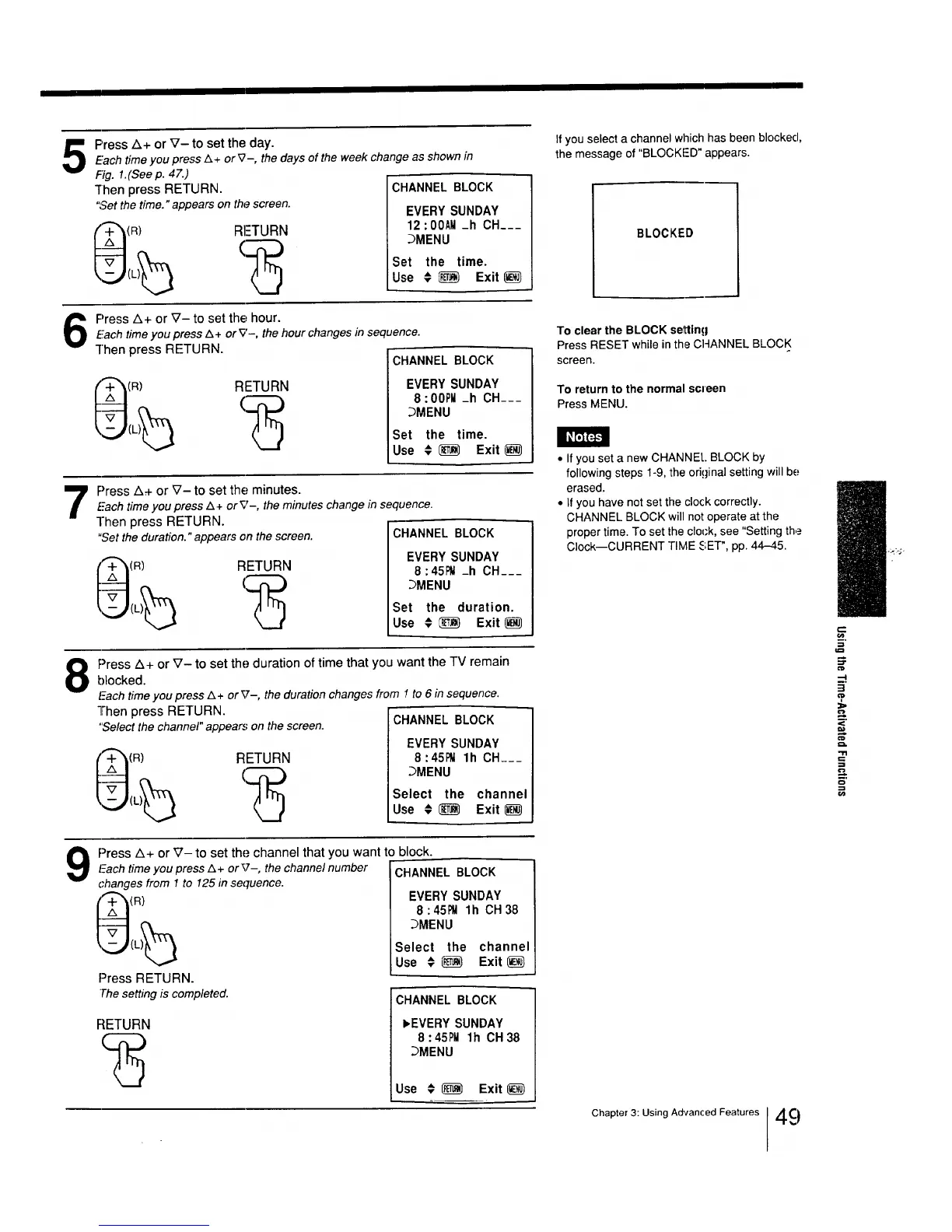
Press Z_+ or V- to set the day.
Fach time you press Z_+ or _2-, the days of the week change as shown in
Fig. 1.(Seep. 47.)
"rhen press RETURN.
"Set the time." appears on the screen.
RI=TURN
CHANNEL BLOCK
EVERY SUNDAY
12:00AM _h CH___
DMENU
Set the time.
Use € _ Exit
Press Z&+or _7- to set the hour.
Each timeyou press Z_+ or V-, the hour changes in sequence.
]'hen press RETURN.
(R) RETURN
CHANNEL BLOCK
EVERY SUNDAY
8:00PM _h CH___
DMENU
Set the time.
Use € _ Exit
Press A+ or _7- to set the minutes.
£-achtime you press Z_+ crY'-, the minutes change in sequence.
]'hen press RETURN.
"Set the duration." appears on the screen.
(R) RETURN
CHANNEL BLOCK
EVERY SUNDAY
8:45_ _h CH___
_MENU
Set the duration.
Use # _ Exit(_
8
Press A+ or V- to set the duration of time that you want the TV remain
blocked.
leachtimeyou press Z_+ or V-, the duration changes from ! to 6 in sequence.
"][hen press RETURN.
"Selectthe channel" appears on the screen. CHANNEL BLOCK
+_(R) RETURN
EVERY SUNDAY
8:45_ lh CH___
_MENU
Select the channel
Use # (_ Exit
If you select a channel which has been blocked,
the message of "BLOCKFD" appears.
BLOCKED
To clear the BLOCK setting
Press RESET while in the CHANNEL BLOCK
screen.
To return to the normal screen
Press MENU.
• If you set a new CHANNE!.. BLOCK by
following steps 1-9, the original setting will be
erased.
• If you have not set the clock correctly.
CHANNEL BLOCK will not operate at the
proper time. To set the clot-k, see "Setting the
Clock--CURRENT rlIVlE SET", pp. 44-¢5.
.=
=
OlD
,--I
-5"
<
9
Press A+ or _7- to set the channel that you want to block.
leach time you press Z&+ or V-, the channel number
changes from 1 to 125 in sequence.
(R)
Press RETURN.
Thesetting is completed.
RETURN
CHANNEL BLOCK
EVERY SUNDAY
8:45_ lh CH38
DMENU
Select the channel
Use # _) Exit _)
ICHANNEL BLOCK
I, EVERY SUNDAY
8:45PM lh CH38
DMENU
Use € _ Exit_)
Chapter 3: Using Advanced Features 49






 To Next Page