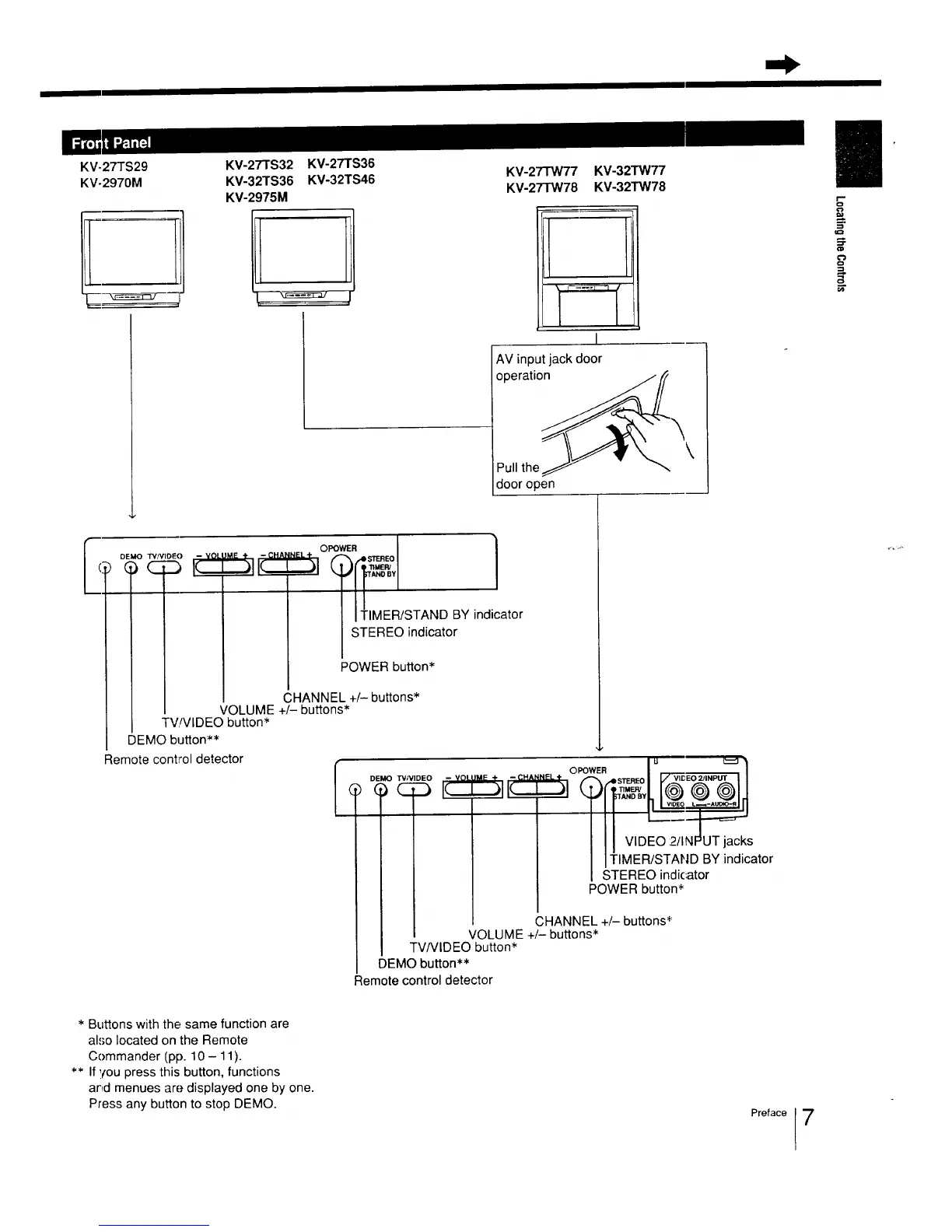
KV-27TS29
KV-2970M
KV-2TrS32 KV-27TS36
KV-32TS36 KV-32TS46
KV-2975M
KV-2TIW77 KV-32TW77
KV-27TW78 KV-32TW78
I
AV input jack door
operatio_,_\
Pull the
door open
E
[
DEMO TV/VIDEO - VOL
)CD IC._
,.EL÷O WE"I ]
|1 TIMER/STAND BY indicator
STEREO indicator
POWER button*
CHANNEL +/- buttons*
I DEMO TV/VIDEO - VOL
c_ IC--
VOLUME +/- buttons*
TV!VIDEO button*
DEMO button**
Remote control detector
i u _,-_ -_
OPOWER I /
INEL+ , /-_ .41 STEREO I I_ VII_ EO 2JINPUT
VIDEO :2/I
I ITIMER/STAND BY indicator'
I STEREO indicator
POWER button*
CHANNEL +/- buttons*
VOLUME +/- buttons*
TV/VlDEO button*
DEMO button**
Remote control detector
* Buttons with the same function are
also located on the Remote
Commander (pp. 10 - 11).
** If you press this button, functions
and menues are displayed one by one.
Press any button to stop DEMO.
Preface
7






 To Next Page