Ill
Connecting and Installing the TV (continued)
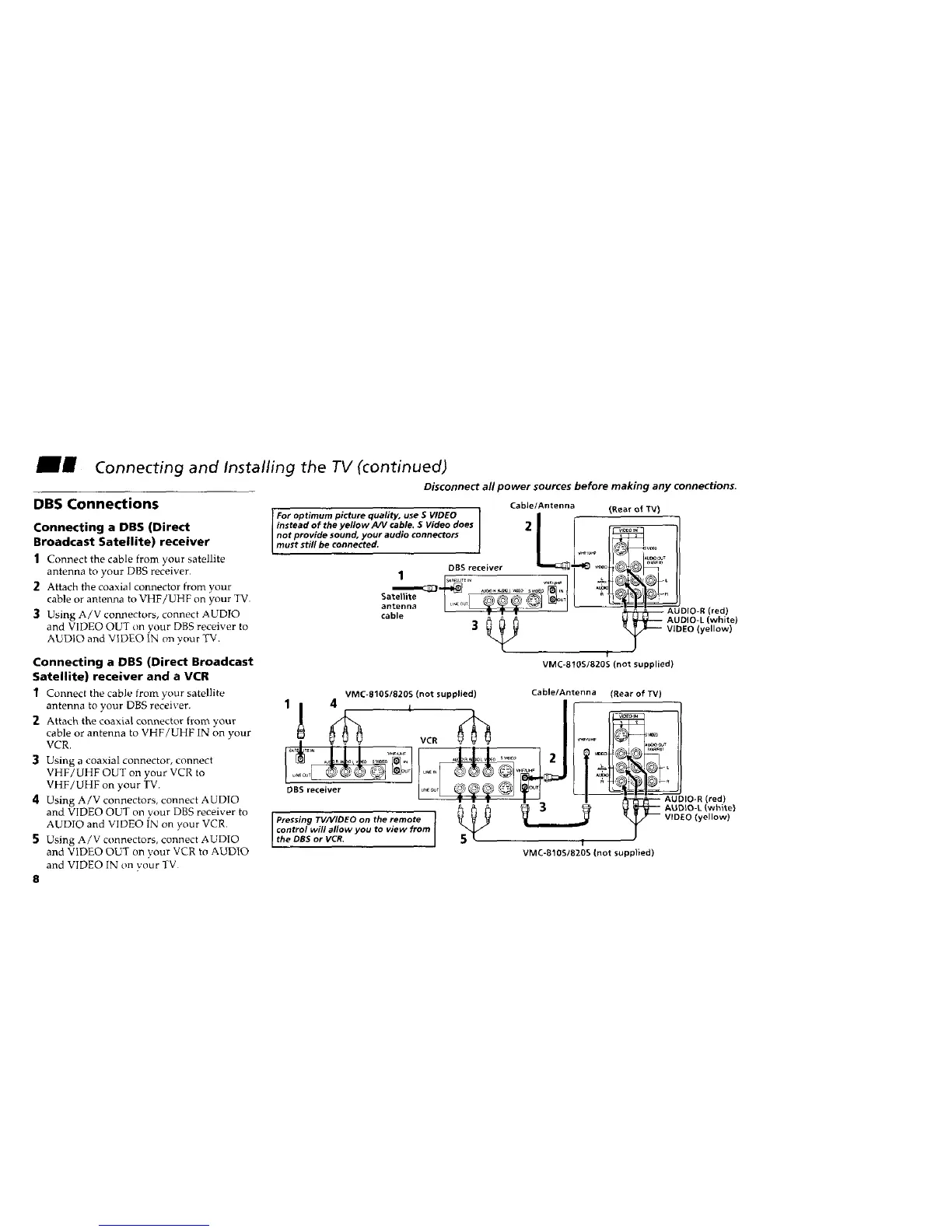
Disconnect all power sources before making any connections.
DBS Connections
Connecting a DBS (Direct
Broadcast Satellite) receiver
1 Connect the cable from ),our satellite
antenna to your DBS receiver.
2 Attach the coaxial connector from your
cable or antenna to VHF]UHF on your TV.
3 Using A/V connectors, connect AUDIO
and VIDEO OUT on vour DBS receiver to
AUDIO and VIDEO IN on your TV.
Connecting a DBS (Direct Broadcast
Satellite) receiver and a VCR
1 Connect the cable from your satellite
antenna to your DBS receiver.
2 Attach the coaxial connector from your
cable or antenna to VHF/UHF IN on your
VCR.
3 Using a coaxial connector, connect
VHF/UHF OUT on your VCR to
VHF/UHF on your TV.
4 Using A/V connectors, connect AUDIO
and VIDEO OUT on your DBS receiver to
AUDIO and VIDEO IN on your VCR.
5 Using A/V connectors, connect AUDIO
and VIDEO OUT on your VCR to AUDIO
and VIDEO IN on your TV
8
Cable/Antenna
For optimum picture quality, use S VIDEO |
instead of the yellow A/V cable. S Video does 2 I
not provide sound, your audio connectors |
must still be connected, i I
OBS receiver
1 b,*_.... v.,,_ I
antenna [ .... _-_ I
cable w • •
(Rear of TV)
_ AUDIO2L (white)
-'- VIDEO (yellow)
l
VMC-810S/820S (not supplied)
VMC-810S/820S (not supplied)
DBS receiver
Pressing TV/VIDEO on the remote
control will allow you to view from
the DBS or VCR.
Cable/Antenna
I
(Rear of TV)
IHF AUO_Oj T
AUDIO-R (red)
_ _ AUDIO-I. (whitel
_ VIDEO (yellow)
T
VMC-810S/820S (not supp}ied)



 To Next Page