Connecting and Installing the TV (continued)
S-Link connections
• KV-32S65, 32V65, 35S65, 35V65 only
S-Link is designed to allow your Sony
components to "communicate".
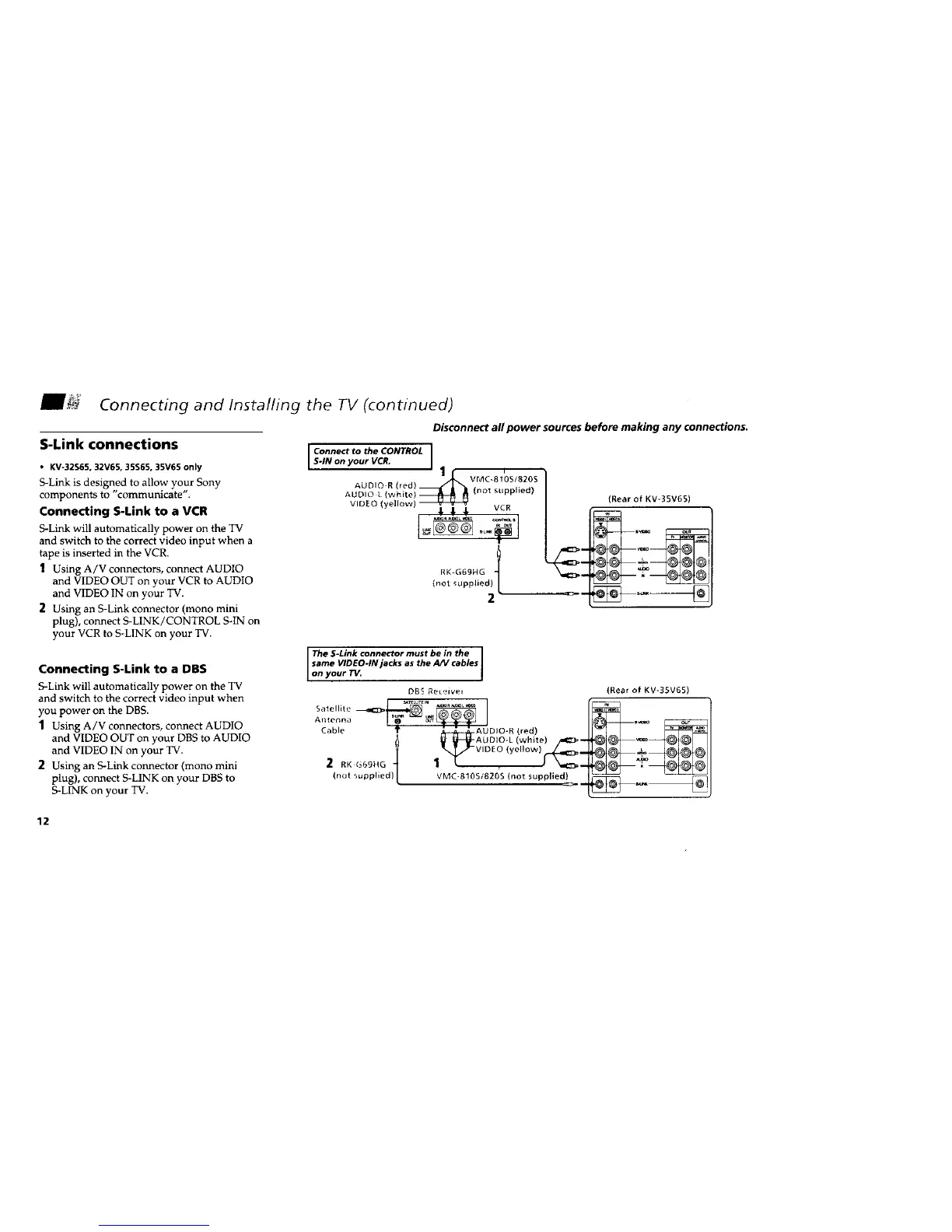
Connecting S-Link to a VCR
S-Link will automatically power on the TV
and switch to the correct video input when a
tape is inserted in the VCR.
1 Using A/V connectors, connect AUDIO
and VIDEO OUT on your VCR to AUDIO
and VIDEO IN on your TV.
2 Using an S-Link connector (mono mini
plug), connect S-LINK/CONTROL S-IN on
your VCR to S-LINK on your TV.
Disconnect all power sources before making any connections.
Connect to the CONTROL ]
S-IN on your VCR. I
' 1.[. vmc-_'os/82os
VIDEO (yellow) _ VCR
RK-G69HG t
(not supplied)
2
(Rear of KV-35V65)
Connecting S-Link to a DBS
S-Link will automatically power on the TV
and switch to the correct video input when
you power on the DBS.
1 Using A/V connectors, connect AUDIO
and VIDEO OUT on your DBS to AUDIO
and VIDEO IN on your TV.
2 Using an S-Link connector (mono mini
plug), connect S-LINK on your DBS to
S-LINK on your TV.
The S-Link connector must be in the
same VIDEO-IN jacks as the A/V cables
on your TV.
DBS _eceivel
Antenna
Cable _ J_,--d,-_- AUDIO - R (red)
_ _-AUDIO-L (white) _l_--
t '_-wDEo (ye,owl__.=>_
(not supplied)[ JMC-810S/820S (not supplied}-
(Rear of KV-3SV65)
2
12






 To Next Page