Connecting and Installing the TV (continued)
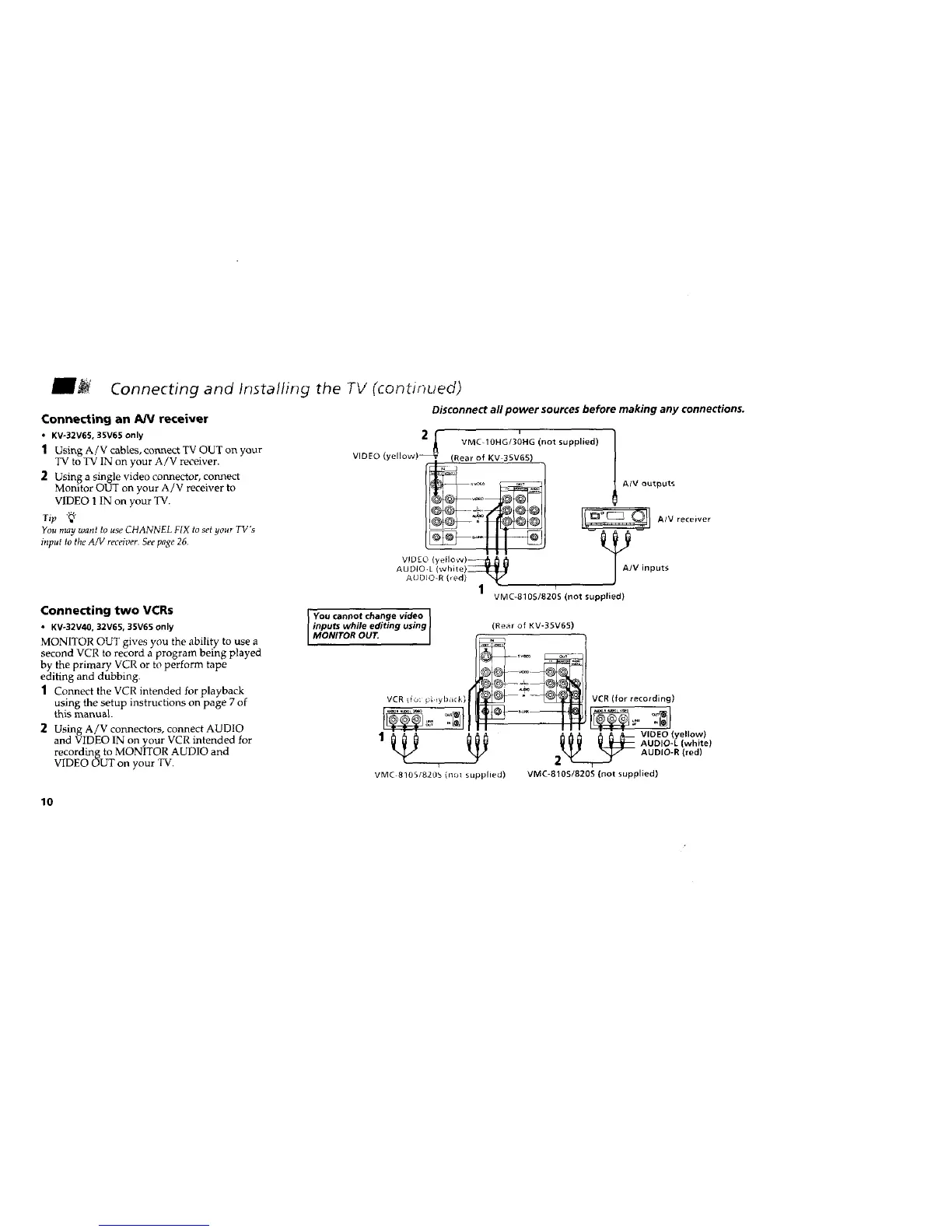
Connecting an AN receiver
• KV-32V65, 35V65 only
1 Using A/V cables, cormect TV OUT on your
"IV to TV IN on your A/V receiver.
2 Using a single video connector, connect
Monitor OUT on your A/V receiver to
VIDEO 1 IN on your TV.
Tip "_"
You may want to use CHANNEL FIX to set your TV's
input to the A/V receiver.Seepage 26.
Connecting two VCRs
• KV-32V40, 32V65, 35V65 only
MONITOR OUT gives you the ability to use a
second VCR to record a program being played
by the primary VCR or to perform tape
editing and dubbing.
] Connect the VCR intended for playback
using the setup instructions on page 7 of
this manual.
2 Using A/V connectors, connect AUDIO
and VIDEO IN on your VCR intended for
recording to MONITOR AUDIO and
VIDEO OUT on your TV.
Disconnect all power sources before making any connections.
VIDEO (
i
VMC+IOHG/30HG (not supplied)
A/V outputs
A/V receiver
putt
r
VMC-810S/820S (not supplied)
You cannot change video
inputs while editing using
MONITOR OUT.
(Rear of KV-35V65)
VCRifo: piiyba{k)
VMC 8!05/820b (rl_t supplied)
VCR (for recording)
2_j__ {: _ VIDEO (yellow)
AUDIO-L (white)
__ AUDIO-R (red)
VMC-81051820S (not supplied)
10






 To Next Page