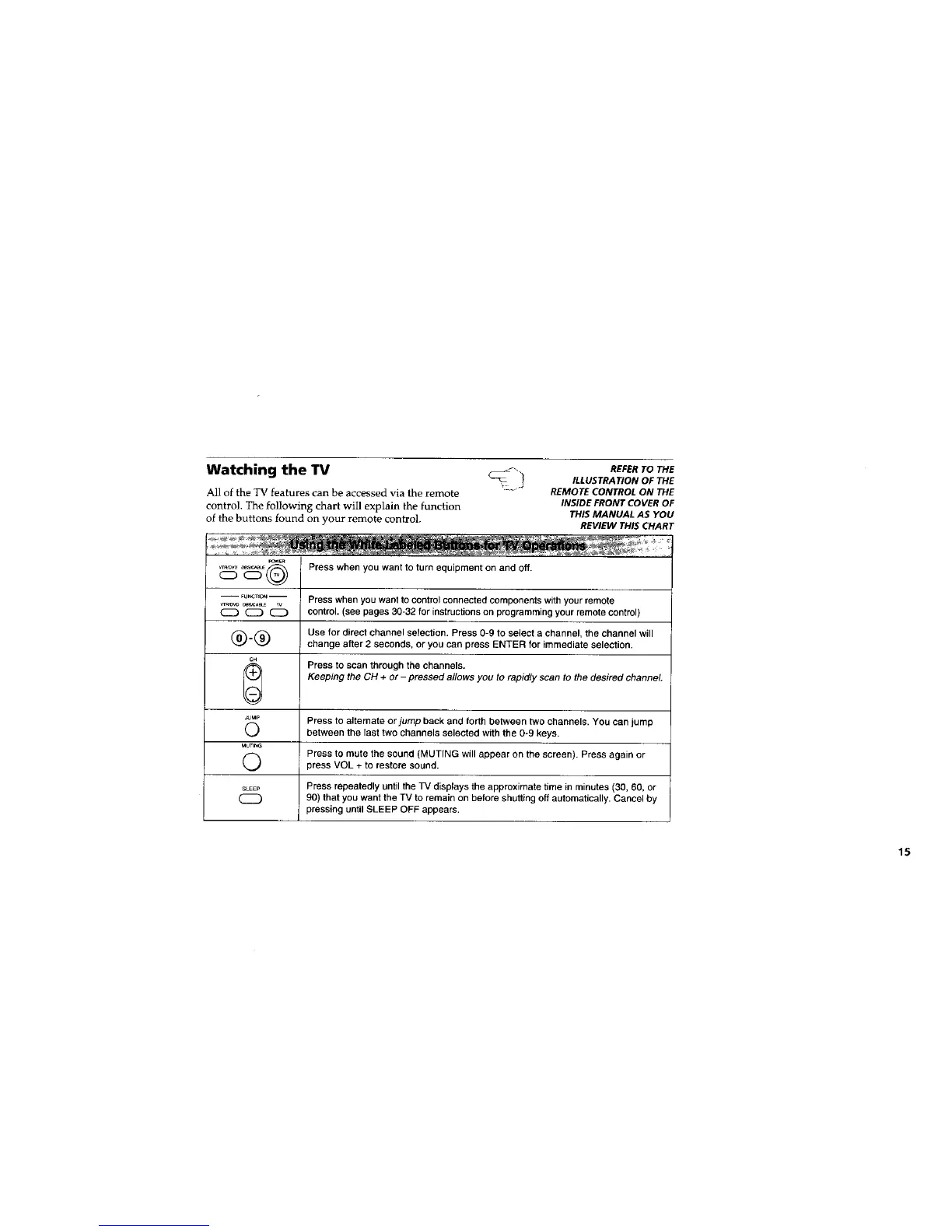
Watching the TV _._ REFERTOTHE
ILLUSTRATION OF THE
All of the TV features can be accessed via the remote REMOTE CONTROL ON THE
control. The following chart will explain the function INSIDE FRONT COVER OF
of the buttons found on your remote control. THIS MANUAL AS YOU
REVIEW THIS CHART
_WER
_ovo o_/_ Press when you want to turn equipment on and off.
CZ)
-- FU,,_T,O,-- Press when you want to control connected components with your remote
'_(_ C_) control. (see pages 30-32 for instructions on programming your remote control)
(_). (_ Use for direct channel selection. Press 0-9 to select a channel, the channel will
change after 2 seconds, or you can press ENTER for immediate selection.
GH
Press to scan through the channels.
Keeping the CH + or- pressed allows you to rapidly scan to the desired channel,
JouP Press to alternate or jump back and forth between two channels. You can jump
(_) between the last two channels selected with the 0-9 keys.
MUTING
O Press to mute the sound (MUTING will appear on the screen). Press again or
press VOL + to restore sound.
SLEEP Press repeatedly until the TV displays the approximate time in minutes (30, 60, or
90) that you want the TV to remain on before shutting off automatically. Cancel by
pressing until SLEEP OFF appears.
15






 To Next Page