Using Your Menus
Learning menu selection
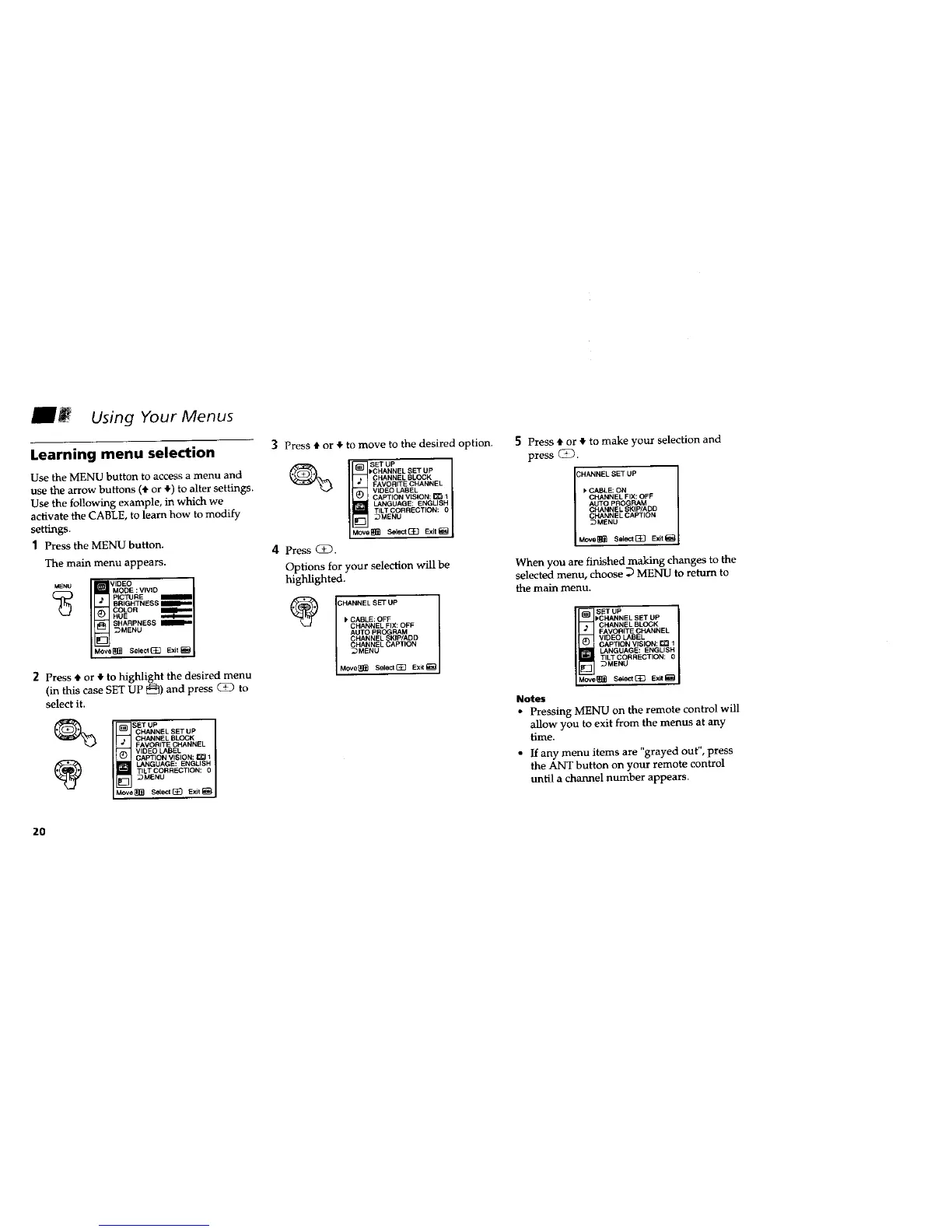
Use the MENU button to access a menu and
use the arrow buttons (• or 4) to alter settings.
Use the following example, in which we
activate the CABLE, to learn how to modify
settings.
1 Press the MENU button.
The main menu appears.
,,DEO
MENU MODE :VIVID
PICTURE
BRIGHTNESS
COLOR
HUE
SHARPNESS MBF_I l
_MENU
Move_ Seleet(_ Exit_
2 Press t or • to highlight the desired menu
(in this case SET UP _]) and press (_23 to
select it.
CHANNEL SET UP J
CHANNEL BLOCK
FAVORITE CHANNEL
VIDEO LABEL
CAPTION VISION: _ 1
LANGUAGE: ENGLISH
TILT CORRECTION: 0
_MENU
Move[_ Setect[_ Exit_
3 Press • or • to move to the desired option.
_ SETUP
I'CHANNEL SET UP
CHANNEL BLOCK
FAVORtTE CHANNEL
VIDEO LABEL
CAPTION VISION: _ 1
LANGUAGE: ENGLISH
TILT CORRECTION: O
_MENU
MOVe_ Select[_ Exit_
4 Press QD.
Options for your selection will be
highlighted.
CABLE: OFF
CHANNEL FIX: OFF
AUTO PROGRAM
CHANNEL SKIP/ADD
CHANNEL CAPTION
_MENU
Move_[_ SelectG_ Exil_
5 Press • or • to make your selection and
press (Z).
CHANNEL SET UP
_' CABLE: ON
CHANNEL FIX: OFF
AUTO P_LOGRAM
CHANN SKIP/ADD
I CHANNEL CAPTION ]
DMBNU
Move_ Sel_t_ Exit_
When you are finished making changes to the
selected menu, choose D MENU to return to
the main menu,
SETUP I
I, CHANNEL SET UP
CHANNEL BLOCK
FAVORITE CHANNEL I
VIDEO LABEL
CAPTON V S ON _1
LANGUAGE: ENGLISH
TJLTCORRECTJON: 0
_MENU
Move_ SiLect{_} ExJt_
Notes
• Pressing MENU on the remote control will
allow you to exit from the menus at any
time.
• If any menu items are "grayed out", press
the ANT button on your remote control
until a channel number appears.
2O






 To Next Page