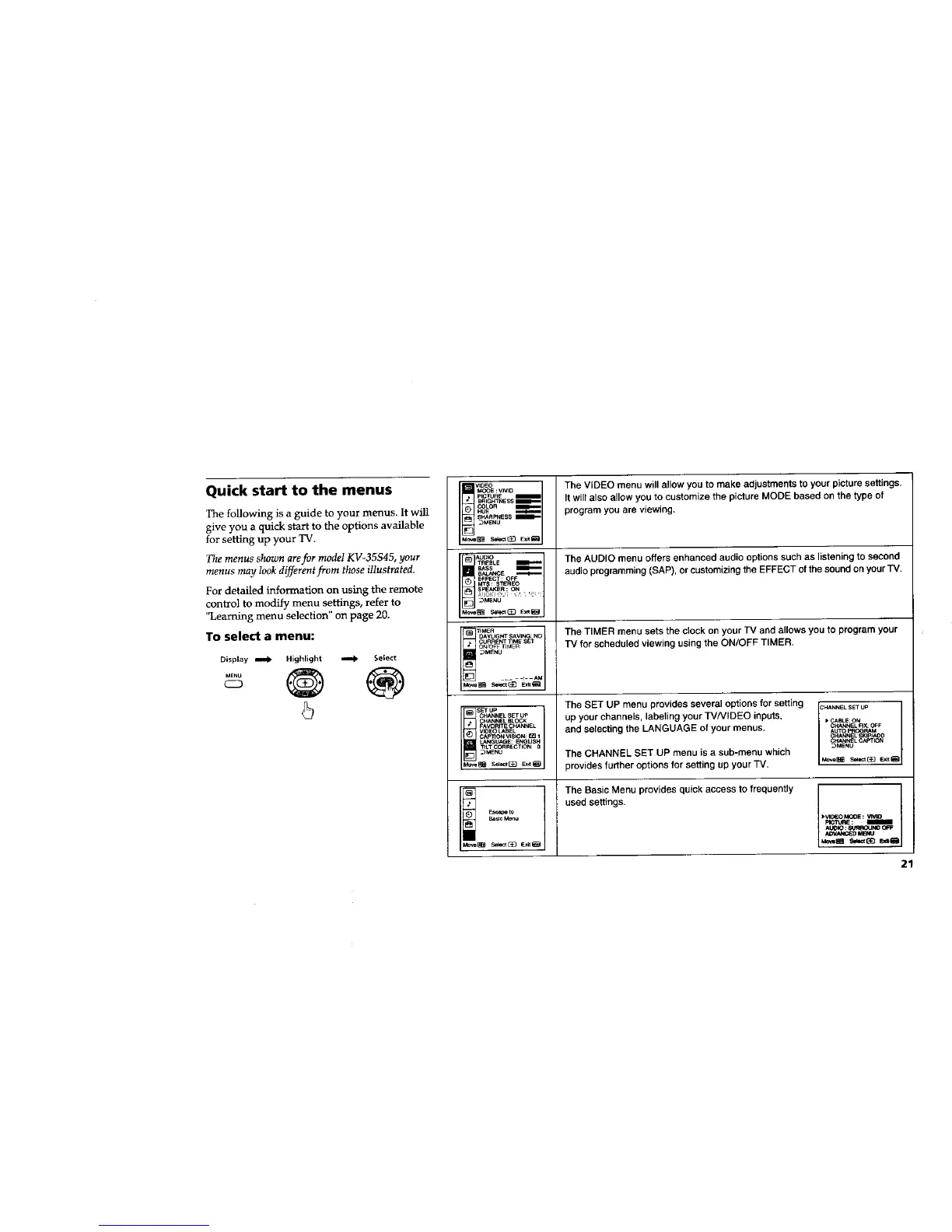
Quick start to the menus
The following is a guide to your menus. It will
give you a quick start to the options available
for setting up your TV.
The menus shown arefor model KV-35S45, your
menus may look different from those illustrated.
For detailed information on using the remote
control to modify menu settings, refer to
"Learning menu selection" on page 20.
To select a menu:
Display _ Highlight _ Select
CD
5
VIDEO
_E : VNID
pI_RE m
BrlIGHTNESS p
COLOR _
HUE _
SHARPNESS _
_MENU
MO_ SekJ_{_ E_at_
AUDIO
TREBLE
EFFECT : OFF
MTS : STEREO
SPEAKER : ON
_M_IU
l! rIMeR
DAYLIGHT SAVI_: NO
CURRENT TIME SEI
ONOFE I_M E [t
_MENU
CHANNEL BLCCK
FAVORITE CH_.NNEL
VIDEO LABEL
CAPTION VISK3N: _ 1
LANGUAGE: E_LISH
TILT C_RECTION: 0
_MENU
The VIDEO menu will allow you to make adjustments to your picture settings.
It will also allow you to customize the picture MODE based on the type of
program you are viewing.
The AUDIO menu offers enhanced audio options such as listening to second
audio programming (SAP), or customizing the EFFECT of the sound on your TV.
The TIMER menu sets the clock on your TV and allows you to program your
TV for scheduled viewing using the ON/OFF TIMER.
The SET UP menu provides several options for setting
up your channels, labeling your TVNIDEO inputs,
and selecting the LANGUAGE of your menus.
The CHANNEL SET UP menu is a sub-menu which
provides further options for setting up your TV.
1
CHANNEL SET UP I
I
CABLE: ON
CHANNEL FIX: OFF
AUTO PROGRAM
I-_NNEL SKIP/AOD
_HANNEL CAPTION
I °-° 1Mm,e_ _1(_] Exit_
The Basic Menu provides quick access to frequently
used settings.
21






 To Next Page