Cable or Antenna Connections
Connecting directly to cable or an
antenna
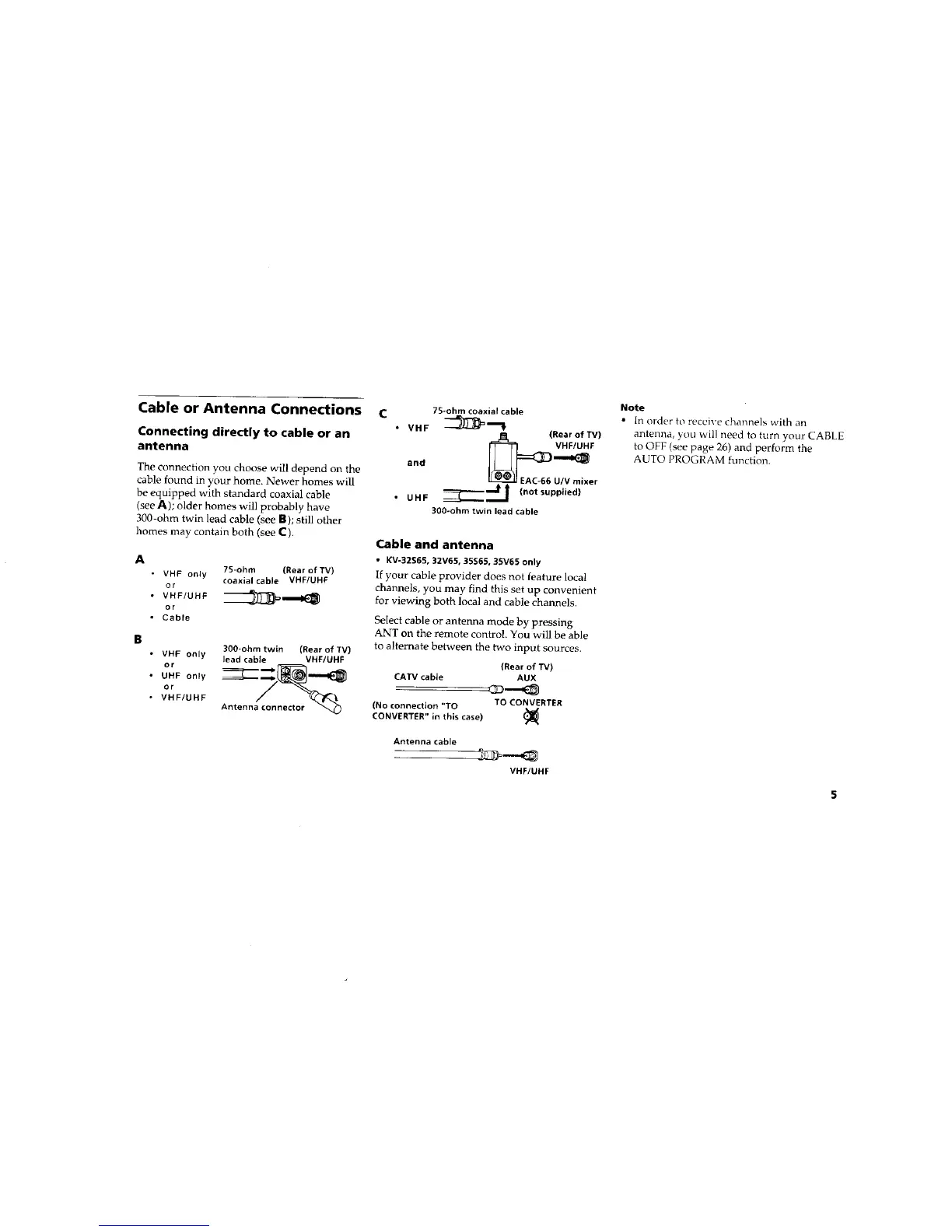
The connection you choose will depend on the
cable found in your home. Newer homes will
be equipped with standard coaxial cable
(see A); older homes will probably have
300-ohm twin lead cable (see B); still other
homes may contain both (see C).
A
• VHF only
Gr
• VHF/UHF
or
• Cable
7S-ohm (Rear of TV)
coaxialcable VHF/UHF
B
300-ohm twin (Rear of TV)
• VHF only lead cable VHF/UHF
• UHF only
or
• VHF/UF_F
Antenna connector
c
7S-ohm coaxial cable
• VHF _ ""_
_J_ (Rear of TV)
ond
EAC-66 U/V mixer
Inot supplied)
• UHF _J
300-ohm twin lead cable
Cable and antenna
• KV-32S65,32V65,35S65,35V65 only
If your cable provider does not feature local
channels, you may find this set up convenient
for viewing both local and cable channels.
Select cable or antenna mode by pressing
ANT on the remote control. You will be able
to alternate between the two input sources.
(Rearof TV)
CATVcable AUX
(No connection "TO TO CONVERTER_._
CONVERTER" in this case)
Note
• In order to receive channels with an
antenr_a, you will need to turn your CABLE
to OFF (see page 26) and perform the
AUTO PROGRAM function.
Antenna cable
-
VHF/UHF






 To Next Page