VCR Connections
Connecting an antenna/cable TV
system with a VCR
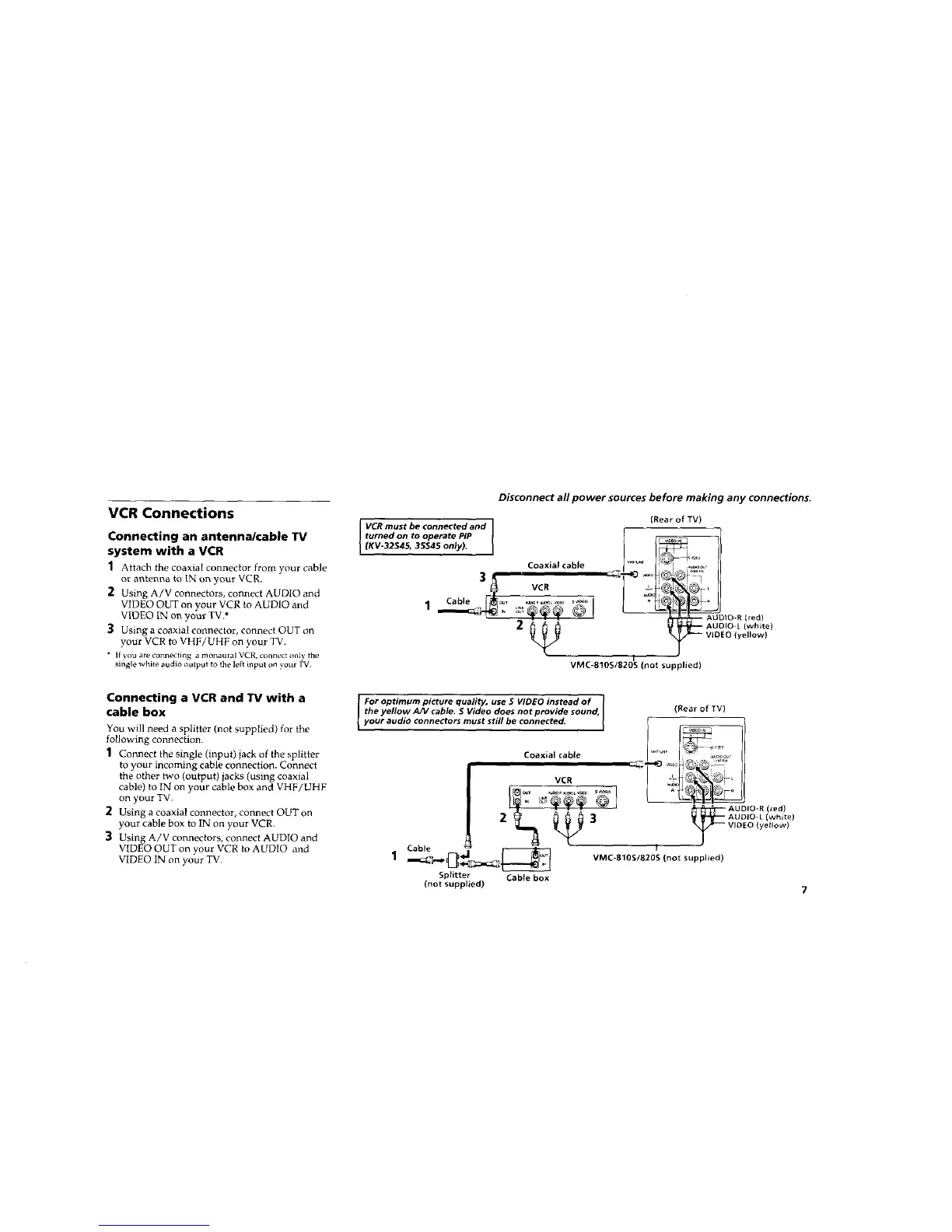
1 Attach the coaxial connector from your cable
or antenna to IN on your VCR.
2 Using A/V connectors, connect AUDIO and
VIDEO OUT on your VCR to AUDIO and
VIDEO IN on your TV.*
3 Using a coaxial connector, connect OUT on
your VCR to VHF/UHF on your TV.
" If you are connecting a monaural VCR, connect only the
single white audio output to the left input on your TV,
Connecting a VCR and TV with a
cable box
You will need a splitter (not supplied) for the
following con_ection.
1 Connect the single (input) jack of the splitter
to your incoming cable connection. Connect
the other two (output) jacks (using coaxial
cable) to IN on your cable box and VHF/UHF
on your TV.
2 Using a coaxial connector, connect OUT on
your cable box to IN on your VCR.
3 Using A/V connectors, connect AUDIO and
VIDEO OUT on your VCR to AUDIO and
VIDEO IN on your TV.
Disconnect all power sources before making any connections.
VCR must be connected and
turned on to operate PIP
(KV-32S4_, 3S$45 only).
Coaxial cable
VCR
(Rear of TV)
VMC-810S/820S (not supplied)
[red)
(white)
lyellow)
For optimum picture quality, use S WDEO instead of I
the yellow A/V cable. $ Wdeo does not provide sound,
your audio connectors must still be connected.
Coaxialcable
VCR
T 6°I
Cable
Splitter Cable box
(not supplied)
(Rear of TV)
'_ 1
w_u._ '
AUDIO-R(red)
AUDIO-L (white)
VIDEO (yellow)
I
VMC-810S/820S (not supplied)






 To Next Page