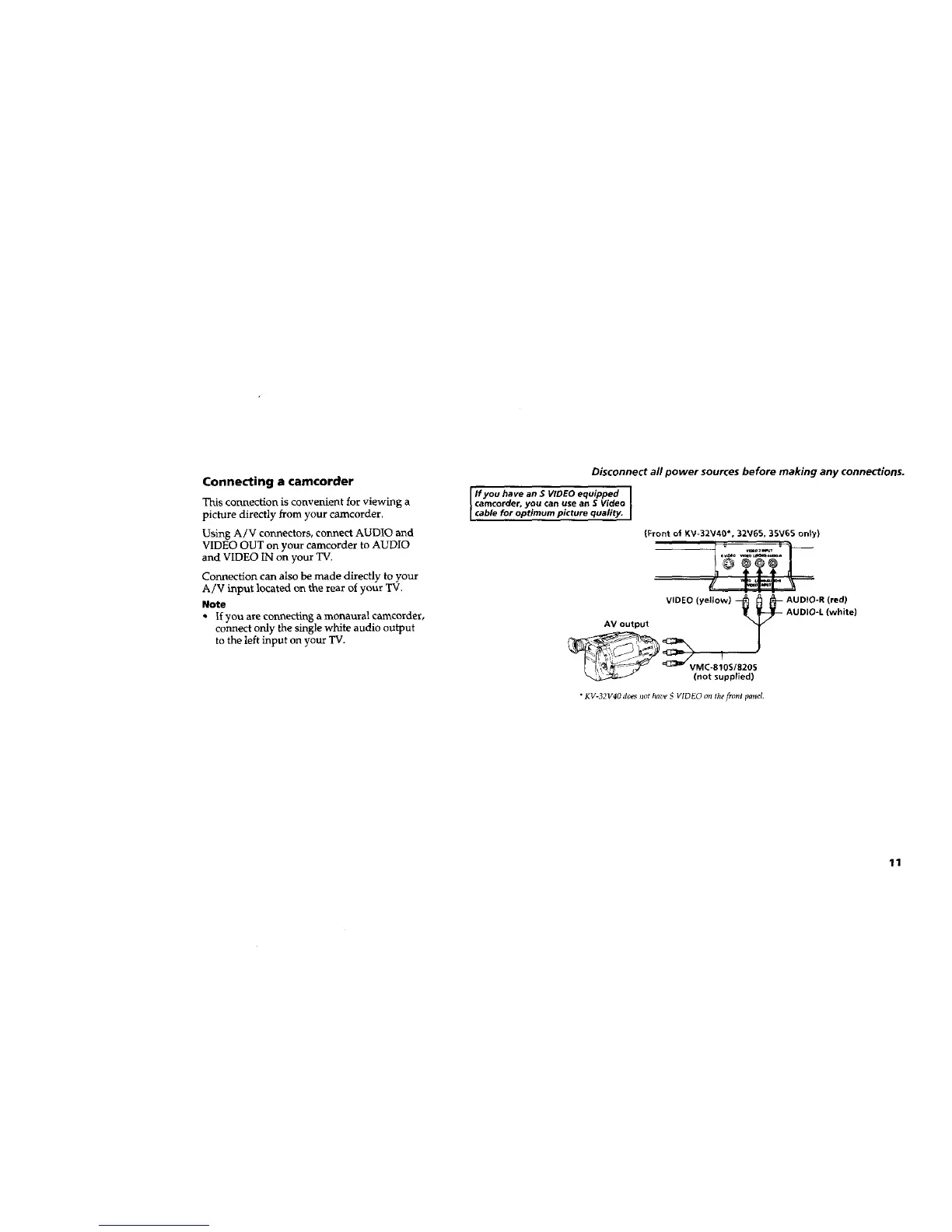
Connecting a camcorder
This coruxection is convenient for viewing a
picture directly from your camcorder.
Using A/V connectors, connect AUDIO and
VIDEO OUT on your camcorder to AUDIO
and VIDEO IN on your TV.
Connection can also be made directly to your
A/V input located on the rear of your 'IV.
Note
• If you are connecting a monaural camcorder,
connect only the single white audio output
to the left input on your "IV.
Disconnect all power sources before making any connections.
I Ifyou have an S VIDEO equipped I
camcorder, you can use an $ Video
I cable for optimum picture quality. I
(Front o_ KV-32V40*, 32V65, 35V65 on_y)
VIDEO (yellow) _ _ _-- AUDIO-R (red)
!_ _-- AUDIO-L (white)
__=_AV output r T
(not suppl_ed)
• KV-32V40 does Jzothave S VIDEO on the front panel
11






 To Next Page