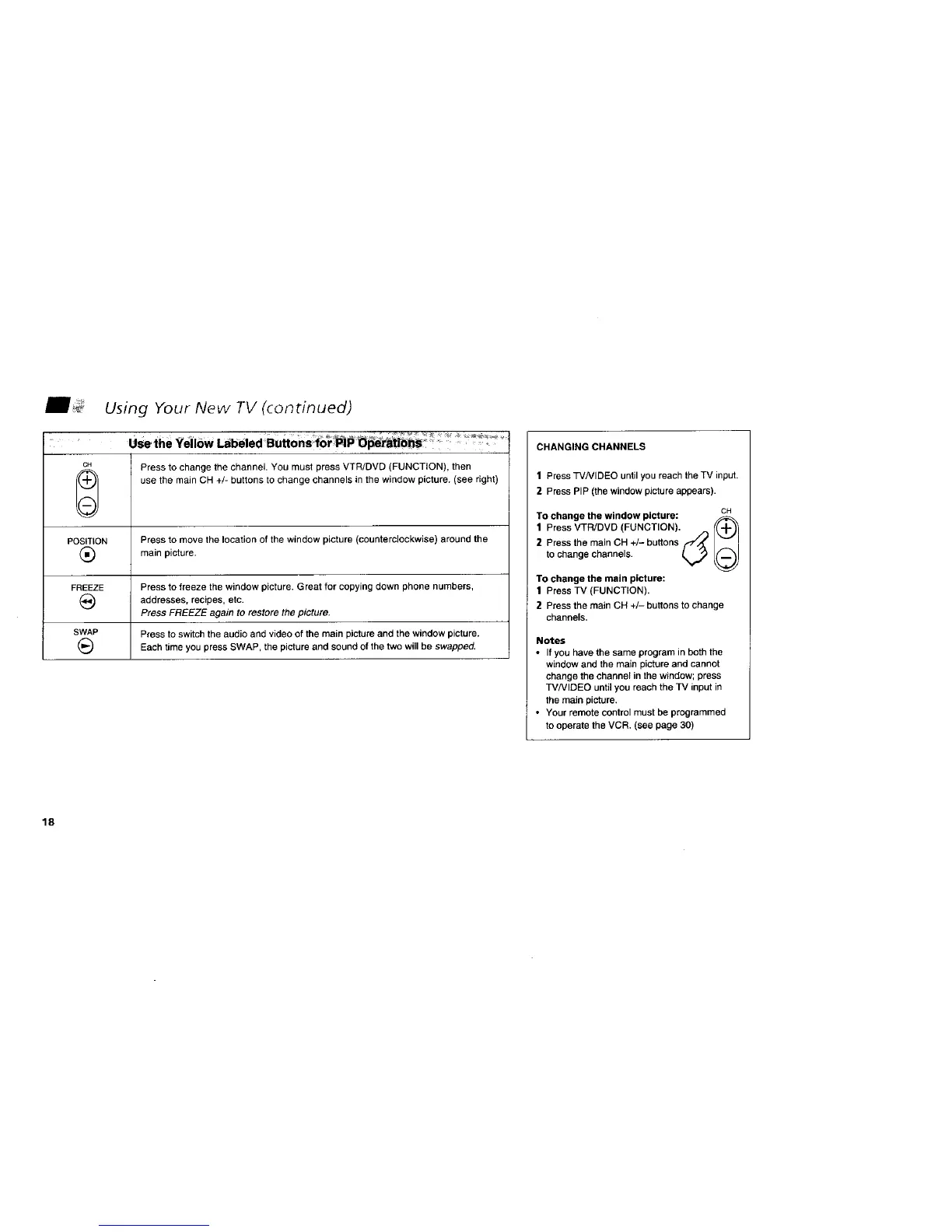
Using Your New TV (continued)
_^ • •
CH Press to change the channel• You must press VTR/DVD (FUNCTION), then
use the main CH +/- buttons to change channels in the window picture. (see right)
POSITION Press to move the location of the window picture (counterclockwise) around the
(_ main picture.
FREEZE Press to freeze the window picture. Great for copying down phone numbers,
(_ addresses, recipes, etc.
Press FREEZE again to restore the picture.
SWAP Press to switch the audio and video of the main picture and the window picture.
(_ Each time you press SWAP, the picture and sound of the two will be swapped.
CHANGING CHANNELS
1 Press TVNIDEO untilyou reach the TV input•
2 Press PIP (the window picture appears)•
To change the window picture: GH
1 Press VTR/DVD (FUNCTION). {(-I-_
2 Press the main CH +/- buttons f_,,,_
to change channels. (,_
To change the main picture:
1 Press TV (FUNCTION).
2 Press the main CH +/- buttons to change
channels.
Notes
• If you have the same program in both the
window and the main picture and cannot
change the channel in the window; press
TVNIDEO until you reach the TV input in
the main picture.
• Your remote control must be programmed
to operate the VCR. (see page 30)
18






 To Next Page