EasyManua.ls Logo

Sony Trinitron KV-32TW77 - SPIX, SHUE, SCOL, SBAL, DISP Adjustments

Sony Trinitron KV-32TW77
79 pages
Print Icon
To Next Page IconTo Next Page
To Previous Page IconTo Previous Page
Loading...
KV-27TW77/27TW78
KV-32TW7
W32TW78
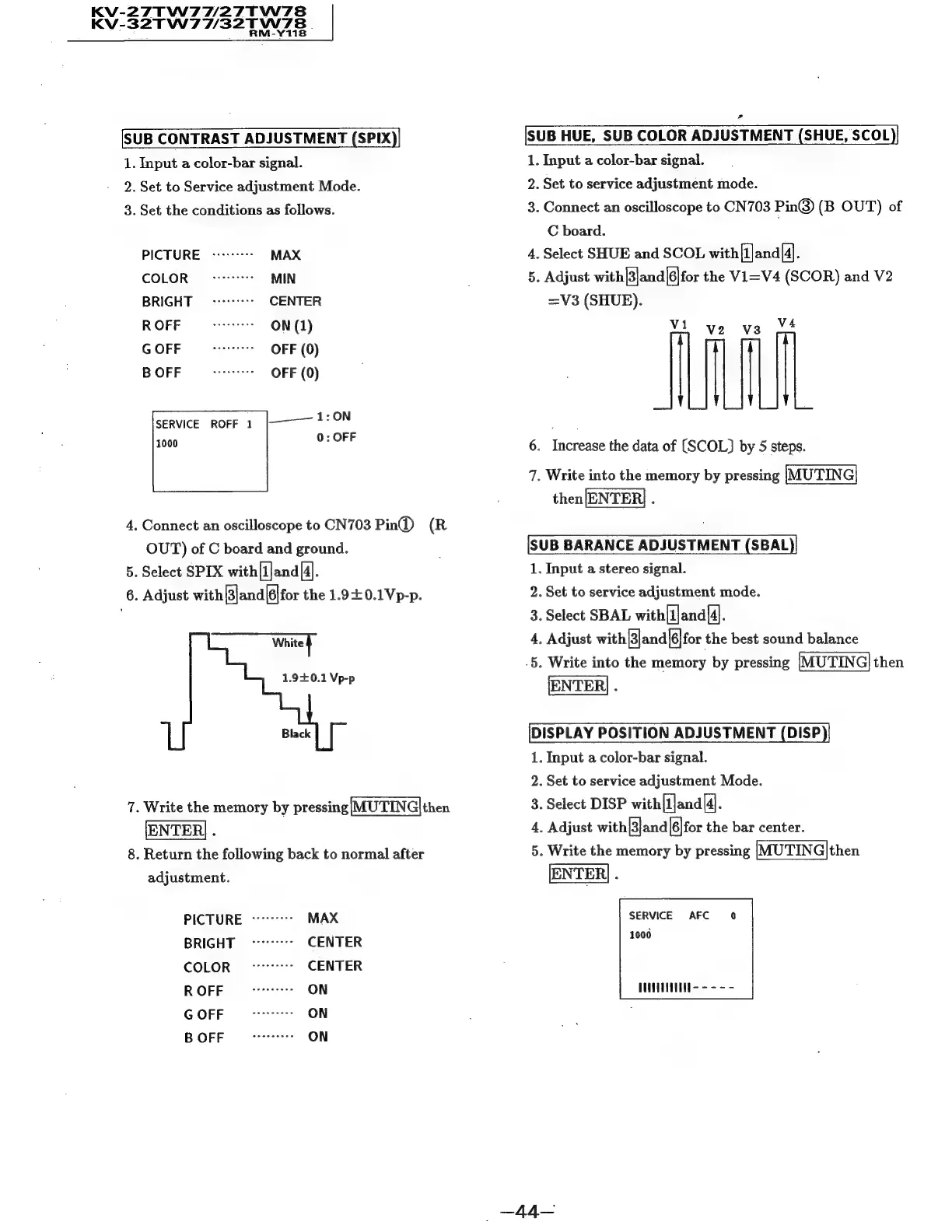
SUB
CONTRAST
ADJUSTMENT
(SPIX)
1.
Input
a
color-bar
signal.
2.
Set
to
Service
adjustment
Mode.
3.
Set
the
conditions
as
follows.
PICTURE
-------
MAX
COLOR
sane
esees
MIN
BRIGHT
0
-----
CENTER
ROFF
ove
ON
(1)
GOFF
ee
OFF
(0)
B
OFF
steer
ones
OFF
(0)
SERVICE
ROFF
1
|————
1:ON
dau
0:
OFF
4.
Connect
an
oscilloscope
to
CN703
Pin@
(R
OUT)
of
C
board
and
ground.
5.
Select
SPIX
with[1]and|4].
6.
Adjust
with|3|and|6|for
the
1.940.1Vp-p.
White
}
1.90.1
Vp-p
7.
Write
the
memory
by
pressing|MUTING|then
ENTER
.
8.
Return
the
following
back
to
normal
after
adjustment.
PICTURE
-7**"7-*°
MAX
BRIGHT
o-77"7""-
CENTER
COLOR
we
eeeeeee
CENTER
R
OFF
rreerer
ON
G
OFF
seaeeeeee
ON
B
OFF
de
eeeeeee
ON
SUB
HUE,
SUB
COLOR
ADJUSTMENT
(SHUE,
SCOL
1.
Input
a
color-bar
signal.
2.
Set
to
service
adjustment
mode.
3.
Connect
an
oscilloscope
to
CN703
Pin@)
(B
OUT)
of
C
board.
4.
Select
SHUE
and
SCOL
with(1Jand|4].
5.
Adjust
with|3|and|6|for
the
Vi=V4
(SCOR)
and
V2
=V3
(SHUE).
Vi
ve
vs
V4
6.
Increase
the
data
of
[SCOL)
by
5
steps.
7.
Write
into
the
memory
by
pressing
|MUTING
then|ENTER|
.
SUB
BARANCE
ADJUSTMENT
(SBAL)
1.
Input
a
stereo
signal.
2.
Set
to
service
adjustment
mode.
3.
Select
SBAL
with[l]and
[4].
4,
Adjust
with|and|6|for
the
best
sound
balance
.5.
Write
into
the
memory
by
pressing
MU'TING|
then
ENTER
.
[DISPLAY
POSITION
ADJUSTMENT
(DISP)
1.
Input
a
color-bar
signal.
2.
Set
to
service
adjustment
Mode.
3.
Select
DISP
with[1]and
[4].
4,
Adjust
with
[Blana|[6|for
the
bar
center.
5.
Write
the
memory
by
pressing
[MUTING]then
[ENTER]
.
SERVICE
AFC
1000
_~44-

Related product manuals