EasyManua.ls Logo

Sony Trinitron KV-32TW77 - Horizontal and Vertical Geometry Adjustments

Sony Trinitron KV-32TW77
79 pages
Print Icon
To Next Page IconTo Next Page
To Previous Page IconTo Previous Page
Loading...
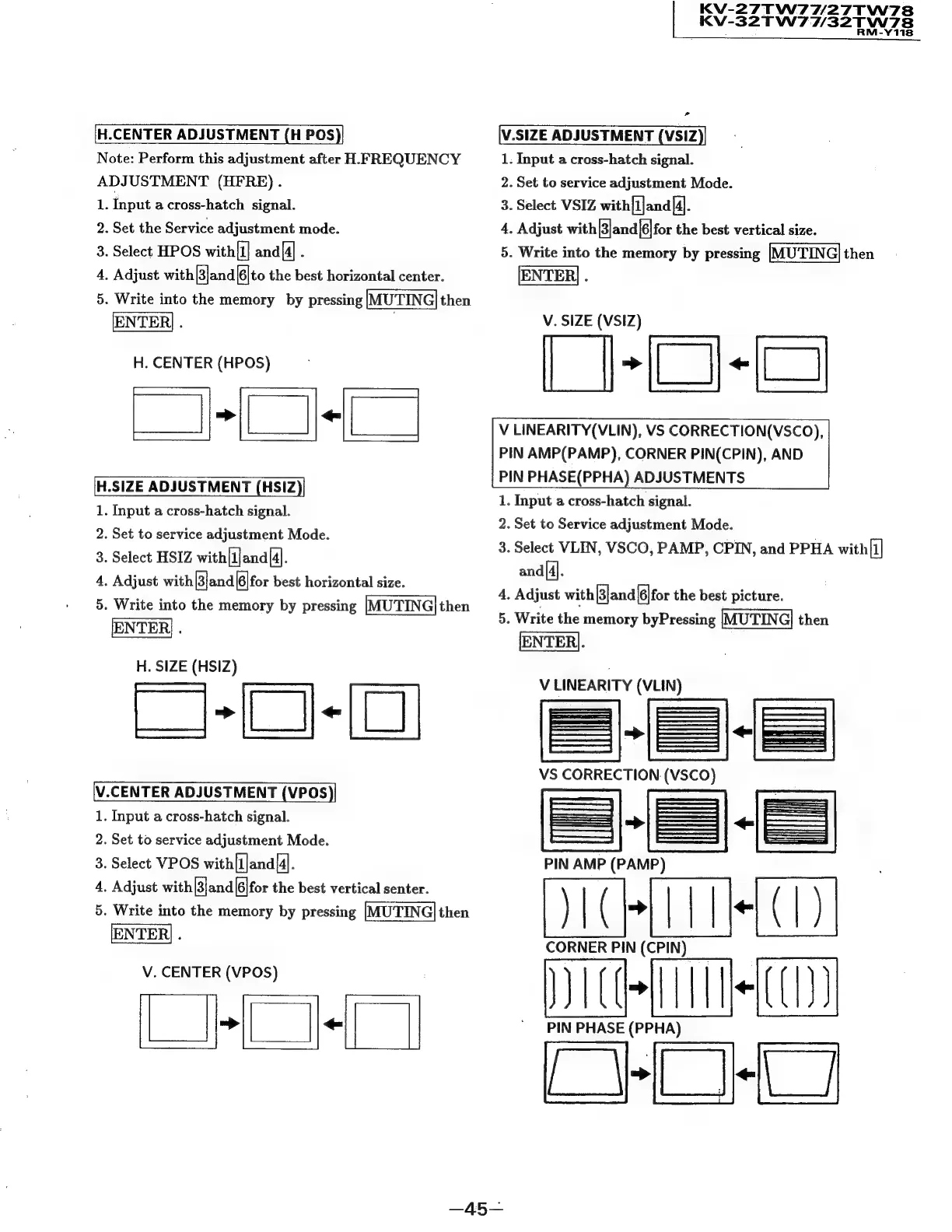
[H.CENTER
ADJUSTMENT
(H
POS)|
Note:
Perform
this
adjustment
after
H
FREQUENCY
ADJUSTMENT
(HFRE).
1.
Input
a
cross-hatch
signal.
2.
Set
the
Service
adjustment
mode.
3.
Select
HPOS
with{i]
and[4]
.
4.
Adjust
with
|and|[6|to
the
best
horizontal
center.
5.
Write
into
the
memory
by
pressing
then
ENTER]
.
H.
CENTER
(HPOS)
|
H.SIZE
ADJUSTMENT
(HSIZ
1.
Input
a
cross-hatch
signal.
2.
Set
to
service
adjustment
Mode.
3.
Select
HSIZ
with|1]and|4].
4.
Adjust
with
[3]and|6|for
best
horizontal
size.
5.
Write
into
the
memory
by
pressing
then
ENTER;
.
H.
SIZE
(HSIZ)
—-O-O
[\V.CENTER
ADJUSTMENT
(VPOS
1.
Input
a
cross-hatch
signal.
2.
Set
to
service
adjustment
Mode.
3.
Select
VPOS
with[1|and{4].
4,
Adjust
with[3]and|6|for
the
best
vertical
senter.
5.
Write
into
the
memory
by
pressing
then
ENTER!
.
V.
CENTER
(VPOS)
Lee]
V
LINEARITY(VLIN),
VS
CORRECTION(VSCO),
PIN
AMP(PAMP),
CORNER
PIN(CPIN),
AND
PIN
PHASE(PPHA)
ADJUSTMENTS
1.
Input
a
cross-hatch
signal.
KV-27TW7W/27TW78
Kv-
32TW77/32TW78
Y118
>
V.SIZE
ADJUSTMENT
(VSIZ
1.
Input
a
cross-hatch
signal.
2.
Set
to
service
adjustment
Mode.
3.
Select
VSIZ
with[1]and[4].
4.
Adjust
with
[3]and(6|for
the
best
vertical
size.
5.
Write
into
the
memory
by
pressing
[MUTING]
then
[ENTER]
.
V.
SIZE
(VSIZ)
|
I-O-
2.
Set
to
Service
adjustment
Mode.
3.
Select
VLIN,
VSCO,
PAMP,
CPIN,
and
PPHA
with
[1]
and|4].
4.
Adjust
with|3]and|6|for
the
best
picture.
5.
Write
the
memory
byPressing
|MUTING|
then
ENTER).
V
LINEARITY
ia
VS
CORRECTION
(
=
PIN
AMP
(PAMP)
na)
CORNER
PIN
(CPIN)
i
co)
PIN
PHASE
(PPHA)
(Ee

Related product manuals