EasyManua.ls Logo

Sony Trinitron KV-35V35 - Page 9

Sony Trinitron KV-35V35
42 pages
Print Icon
To Next Page IconTo Next Page
To Previous Page IconTo Previous Page
Loading...
a
en
ENE
5]
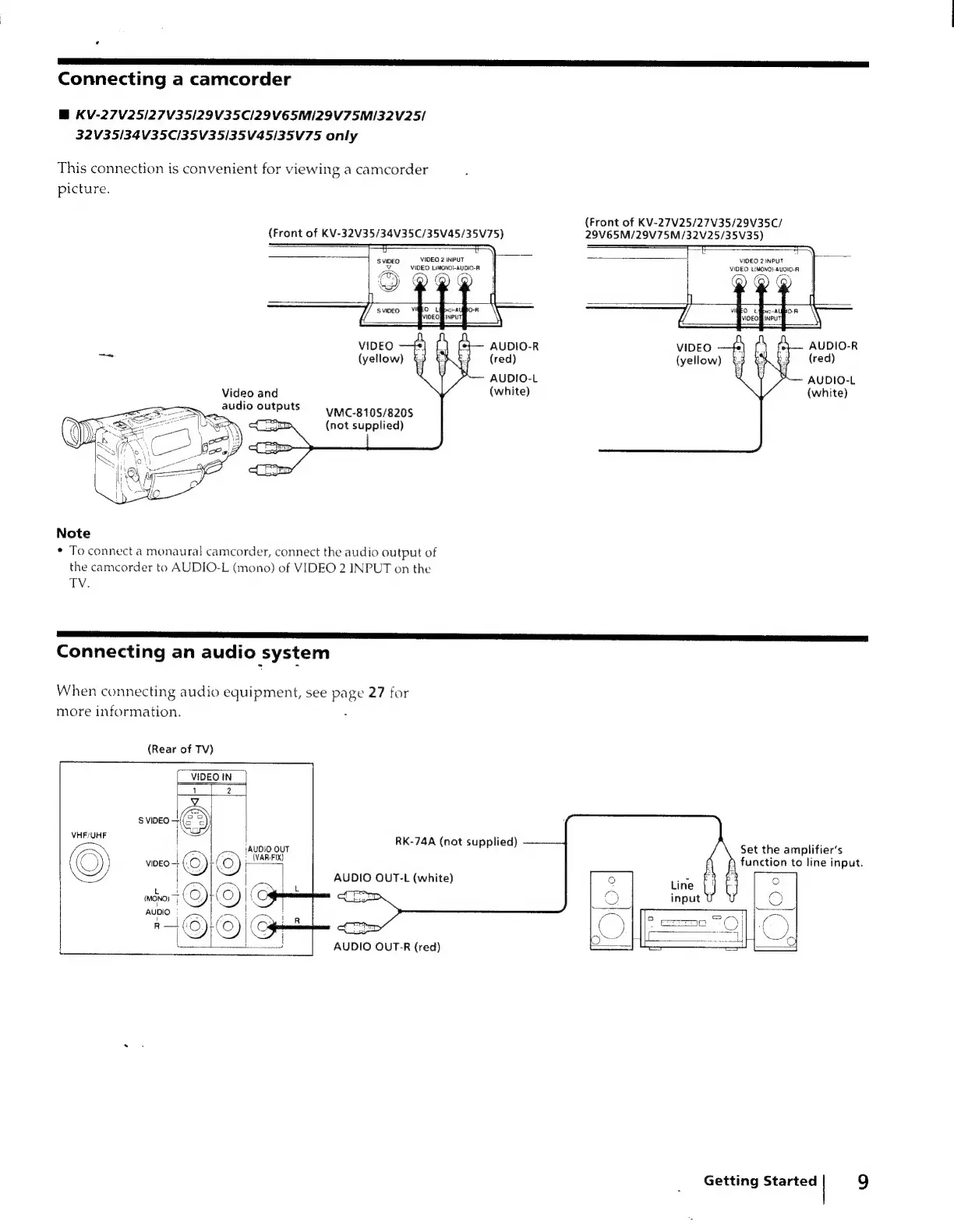
Connecting
a
camcorder
BM
KV-27V25/27V35/29V35CI29V6E5MI29V75M/32V25/
32V35/34V35C/35V35/35V45/35V75
only
This
connection
is
convenient
for
viewing
a
camcorder
picture.
(Front
of
KV-27V25/27V35/29V35C/
29V65M/29V75M/32V25/35V35)
(Front
of
KV-32V35/34V35C/35V45/35V75)
uv
S
VIDEO
VIDEO
2
INPUT
id
VIDEO
LiMONO}-AUDIO-R
VIDEO
2
INPUT
VIDEO
L{MONO})-AUDIO-R
VIDEO
AUDIO-R
VIDEO
AUDIO-R
>
(yellow)
(red)
(yellow)
(red)
AUDIO-L
AUDIO-L
Video
and
(white)
(white)
VMC-810S/820S
audio
outputs
:
3
(not
supplied)
Note
*
To
connect
a
monaural
camcorder,
connect
the
audio
output
of
the
camcorder
to
AUDIO-L
(mono)
of
VIDEO
2
INPUT
on
the
TV.
Connecting
an
audio
system
When
connecting
audio
equipment,
see
page
27
for
more
information.
(Rear
of
TV)
VIDEO
IN
VHF/UHF
|
:
jAUDIO
OUT
{
+
(VARIFIX)
|
VIDEO
‘Ze
rs.
|
RK-74A
(not
supplied)
———
Set
the
amplifier’s
function
to
line
input.
AUDIO
OUT-L
(white)
AUDIO
OUT-R
(red)
Getting
Started
9

Related product manuals